Type text, add images, blackout confidential details, add comments, highlights and more.
02. Sign it in a few clicks
Draw your signature, type it, upload its image, or use your mobile device as a signature pad.
03. Share your form with others
Send child care staff credential via email, link, or fax. You can also download it, export it or print it out.
How to use or fill out Early Childhood Professional Certificate (ECPC) with our platform
Ease of Setup
DocHub User Ratings on G2
Ease of Use
DocHub User Ratings on G2
Click ‘Get Form’ to open the Early Childhood Professional Certificate (ECPC) in the editor.
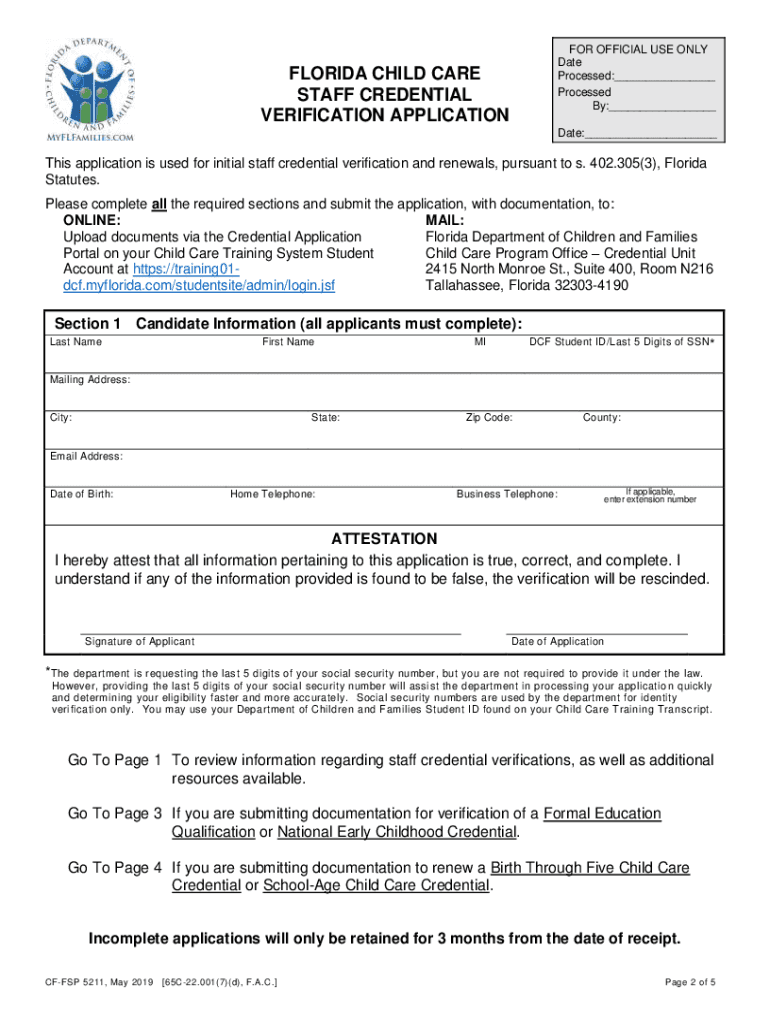
Begin with Section 1, Candidate Information. Fill in your Last Name, First Name, MI, DCF Student ID or last 5 digits of SSN, and your mailing address including City, State, Zip Code, and County. Don’t forget to provide your Email Address and Date of Birth.
In the Attestation section, confirm that all information is accurate by signing and dating the application.
Proceed to Section 2 for Formal Education Qualification. Check the box if you are submitting documentation and ensure you include a copy of your college transcript.
If applicable, complete Sections 3 through 5 based on your credentials or experience. Ensure all required documents are attached before submission.
Start using our platform today to easily fill out your ECPC application online for free!
Fill out Early Childhood Professional Certificate (ECPC) online It's free
See more Early Childhood Professional Certificate (ECPC) versions
We've got more versions of the Early Childhood Professional Certificate (ECPC) form. Select the right Early Childhood Professional Certificate (ECPC) version from the list and start editing it straight away!
Early childhood professional certificate ecpc costEarly childhood professional certificate ecpc onlineECPC Early ChildhoodEarly childhood professional certificate ecpc near meEarly childhood education certificate online freeFCCPC certificationDifference between FCCPC and CDAEarly Childhood Education degree
Security and compliance
At DocHub, your data security is our priority. We follow HIPAA, SOC2, GDPR, and other standards, so you can work on your documents with confidence.
Early Childhood Professional (ECPC) Career Certificate
This program prepares students who work with children 3 to 5 years old in a licensed childcare setting to provide quality care to young children.Read more
Cookie consent notice
This site uses cookies to enhance site navigation and personalize your experience.
By using this site you agree to our use of cookies as described in our Privacy Notice.
You can modify your selections by visiting our Cookie and Advertising Notice.