




Here's how it works



How to use or fill out Proposition 130 - constitutional property tax exemptions with our platform

- Click ‘Get Form’ to open it in the editor.
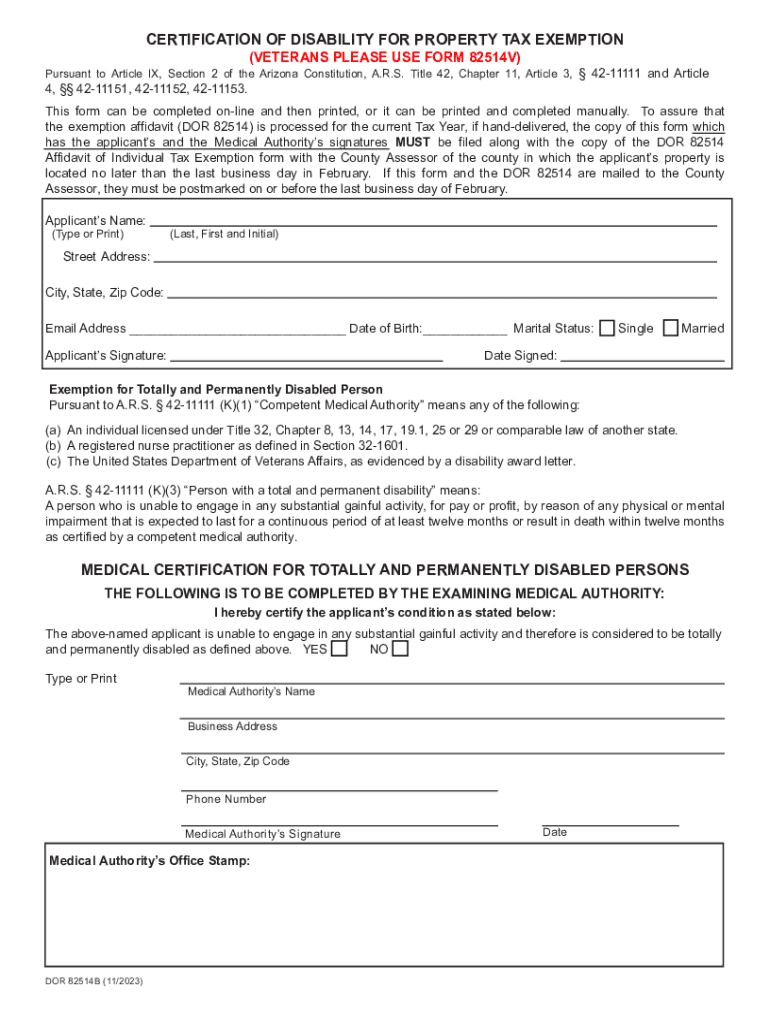
- Begin by entering the applicant’s name, including last name, first name, and initial in the designated fields.
- Fill in the street address, city, state, and zip code accurately to ensure proper identification.
- Provide your email address and date of birth in the respective fields for verification purposes.
- Select your marital status by checking either 'Single' or 'Married'.
- Sign and date the form where indicated to validate your application.
- Ensure that a competent medical authority completes the medical certification section, confirming your disability status.
- Finally, review all entries for accuracy before submitting the form to your County Assessor by the deadline.
Start using our platform today to complete your Proposition 130 form online for free!
It's free
See more Proposition 130 - constitutional property tax exemptions versions
Got questions?
Can I type my eSignature on my Proposition 130 - constitutional property tax exemptions?
Yes, a typed name is recognized as a valid electronic signature when you create it on your form using a compliant solution like DocHub. Simply upload your Proposition 130 - constitutional property tax exemptions to our editor, click Sign in the top tool pane → Create your signature → Type your name in the proper tab, and decide how it will appear on your document.
How to manage my Proposition 130 - constitutional property tax exemptions from Gmail?
If your go-to electronic mail service is Gmail, you can easily integrate your DocHub editor into your work. Modify your Proposition 130 - constitutional property tax exemptions with DocHub tools and connect it to your drafts in Gmail. See how easy it can be to exchange files and work together with a swift PDF editing solution at hand.
Security and compliance
At DocHub, your data security is our priority. We follow HIPAA, SOC2, GDPR, and other standards, so you can work on your documents with confidence.
Learn more


