




Here's how it works



How to use or fill out Patient Forms - Children's Clinic, P A - Pediatrics for Family with DocHub

- Click ‘Get Form’ to open the Patient Information Form in our editor.
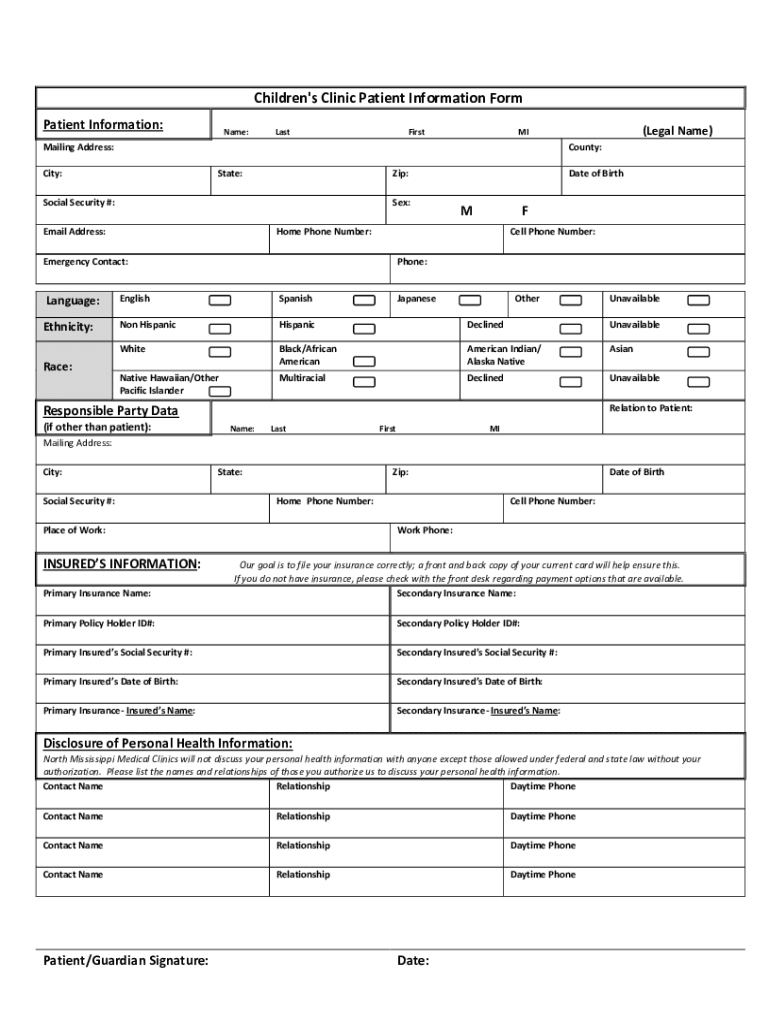
- Begin by entering the patient's legal name in the designated fields for Last, First, and MI. Ensure accuracy as this information is crucial for medical records.
- Fill in the mailing address, including County, City, State, and Zip code. This helps us reach you for any necessary communications.
- Provide the Social Security number and select the patient's sex (M/F) along with their date of birth.
- Enter contact numbers: Home Phone and Cell Phone. This ensures we can contact you promptly if needed.
- Complete the Emergency Contact section by providing a name and phone number of someone we can reach in case of an emergency.
- Indicate preferred language and ethnicity/race from the options provided to help us understand your background better.
- If applicable, fill out Responsible Party Data if it differs from the patient. Include their relationship to the patient.
- For insurance details, provide information about primary and secondary insurance policies as required. Attach copies of insurance cards if available.
- Lastly, review all entered information for accuracy before signing at the bottom of the form. Your signature confirms that all details are correct.
Start filling out your Patient Forms today using our platform for free!
It's free
See more Patient Forms - Children's Clinic, P A - Pediatrics for Family versions
Got questions?
Can I type my eSignature on my Patient Forms - Children's Clinic, P A - Pediatrics for Family?
Sure, a typed name is recognized as a valid electronic signature when you add it to your document using a compliant solution like DocHub. Simply add your Patient Forms - Children's Clinic, P A - Pediatrics for Family to our editor, click Sign in the top tool pane → Create your signature → Type your name in the appropriate tab, and decide how it will appear on your document.
How do you edit Patient Forms - Children's Clinic, P A - Pediatrics for Family on iOS?
You can easily edit and complete your Patient Forms - Children's Clinic, P A - Pediatrics for Family on any iOS device. Open an internet browser of your liking, visit the DocHub website, authorize or create a new account, add your file for editing, and make your desired adjustments. Our service is mobile-friendly, so utilizing its features on your smartphone will be a no-brainer, even on the first try.
Security and compliance
At DocHub, your data security is our priority. We follow HIPAA, SOC2, GDPR, and other standards, so you can work on your documents with confidence.
Learn more




