Type text, add images, blackout confidential details, add comments, highlights and more.

02. Sign it in a few clicks
Draw your signature, type it, upload its image, or use your mobile device as a signature pad.

03. Share your form with others
Send it via email, link, or fax. You can also download it, export it or print it out.

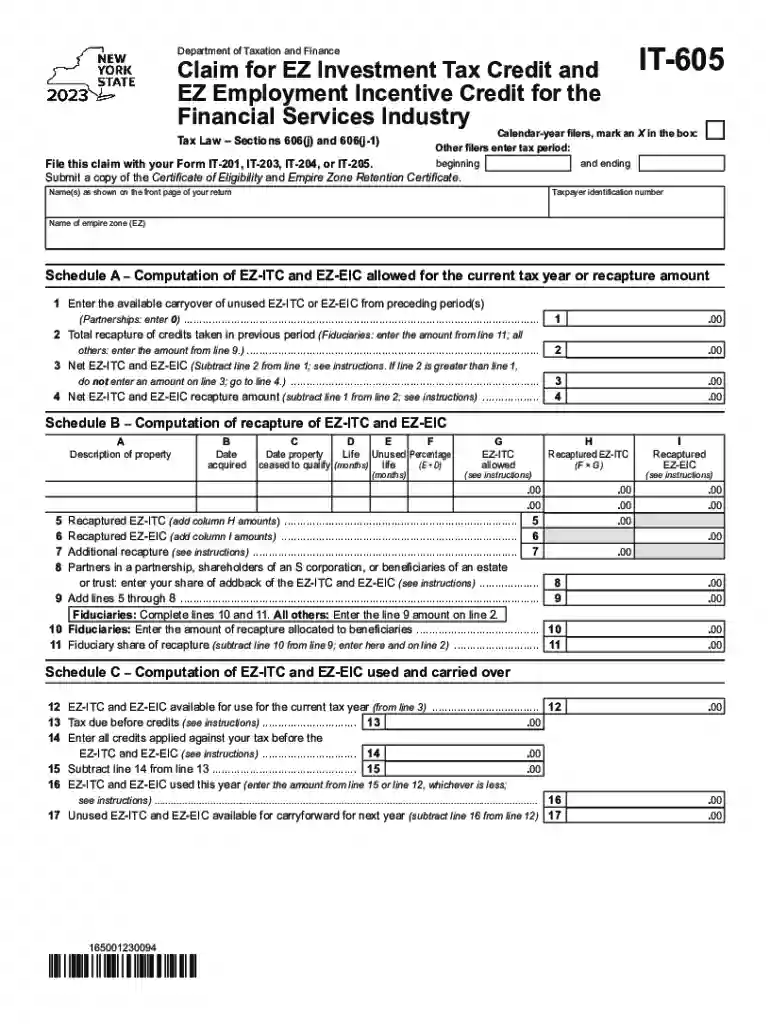
How to use or fill out Form IT-605 Claim for EZ Investment Tax Credit and EZ Employment Incentive Credit for the Financial with DocHub
Ease of Setup
DocHub User Ratings on G2
Ease of Use
DocHub User Ratings on G2
Click ‘Get Form’ to open it in the editor.
Begin by marking the appropriate box for calendar-year filers or entering your tax period dates. This ensures that your claim aligns with the correct filing timeframe.
Fill in your name(s) as shown on your tax return and provide your taxpayer identification number. This information is crucial for identifying your claim.
In Schedule A, enter the available carryover of unused EZ-ITC or EZ-EIC from previous periods. If you are a partnership, enter 0.
Continue by calculating the total recapture of credits taken in previous periods and subtract this from the carryover amount to find your net EZ-ITC and EZ-EIC.
Complete Schedule B by detailing property descriptions, acquisition dates, and calculating recaptured amounts based on provided instructions.
Finally, review all entries for accuracy before submitting your completed form along with any required certificates.
Start using our platform today to fill out Form IT-605 easily and efficiently!
Fill out Form IT-605 Claim for EZ Investment Tax Credit and EZ Employment Incentive Credit for the Financial online It's free
See more Form IT-605 Claim for EZ Investment Tax Credit and EZ Employment Incentive Credit for the Financial versions
We've got more versions of the Form IT-605 Claim for EZ Investment Tax Credit and EZ Employment Incentive Credit for the Financial form. Select the right Form IT-605 Claim for EZ Investment Tax Credit and EZ Employment Incentive Credit for the Financial version from the list and start editing it straight away!
Instructions for Form IT-605 Claim for EZ Investment Tax
Instructions for Form IT-605. Claim for EZ Investment Tax Credit and EZ Employment. Incentive Credit for the Financial Services Industry. IT-605-I. Page 2. PageRead more
Form IT-203-I:2017:Instructions for From IT-203 Nonresident
Form IT-203. Reminder: To claim a tax credit (with the exception of the household credit and the part-year NYC school tax credit) you must complete and.Read more
Cookie consent notice
This site uses cookies to enhance site navigation and personalize your experience.
By using this site you agree to our use of cookies as described in our Privacy Notice.
You can modify your selections by visiting our Cookie and Advertising Notice.