Type text, add images, blackout confidential details, add comments, highlights and more.
02. Sign it in a few clicks
Draw your signature, type it, upload its image, or use your mobile device as a signature pad.
03. Share your form with others
Send it via email, link, or fax. You can also download it, export it or print it out.
How to use or fill out police uci how-do-iimgCampus Security Authority (CSA) Report Form with our platform
Ease of Setup
DocHub User Ratings on G2
Ease of Use
DocHub User Ratings on G2
Click ‘Get Form’ to open the police uci how-do-iimgCampus Security Authority (CSA) Report Form in the editor.
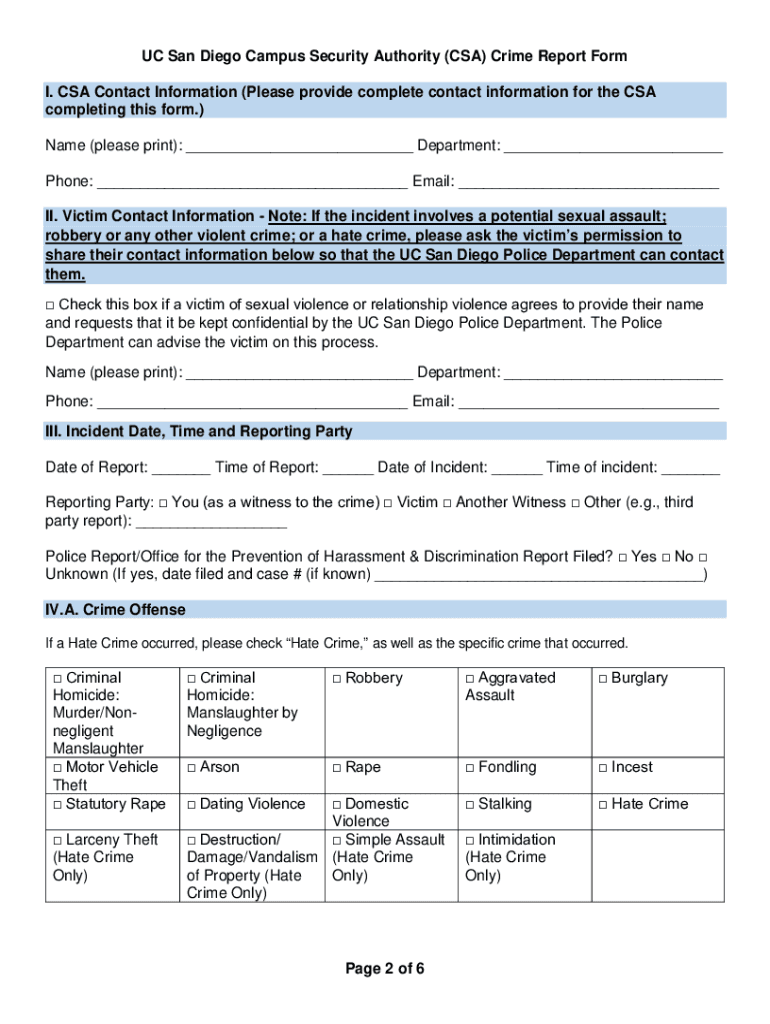
Begin by filling out Section I, providing your complete contact information as the CSA. Ensure all fields are accurately completed.
In Section II, enter the victim's contact information if applicable. If the incident involves sensitive matters like sexual violence, check the confidentiality box.
Proceed to Section III to document the date and time of both the report and incident. Select who is reporting: you, a victim, or another witness.
In Section IV.A, indicate the type of crime offense that occurred by checking the appropriate boxes. If it’s a hate crime, specify any biases in Section IV.B.
Describe the incident in detail in Section V without probing witnesses or victims. Provide as much context as possible.
Finally, complete Section VI by detailing the incident location and classification based on Clery definitions.
Start using our platform today for free to streamline your form completion process!
Fill out police uci how-do-iimgCampus Security Authority (CSA) Report Form online It's free
See more police uci how-do-iimgCampus Security Authority (CSA) Report Form versions
We've got more versions of the police uci how-do-iimgCampus Security Authority (CSA) Report Form form. Select the right police uci how-do-iimgCampus Security Authority (CSA) Report Form version from the list and start editing it straight away!
Feb 15, 2026 law enforcement officials investigating the escalation of similar crimes over the last year. latest of a series of reports on the University of
Cookie consent notice
This site uses cookies to enhance site navigation and personalize your experience.
By using this site you agree to our use of cookies as described in our Privacy Notice.
You can modify your selections by visiting our Cookie and Advertising Notice.