Liability Release Form - Colorado 4-H - Colorado State 2026

Get Form
Liability Release Form - Colorado 4-H - Colorado State Preview on Page 1

Here's how it works

01. Edit your form online
Type text, add images, blackout confidential details, add comments, highlights and more.

02. Sign it in a few clicks
Draw your signature, type it, upload its image, or use your mobile device as a signature pad.

03. Share your form with others
Send it via email, link, or fax. You can also download it, export it or print it out.

How to use or fill out Liability Release Form - Colorado 4-H - Colorado State with DocHub

Form edit decoration
9.5
Ease of Setup
DocHub User Ratings on G2
9.0
Ease of Use
DocHub User Ratings on G2
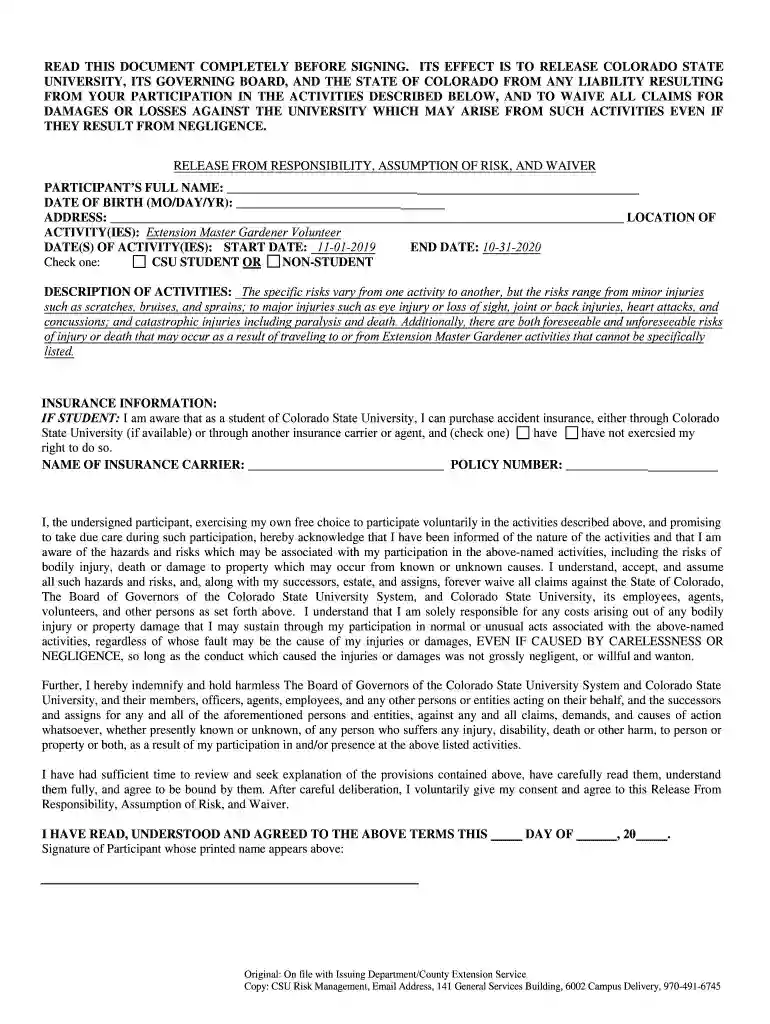
  1. Click ‘Get Form’ to open the Liability Release Form in our editor.
  2. Begin by entering your full name in the designated field. This is essential for identifying you as the participant.
  3. Next, provide your date of birth in the format (MM/DD/YYYY) to confirm your eligibility.
  4. Fill in your address accurately, ensuring that all details are correct for any necessary correspondence.
  5. Indicate the location of the activities you will be participating in, specifically noting 'Extension Master Gardener Volunteer'.
  6. Enter the start and end dates of your activities. Make sure these dates align with your participation schedule.
  7. Select whether you are a CSU student or a non-student by checking the appropriate box.
  8. Review and acknowledge the risks associated with participation by reading through the description provided in the form.
  9. If applicable, complete the insurance information section, including your insurance carrier's name and policy number.
  10. Finally, sign and date the form at the bottom to confirm your understanding and acceptance of all terms outlined.

Start using our platform today to easily fill out and manage your Liability Release Form!

See more Liability Release Form - Colorado 4-H - Colorado State versions

We've got more versions of the Liability Release Form - Colorado 4-H - Colorado State form. Select the right Liability Release Form - Colorado 4-H - Colorado State version from the list and start editing it straight away!
Versions Form popularity Fillable & printable
2019 4.8 Satisfied (83 Votes)
be ready to get more

Complete this form in 5 minutes or less

Get form

Got questions?

We have answers to the most popular questions from our customers. If you can't find an answer to your question, please contact us.
Contact us
What to Include in a Release of Liability Form Releasor: Full name of the releasor. Releasee: Full name of the releasee. Effective date: The date the waiver takes effect. Incident: Details of the injury, debt, or accident. Compensation: The total that must be paid in exchange for signing the waiver.
Yes, liability waivers can be legally binding documents. Its, therefore, advisable to seek legal or professional guidance to ensure your waiver is well-drafted and legally valid for your location. Other relevant factors that determine the enforceability of liability waivers include: The terms and language used.
A location release form is signed by a property owner whose property is used by a specific individual or group to shoot their film content and the filming producer. It proves that the location owner has permitted the use of their property for film shooting purposes.
Technically, the California DMV does not require notarization for an NRL or REG 138 form. However, having this form docHubd offers additional legal protectionespecially in cases involving private sales, out-of-state transactions, or disputes over the timing of the transfer.
How Do You Write a Media Release Form? Name of the parties involved, i.e., releasor and releasee. Detailed information about the project. Explicit information of the permissions granted. Any special considerations, including payment obligations or credit, if any. A space for all parties to sign.

Security and compliance

At DocHub, your data security is our priority. We follow HIPAA, SOC2, GDPR, and other standards, so you can work on your documents with confidence.

Learn more
ccpa2
pci-dss
gdpr-compliance
hipaa
soc-compliance