Stop payment indemnity agreement asu 2026

Get Form
asu student indemnity agreement Preview on Page 1

Here's how it works

01. Edit your asu student indemnity agreement online
Type text, add images, blackout confidential details, add comments, highlights and more.

02. Sign it in a few clicks
Draw your signature, type it, upload its image, or use your mobile device as a signature pad.

03. Share your form with others
Send it via email, link, or fax. You can also download it, export it or print it out.

How to use or fill out stop payment indemnity agreement asu with our platform

Form edit decoration
9.5
Ease of Setup
DocHub User Ratings on G2
9.0
Ease of Use
DocHub User Ratings on G2
  1. Click ‘Get Form’ to open the stop payment indemnity agreement in the editor.
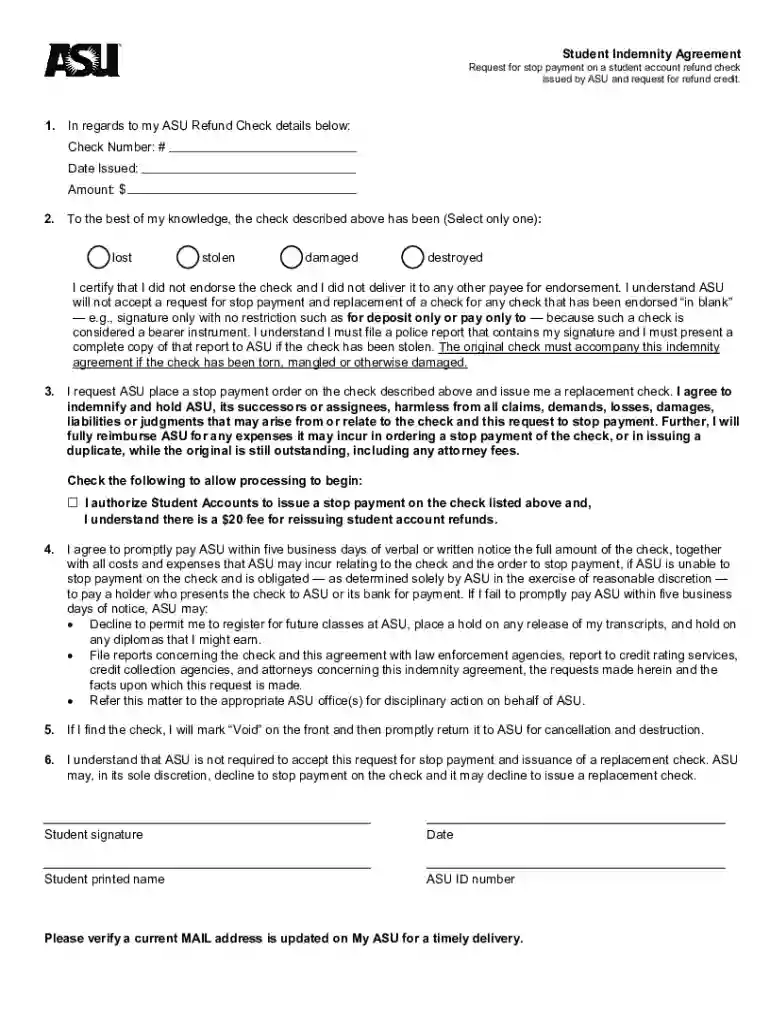
  2. Begin by entering your ASU Refund Check details, including the Check Number, Date Issued, and Amount. Ensure accuracy to avoid processing delays.
  3. Select the appropriate option regarding the status of your check: lost, stolen, damaged, or destroyed. This is crucial for ASU's records.
  4. Review the certification statement carefully. Confirm that you did not endorse the check and understand the implications of your request.
  5. Check the box authorizing Student Accounts to issue a stop payment and acknowledge the $20 fee for reissuing refunds.
  6. Sign and date the form at the bottom. Include your printed name and ASU ID number for identification purposes.
  7. Finally, ensure your current mailing address is updated on My ASU for timely delivery of any correspondence or replacement checks.

Start using our platform today to streamline your document editing and signing process for free!

See more stop payment indemnity agreement asu versions

We've got more versions of the stop payment indemnity agreement asu form. Select the right stop payment indemnity agreement asu version from the list and start editing it straight away!
Versions Form popularity Fillable & printable
2021 4.8 Satisfied (45 Votes)
2009 4 Satisfied (37 Votes)
be ready to get more

Complete this form in 5 minutes or less

Get form

Got questions?

We have answers to the most popular questions from our customers. If you can't find an answer to your question, please contact us.
Contact us

Electronic document approval demands a software solution that works in compliance with data protection and eSignature standards. DocHub is a great tool for that, because it meets all the previously mentioned requirements. Whatever method you like to sign your stop payment indemnity agreement asu in DocHub, your electronic signature will be legally binding and court-admissible.

Document editing with DocHub is equally convenient on desktop and mobile devices. You only need an internet browser to modify your stop payment indemnity agreement asu on Android. Open our site and sign in to access the instruments you require. Add your document and introduce your intended changes. After that, you can keep your form in your document storage or send it out immediately.

If checks are lost in the mail or sent to invalid mailing addresses, we require two weeks to pass before we will stop payment and reissue your refund. Please call the Controllers Office at 828-262-2110 to request a new check.
Refunds are when you have leftover financial aid and loans, so its refunded back to you by ASU. Or for other reasons (dropping class by refund date, etc.)
By enrolling in direct deposit, any financial aid funds that remain after your charges have been paid will go directly into your bank account. Enroll in direct deposit by going to the Finances tab in My ASU and clicking Direct deposit enrollment.

Security and compliance

At DocHub, your data security is our priority. We follow HIPAA, SOC2, GDPR, and other standards, so you can work on your documents with confidence.

Learn more
ccpa2
pci-dss
gdpr-compliance
hipaa
soc-compliance