Type text, add images, blackout confidential details, add comments, highlights and more.

02. Sign it in a few clicks
Draw your signature, type it, upload its image, or use your mobile device as a signature pad.

03. Share your form with others
Send mobisuper reviews via email, link, or fax. You can also download it, export it or print it out.

How to use or fill out Financial Hardship Form (v16) with DocHub
Ease of Setup
DocHub User Ratings on G2
Ease of Use
DocHub User Ratings on G2
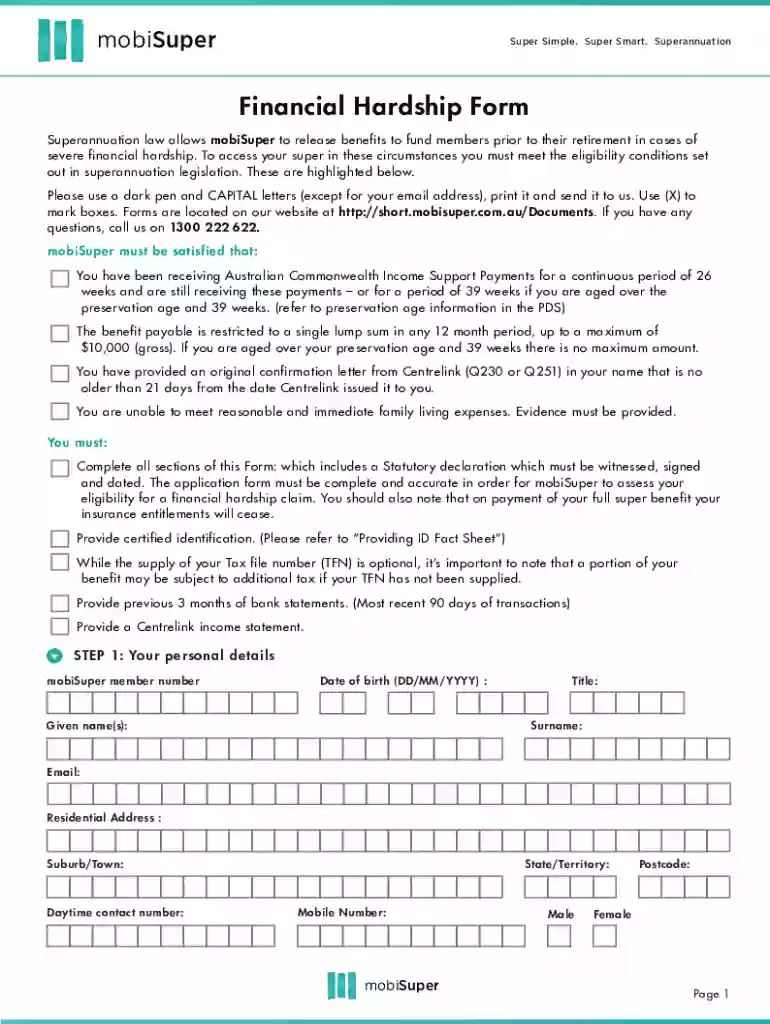
Click ‘Get Form’ to open the Financial Hardship Form (v16) in our editor.
Begin by entering your personal details in Step 1. Fill in your mobiSuper member number, date of birth, name, email, and residential address using a dark pen and capital letters.
In Step 2, provide your Tax File Number (TFN). While optional, including it can help avoid additional tax on your benefits.
For Step 3, select your payment method: Electronic Funds Transfer (EFT) or Cheque. Ensure you attach necessary documentation if choosing EFT.
Proceed to Step 4 to specify the payment amount. Choose between the maximum allowable amount or a specific requested amount.
In Steps 5 and 6, provide details about your employment status and financial situation, including income, living expenses, and debts.
Complete Step 7 by explaining your financial hardship circumstances and how you intend to use the funds if approved.
Finally, review the privacy statement in Step 8 before signing the declaration in Step 9. Ensure all information is accurate before submission.
Start filling out your Financial Hardship Form (v16) today for free using our platform!
Fill out Financial Hardship Form (v16) online It's free
We've got more versions of the Financial Hardship Form (v16) form. Select the right Financial Hardship Form (v16) version from the list and start editing it straight away!
Severe financial hardship is when you are unable to meet reasonable and immediate family living expenses like groceries, rent or medical costs. You may be able to access some of your super early to help.
How to prove you are in financial hardship?
bank statements showing a reduction of income, essential spending and reduced savings. a report from a financial counselling service. debt repayment agreements.
What proof do you need for financial hardship?
Information that is relevant would include: Details of your income. Details of your expenses. The cause of your financial hardship (and evidence of the cause if available, for example, a medical certificate)
What documents do I need for financial hardship?
Contact your creditor Details of your income. Details of your expenses. The cause of your financial hardship (and evidence of the cause if available, for example, a medical certificate)
What do I need to prove financial hardship?
Common documents might include: Bank statements that show income and expenses. Copies of your most recent tax returns. Copies of pay stubs. Copies of other bills (credit cards, utilities, medical bills, etc.). Letters of unemployment or notices of reduction in pay/hours. Eviction notice. Medical bills.
mobisuper login
Financial hardship form v16 templateFinancial hardship form v16 pdf downloadFinancial hardship form v16 downloadFinancial hardship form v16 pdfFinancial hardship form v16 onlineFinancial hardship form for medical billsFinancial hardship application formVA financial hardship form
Security and compliance
At DocHub, your data security is our priority. We follow HIPAA, SOC2, GDPR, and other standards, so you can work on your documents with confidence.
Financial hardship may be deemed to exist when the debtor needs substantially all of his or her current and anticipated income and liquid assets to meet current and anticipated ordinary and necessary living expenses during the projected period of collection.
mobisuper financial hardship
CruzPay Announcements Archive - Financial Affairs
A new temporary program is available for eligible UCSC employees who are experiencing financial hardship as a result of the summer 2020 wildfires in California.
Cookie consent notice
This site uses cookies to enhance site navigation and personalize your experience.
By using this site you agree to our use of cookies as described in our Privacy Notice.
You can modify your selections by visiting our Cookie and Advertising Notice.