




Here's how it works

01. Edit your form online
Type text, add images, blackout confidential details, add comments, highlights and more.

02. Sign it in a few clicks
Draw your signature, type it, upload its image, or use your mobile device as a signature pad.

03. Share your form with others
Send it via email, link, or fax. You can also download it, export it or print it out.
How to use or fill out fill ioMission-College-Santa-Clara-NurseFillable Mission College Santa Clara - Nurse Assistant

- Click ‘Get Form’ to open it in the editor.
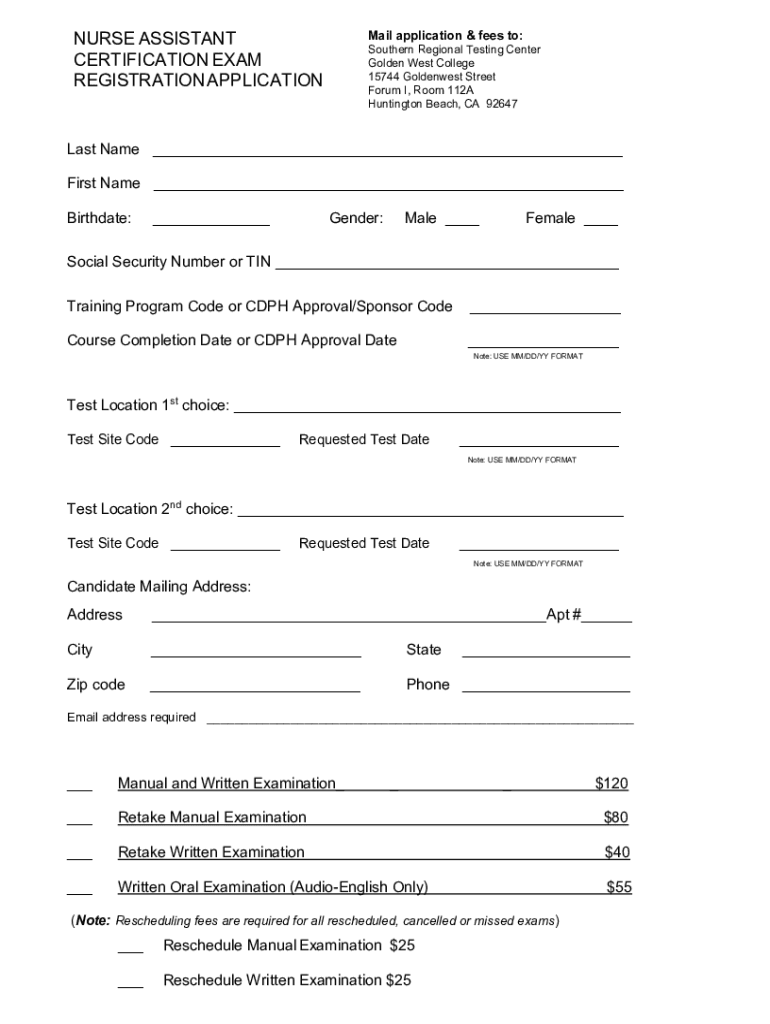
- Begin by entering your Last Name and First Name in the designated fields. Ensure that the spelling matches your identification documents.
- Input your Birthdate in MM/DD/YY format, followed by selecting your Gender by checking either Male or Female.
- Provide your Social Security Number or TIN in the appropriate field, followed by the Training Program Code or CDPH Approval/Sponsor Code.
- Fill in the Course Completion Date or CDPH Approval Date using MM/DD/YY format.
- Select your preferred Test Location and enter the Test Site Code along with your Requested Test Date, ensuring to follow the MM/DD/YY format again.
- Complete your Candidate Mailing Address, including Apt #, City, State, and Zip code. Don’t forget to provide a valid Phone number and Email address.
- Indicate which examination options you are registering for by checking the corresponding boxes and entering payment amounts as needed.
- Finally, review all entered information for accuracy before signing and dating the form at the bottom.
Start filling out your application today using our platform for free!
Fill out fill ioMission-College-Santa-Clara-NurseFillable Mission College Santa Clara - Nurse Assistant online
It's free
It's free
See more fill ioMission-College-Santa-Clara-NurseFillable Mission College Santa Clara - Nurse Assistant versions
We've got more versions of the fill ioMission-College-Santa-Clara-NurseFillable Mission College Santa Clara - Nurse Assistant form. Select the right fill ioMission-College-Santa-Clara-NurseFillable Mission College Santa Clara - Nurse Assistant version from the list and start editing it straight away!
Security and compliance
At DocHub, your data security is our priority. We follow HIPAA, SOC2, GDPR, and other standards, so you can work on your documents with confidence.
Learn more


