




Here's how it works



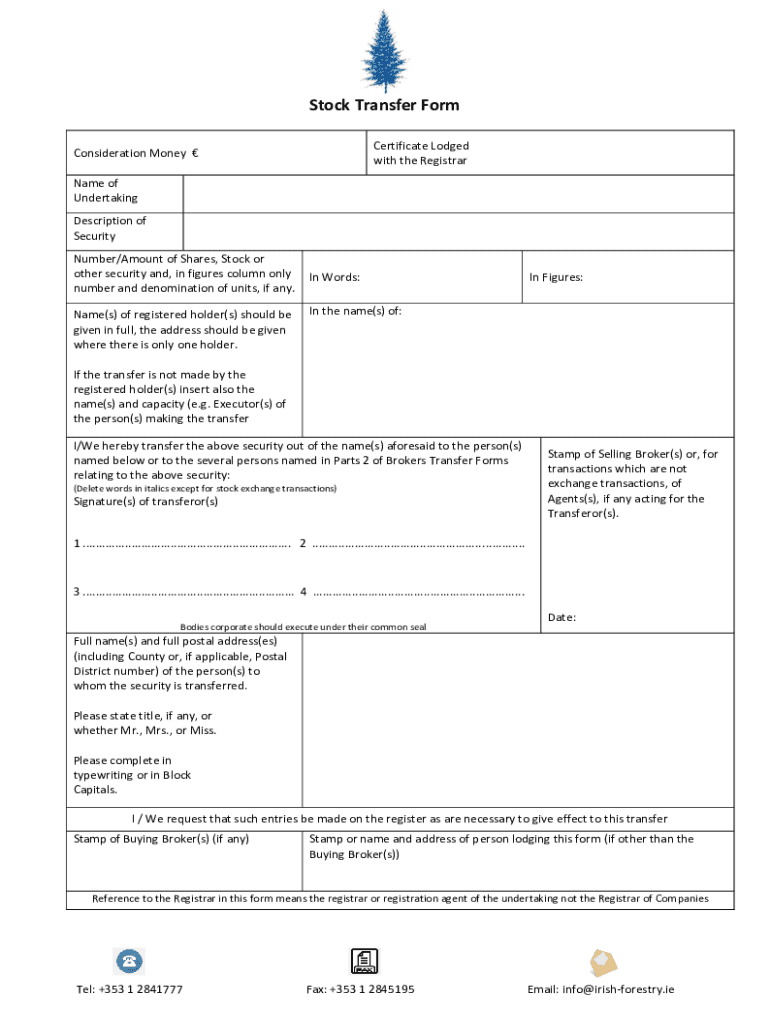
How to use or fill out ie Irish Stock Transfer with our platform

- Click ‘Get Form’ to open the ie Irish Stock Transfer in the editor.
- Begin by entering the 'Consideration Money €' in the designated field, ensuring accuracy for financial records.
- Fill in the 'Name of Undertaking' and provide a clear 'Description of Security' to identify the stock being transferred.
- In the section for 'Number/Amount of Shares', specify both in words and figures. Ensure that you include any denominations if applicable.
- List the full name(s) and address(es) of registered holder(s). If there are multiple holders, ensure all details are complete.
- If applicable, include names and capacities of individuals making the transfer who are not registered holders.
- Sign where indicated as transferor(s), and ensure any necessary stamps from brokers or agents are affixed.
- Finally, provide full postal addresses of the new security holders, including titles (Mr., Mrs., Miss) as required.
Start using our platform today to streamline your stock transfer process for free!
It's free
See more ie irish stock transfer versions
| Versions | Form popularity | Fillable & printable |
|---|---|---|
| 2016 | 4.8 Satisfied (146 Votes) |
Got questions?
Can I sign my ie irish stock transfer electronically?
According to eSignature regulations, forms approved digitally have the same validity as traditionally approved ones. You can eSign almost any business and personal paperwork. Four types of documents still require handwritten signatures only - wills and testamentary trusts, court orders and other court forms, state statutes governing divorce, adoption, or other family law, and notice of cancellation of utility services. If you follow the guidelines and utilize a safe and compliant software solution, like DocHub, you can eSign your ie irish stock transfer without printing it.
How to fill out and sign ie irish stock transfer online?
You can quickly complete, modify, and even eSign your ie irish stock transfer using DocHub. Create a new profile and begin your free trial. After that, you may add the document with the form and simply make all the needed edits. No need to print on paper or use a third-party application to sign it, as you can put your electronic signature on your document quicker through DocHub.
Security and compliance
At DocHub, your data security is our priority. We follow HIPAA, SOC2, GDPR, and other standards, so you can work on your documents with confidence.
Learn more




