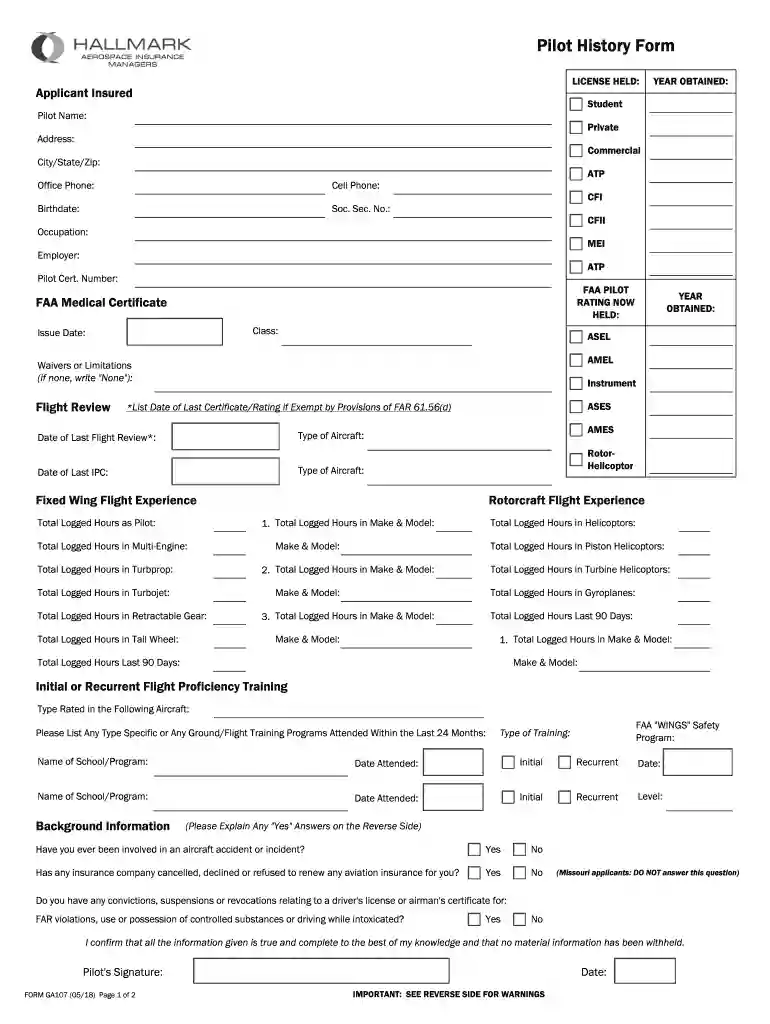
pilot history form Preview on Page 1

Insurance pilot history form 2026

Here's how it works

  • 01. Edit your pilot history form online

    Type text, add images, blackout confidential details, add comments, highlights and more.

  • 02. Sign it in a few clicks

    Draw your signature, type it, upload its image, or use your mobile device as a signature pad.

  • 03. Share your form with others

    Send insurance pilot history form via email, link, or fax. You can also download it, export it or print it out.

How to use or fill out insurance pilot history form with our platform

Form edit decoration
9.5
Ease of Setup
DocHub User Ratings on G2
9.0
Ease of Use
DocHub User Ratings on G2
  1. Click ‘Get Form’ to open the insurance pilot history form in the editor.
  2. Begin by filling in your personal information, including your name, address, and contact details. Ensure accuracy as this information is crucial for identification.
  3. Next, indicate the type of pilot license you hold by selecting from options such as Private, Commercial, or ATP. This section helps categorize your experience level.
  4. Complete the flight experience section by entering total logged hours for various aircraft types. Be specific about make and model to provide a clear picture of your flying background.
  5. In the background information section, answer questions regarding any past incidents or insurance issues honestly. If applicable, provide explanations on the reverse side.
  6. Finally, review all entries for accuracy before signing and dating the form at the bottom. This ensures that all provided information is true and complete.

Start using our platform today to fill out your insurance pilot history form easily and for free!

See more pilot history form versions

We've got more versions of the pilot history form form. Select the right pilot history form version from the list and start editing it straight away!

VersionsForm popularityFillable & printable
20184.8 Satisfied (141 Votes)

be ready to get more

Complete this form in 5 minutes or less

Got questions?

We have answers to the most popular questions from our customers. If you can't find an answer to your question, please contact us.

As outlined by eSignature laws, documents approved digitally have the same validity as traditionally approved ones. You can electronically sign almost any business and private paperwork. Four types of paperwork still call for handwritten signatures only - wills and testamentary trusts, court orders and other court papers, state statutes regulating divorce, adoption, or other family law, and notice of cancellation of utility services. If you adhere to the guidelines and use a trustworthy and compliant software solution, like DocHub, you can eSign your hallmark pilot without printing it.

You may quickly complete, modify, and even eSign your insurance pilot form utilizing DocHub. Create a new account and begin your free trial. After that, you may upload the file with the form and easily make all the needed edits. No need to print on paper or use a third-party application to sign it, as you can put your electronic signature on your document faster via DocHub.

Liability insurance will cover pilots expenses in the event they are held legally responsible for causing bodily injury or property damage with their aircraft to a third party. Hull insurance covers most kinds of physical damage in the event of an accident.
The History of Aviation: Timeline Overview DateEvent1783The invention of the hot air balloon1895Otto Lilienthal uses a biplane glider1903Orville and Wilbur Wright make the first sustained flight1927Charles Lindbergh makes a trans-Atlantic flight6 more rows
Aviation insurers provide insurance cover for insureds (airlines, manufacturers, airports, service providers {refuellers, caterers, security screeners and the like}) against loss, damage and liability, in return for premiums.

Security and compliance

At DocHub, your data security is our priority. We follow HIPAA, SOC2, GDPR, and other standards, so you can work on your documents with confidence.

People also ask

What is a Flight Review The Quick Answer. A flight review is a two-yearly check that will assess your knowledge and handling skills in an aircraft. It consists of a minimum of 1 hour of ground training and 1 hour of flight training. The aim is to assess a pilots competency in aviation theory and handling skills.
The global aviation insurance market is anticipated to garner $6,326.30 million in the 20212028 timeframe, growing from $4,282.90 million in 2020, at a healthy CAGR 5.20%.
The first-ever aviation insurance policy was written by Lloyds of London in 1911. The company stopped writing aviation policies in 1912 after bad weather at an air meet caused crashes, and ultimately losses, on those first policies.
Aviation insurance is intended for the aerospace industry to cover the risks associated with its activities. It provides general liability coverage for air transport of passengers and cargo; losses caused by military operations or terrorist activities; physical damage; and liability to passengers and third parties.
Allianz AG was founded in Berlin on 5 February 1890 by the then-director of the Munich Reinsurance Company Carl von Thieme (a native of Erfurt, whose father was the director of the insurance company Thuringia) and Wilhelm von Finck (co-owner of the Merck Finck Co. Bank).

Related links

Pilot history and Use Request Form

You must attach a copy of your driver license, your Medical Certificate, and the Certificate of Insurance evidencing required insurance coverage.

Learn more
Pilots Insurance Application

Aerospace Insurance Managers, Inc. Pilot History Form. Policy Number. Agent Name AVIATORS INSURANCE AGENCY, INC. Pilot Name (Printed). Street Address: City

Learn more
Sapiens - Reviews - Insurance Claims Management - RFP.wiki

To reduce risk, use a consistent questionnaire for every shortlisted vendor. You can start with our free template on Insurance Claims Management Systems RFP

Learn more
If you believe that this page should be taken down, please follow our DMCA take down process here