Type text, add images, blackout confidential details, add comments, highlights and more.
02. Sign it in a few clicks
Draw your signature, type it, upload its image, or use your mobile device as a signature pad.
03. Share your form with others
Send 80 ru via email, link, or fax. You can also download it, export it or print it out.
How to use or fill out cdtfa 245 with our platform
Ease of Setup
DocHub User Ratings on G2
Ease of Use
DocHub User Ratings on G2
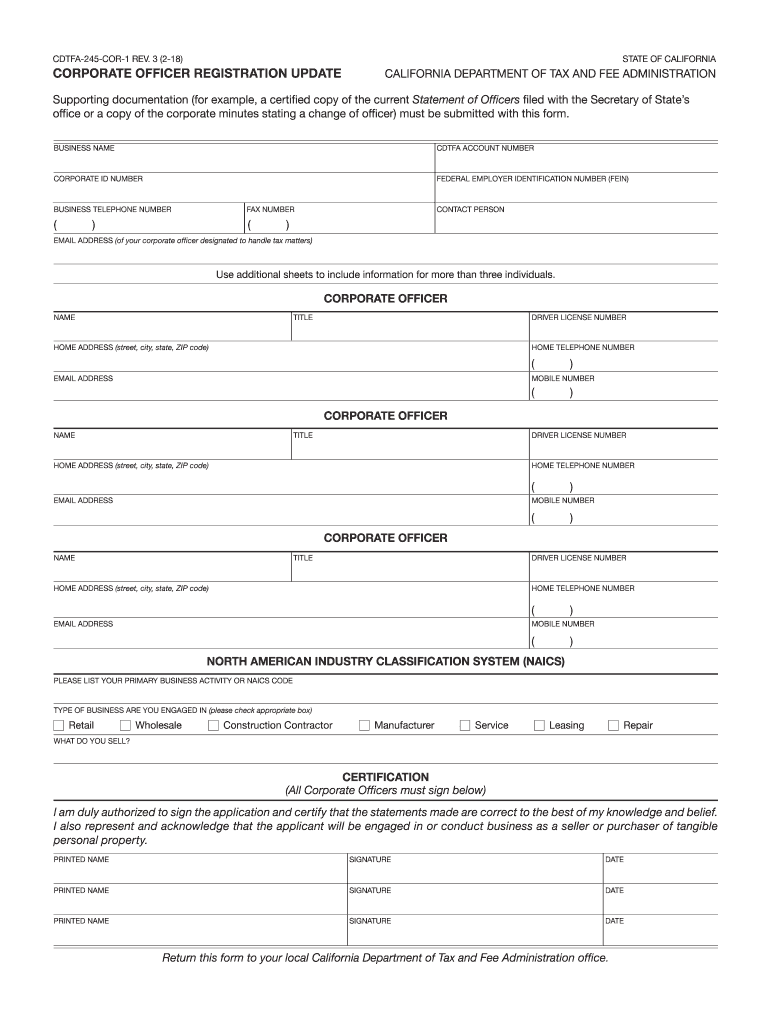
Click ‘Get Form’ to open the CDTFA 245 in the editor.
Begin by entering your business name, CDTFA account number, corporate ID number, and federal employer identification number (FEIN) in the designated fields.
Provide your business telephone number and fax number. Ensure all contact information is accurate for effective communication.
Fill in the contact person’s details, including their email address, which should be that of the corporate officer handling tax matters.
For each corporate officer, enter their name, title, driver license number, home address (including street, city, state, ZIP code), home telephone number, mobile number, and email address. Use additional sheets if necessary.
Indicate your primary business activity or NAICS code and check the appropriate box for your type of business engagement.
Complete the certification section by having all corporate officers sign and date the form to confirm accuracy.
Start using our platform today to fill out your CDTFA 245 form online for free!
You must submit supporting documentation (for example, a copy of the current Statement of Information filed with the Secretary of. States office) with thisRead more
Californias sales and use tax laws are administered by the California Department of Tax and Fee. Administration (CDTFA) as of July 1, 2017. The previousRead more
Cookie consent notice
This site uses cookies to enhance site navigation and personalize your experience.
By using this site you agree to our use of cookies as described in our Privacy Notice.
You can modify your selections by visiting our Cookie and Advertising Notice.