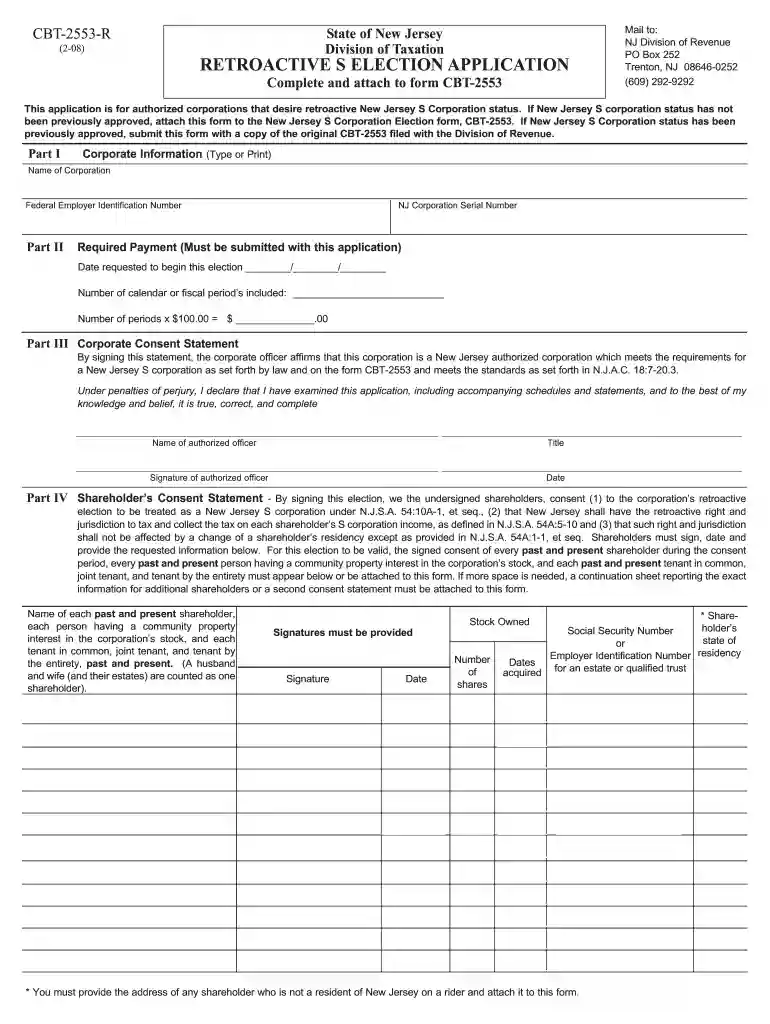
CBT-2553 - R New Jersey Retroactive S Election Application-2026

Get Form
cbt 2553 r Preview on Page 1

Here's how it works

01. Edit your cbt 2553 r online
Type text, add images, blackout confidential details, add comments, highlights and more.

02. Sign it in a few clicks
Draw your signature, type it, upload its image, or use your mobile device as a signature pad.

03. Share your form with others
Send it via email, link, or fax. You can also download it, export it or print it out.

How to use or fill out CBT-2553 - R New Jersey Retroactive S Election Application with DocHub

Form edit decoration
9.5
Ease of Setup
DocHub User Ratings on G2
9.0
Ease of Use
DocHub User Ratings on G2
  1. Click ‘Get Form’ to open the CBT-2553 - R application in our platform.
  2. In Part I, enter the 'Name of Corporation' exactly as it appears on form NJ-REG and the original CBT-2553. Then, input your 'Federal Employer Identification Number' (FEIN) assigned by the IRS.
  3. Proceed to Part II. Fill in the 'NJ Corporation Serial Number' and indicate the 'Required Payment' of $100 for each year applicable. Specify the 'Date requested to begin this election' and calculate the total payment based on the number of periods.
  4. In Part III, read through the Corporate Consent Statement carefully. Print your name and title as an authorized officer, then sign and date this section.
  5. Move to Part IV where all shareholders must consent. List each shareholder's name, Social Security Number or Employer Identification Number, residency state, stock owned, and ensure signatures are provided.
  6. Once completed, save your document and submit it via mail to NJ Division of Revenue at the specified address.

Start using our platform today for free to streamline your form completion process!

See more CBT-2553 - R New Jersey Retroactive S Election Application versions

We've got more versions of the CBT-2553 - R New Jersey Retroactive S Election Application form. Select the right CBT-2553 - R New Jersey Retroactive S Election Application version from the list and start editing it straight away!
Versions Form popularity Fillable & printable
2008 4.8 Satisfied (45 Votes)
be ready to get more

Complete this form in 5 minutes or less

Get form

Got questions?

We have answers to the most popular questions from our customers. If you can't find an answer to your question, please contact us.
Contact us

Microsoft Word doesn’t have signing tools to create legitimate eSignatures and enforceable paperwork. Luckily, DocHub is an online eSignature-compliant editor that supports various document formats, such as .doc files. Log in to your account and add the Word edition of your CBT-2553 - R New Jersey Retroactive S Election Application from your device and cloud, or URL - our editor will automatically convert it into an editable PDF. Make all required modifications in your document and click Sign to create your own legally-binding eSignature. You will find four signing options from which to choose.

You can find and modify your CBT-2553 - R New Jersey Retroactive S Election Application online by using DocHub. Its simple yet feature-rich design allows you to begin productive work immediately after you sign up your account. Create your account and add your document, and then our user interface will guide you via our stress-free form completion experience.

How long does the process take? Typically, you will get a verdict on your form 2553 application within 60 days of submitting it to the IRS. If you have not heard back in that timeframe, docHub out to the IRS directly. You can call the IRS at (800) 829-4933 to check the status of your application.
Filing as an S Corp in New Jersey Step 1: Choose a Business Name. Step 2: Appoint Directors and a Registered Agent. Step 3: File Articles of Organization. Step 4: Create an S Corp Operating Agreement. Step 5: Apply for an Employer Identification Number. Step 6: File Form 2553 for S Corporation Election.
To qualify for S corporation status, the corporation must meet the following requirements: Be a domestic corporation. Have only allowable shareholders. Have no more than 100 shareholders. Have only one class of stock.

Security and compliance

At DocHub, your data security is our priority. We follow HIPAA, SOC2, GDPR, and other standards, so you can work on your documents with confidence.

Learn more
ccpa2
pci-dss
gdpr-compliance
hipaa
soc-compliance
be ready to get more

Complete this form in 5 minutes or less

Get form

People also ask

New Jersey S Corporation Filing Requirements To qualify for S corporation tax status, your business must: Be a domestic LLC or corporation. Have no more than 100 shareholders or members (shareholders is the term for owners of a corporation, while members is the term for owners of an LLC) Only have one class of
Purpose - A corporation must file form CBT-2553 to elect to be treated as a New Jersey S corporation or a New Jersey QSSS or to report a change in shareholders.
In order to qualify for S corporation status, the IRS requires the corporation to be residentially located in the United States, retain fewer than 100 shareholders limited to individuals, trusts, and estates (excluding partnerships, corporations, and nonresident alien shareholders), issue only one class of stock, and
An S corporation or S corp, also known as an S subchapter, is one type of legal business structure common among small business. A limited liability company (LLC) is another. Requirements of an S corp give a corporation with 100 shareholders or less the benefit of incorporation while being taxed as a partnership.
The due date for the filing of a CBT-100 is the 15th day of the fourth month following the ending month of the accounting period. For example, if a corporations accounting period ends on December 31, 2022, the due date for filing the 2022 New Jersey CBT-100 is April 15, 2023.

Related links