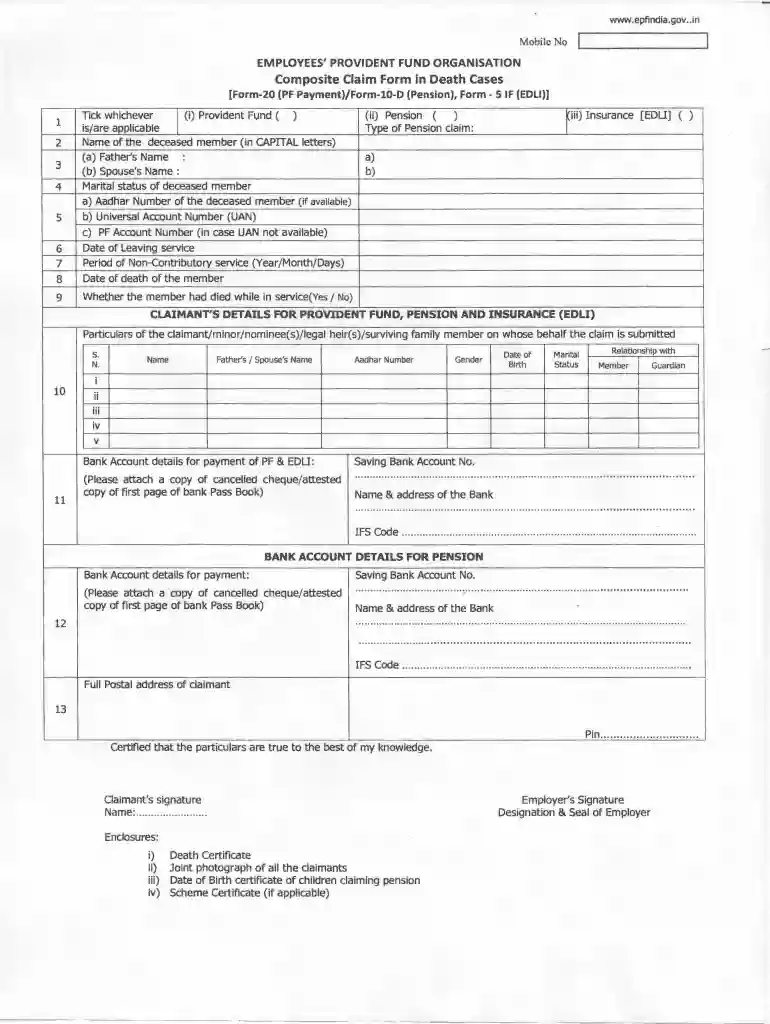
Composite claim form in death cases in word format 2026

Get Form
composite claim form in death cases Preview on Page 1

Here's how it works

01. Edit your composite claim form in death cases online
Type text, add images, blackout confidential details, add comments, highlights and more.

02. Sign it in a few clicks
Draw your signature, type it, upload its image, or use your mobile device as a signature pad.

03. Share your form with others
Send composite claim form in death cases in word format via email, link, or fax. You can also download it, export it or print it out.

How to use or fill out composite claim form in death cases in word format with DocHub

Form edit decoration
9.5
Ease of Setup
DocHub User Ratings on G2
9.0
Ease of Use
DocHub User Ratings on G2
  1. Click ‘Get Form’ to open it in the editor.
  2. Begin by entering the name of the deceased member in CAPITAL letters, followed by their father's and spouse's names. Ensure accuracy as this information is crucial for processing.
  3. Indicate the marital status of the deceased member and provide their Aadhar Number, Universal Account Number (UAN), or PF Account Number if UAN is not available.
  4. Fill in the date of leaving service, period of non-contributory service, and date of death. Confirm whether the member died while in service by selecting 'Yes' or 'No'.
  5. Complete the claimant's details section, including names, relationships with the deceased, and necessary identification numbers such as Aadhar.
  6. Provide bank account details for payment of Provident Fund and Pension. Attach a copy of a cancelled cheque or an attested copy of the first page of your bank passbook.
  7. Finally, certify that all particulars are true to your knowledge by signing at the bottom. Don’t forget to attach required enclosures like the death certificate and photographs.

Start using our platform today to streamline your document editing and form completion process for free!

be ready to get more

Complete this form in 5 minutes or less

Get form

Got questions?

We have answers to the most popular questions from our customers. If you can't find an answer to your question, please contact us.
Contact us

Microsoft Word doesn’t have signing tools to generate legitimate eSignatures and enforceable documents. Luckily, DocHub is an online eSignature-compliant editor that works with various file formats, such as .doc files. Sign in to your account and import the Word version of your death case form from your device and cloud, or URL - our editor will automatically transform it into an editable PDF. Make all required alterations in your form and click Sign to generate your own legally-binding electronic signature. You will find four signing options from which to choose.

You can easily fill out, modify, and even eSign your epf form 20 10d 5if pdf download utilizing DocHub. Create a new account and start your free trial. After that, you can upload the document with the form and simply make all the required edits. No need to print on paper or use a third-party application to sign it, as you can put your electronic signature on your document faster through DocHub.

Mention name of the deceased and date of expiry. In case person is missing/not traceable (i.e., whereabouts of person is unknown for more than 7 years an order/certi�cate of legal death/presumption of death may be issued by Court) mention date since missing.
Some common information required in all EPF forms includes: Aadhaar details. PAN. Nominee details. Bank account details. UAN. Other details such as date of birth, address, etc. Claimants signature.
In the event of the death of a member, the nominee or the family member shall use the given Form to claim the members Provident Fund dues. For final settlement in favour of nominee/beneficiary of a deceased member, this Form will be used by: a nominee or legal heir of the deceased member.
be ready to get more

Complete this form in 5 minutes or less

Get form

People also ask

How to Fill EPF Form 20 Name of the Member. Fathers/Husbands Name (in case of married women) Name and Address of the Establishment in which the member was last employed. EPF Account Number. Date of Leaving the Service. Reason for Leaving the Service (Mention Death in case of the deceased member)
Dear Sir, Re: Deceased Account. Late Shri/Smt .. Account No (s) I/We advise the demise of Shri/Smt. on. . He/She holds the above account(s) at your branch. Annexure-II. ESTATE CLAIM FORM. UNION BANK OF INDIA.
Fill out the form completely including details such as mobile number, name of deceased member, fathers name, spouses name, marital status of deceased member, UAN or PF account number, date of leaving service, period of non-contributory service (to be filled by employer), date of members death, claimants details for
Form 10D is used to apply for a monthly pension under the Employees Pension Scheme (EPS), managed by the EPFO. Its typically filled after retirement, permanent disability, or in case of the members death. This form is essential to claim pension benefits youre eligible for.
The Composite Claim Form in Death Cases requires both the claimants as well as the employers signature. The following enclosures/documents must be attached with the Composite Claim Form in death cases: Death certificate. Joint photograph of all the claimants.

composite claim form in death cases in excel