




Here's how it works

01. Edit your form online
Type text, add images, blackout confidential details, add comments, highlights and more.

02. Sign it in a few clicks
Draw your signature, type it, upload its image, or use your mobile device as a signature pad.

03. Share your form with others
Send it via email, link, or fax. You can also download it, export it or print it out.
How to use or fill out Economic Development for a Growing Economy (EDGE) with our platform

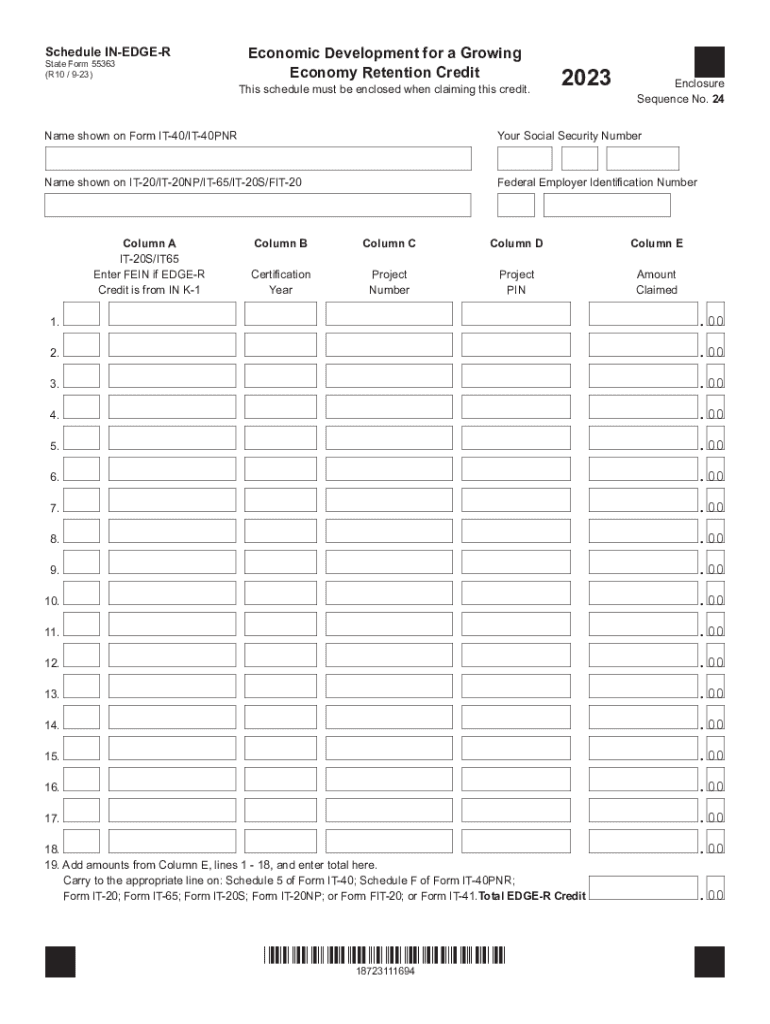
- Click ‘Get Form’ to open the Economic Development for a Growing Economy (EDGE) form in the editor.
- Begin by entering the name of the individual, corporation, or nonprofit organization claiming the credit in the designated field.
- Input your Social Security Number or Federal Employer Identification Number in the appropriate section.
- For Column A, if applicable, enter the FEIN of your S corporation or partnership. Ensure you split it into two boxes as instructed.
- In Column B, enter the tax year for which you are claiming the credit, found on your certification letter.
- Fill in Column C with the project number received from the Indiana Economic Development Corporation (IEDC).
- Enter your project PIN in Column D as provided by IEDC. If you lack a PIN for years prior to 2014, leave this blank.
- In Column E, input the amount of credit you are claiming for each line item.
- Finally, add up all amounts from Column E and enter the total on line 19. This is your total EDGE-R credit to be carried over to your tax forms.
Start using our platform today to streamline your EDGE form completion and ensure a hassle-free experience!
Fill out Economic Development for a Growing Economy (EDGE) online
It's free
It's free
See more Economic Development for a Growing Economy (EDGE) versions
We've got more versions of the Economic Development for a Growing Economy (EDGE) form. Select the right Economic Development for a Growing Economy (EDGE) version from the list and start editing it straight away!
Security and compliance
At DocHub, your data security is our priority. We follow HIPAA, SOC2, GDPR, and other standards, so you can work on your documents with confidence.
Learn more


