Cigarette Tax Stamp (CTS) Email Request - CDTFA - CA 2026

Get Form
Cigarette Tax Stamp (CTS) Email Request - CDTFA - CA Preview on Page 1

Here's how it works

01. Edit your form online
Type text, add images, blackout confidential details, add comments, highlights and more.

02. Sign it in a few clicks
Draw your signature, type it, upload its image, or use your mobile device as a signature pad.

03. Share your form with others
Send it via email, link, or fax. You can also download it, export it or print it out.

How to use or fill out Cigarette Tax Stamp (CTS) Email Request - CDTFA - CA with our platform

Form edit decoration
9.5
Ease of Setup
DocHub User Ratings on G2
9.0
Ease of Use
DocHub User Ratings on G2
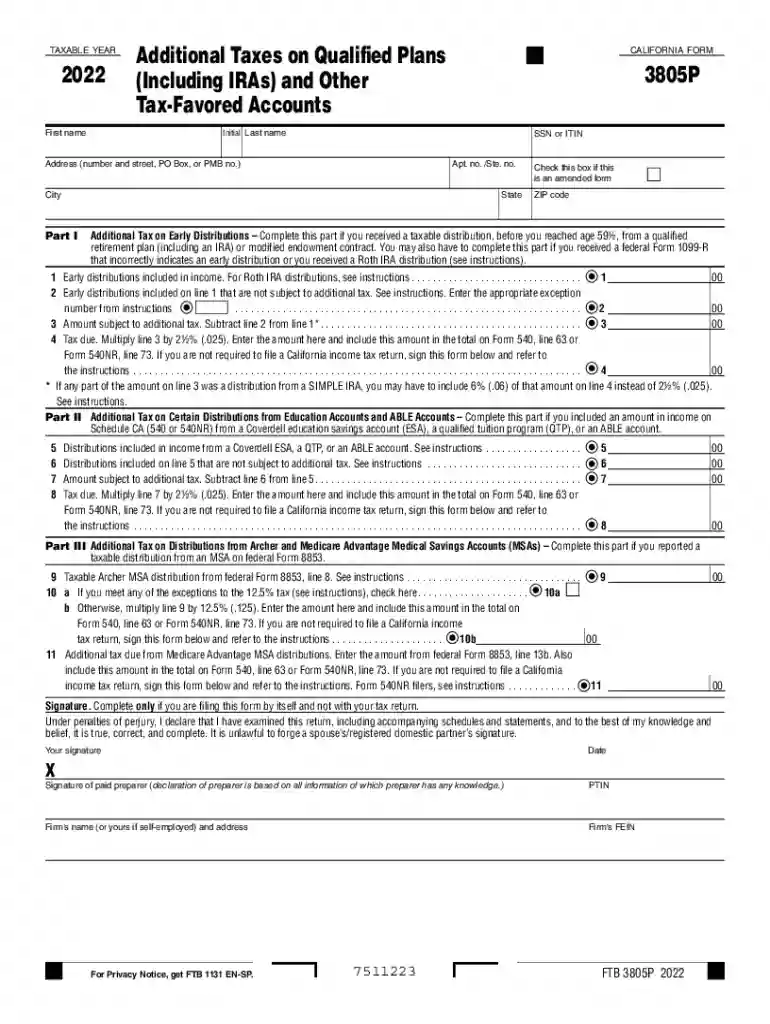
  1. Click ‘Get Form’ to open the Cigarette Tax Stamp (CTS) Email Request in the editor.
  2. Begin by entering your taxable year at the top of the form. Ensure that you select the correct year, as this will affect your tax calculations.
  3. Fill in your first and last name, along with your Social Security Number (SSN) or Individual Taxpayer Identification Number (ITIN). This information is crucial for identification purposes.
  4. Provide your complete address, including street number, city, state, and ZIP code. Double-check for accuracy to avoid any processing delays.
  5. If applicable, check the box indicating that this is an amended form. This is important if you are correcting a previously submitted request.
  6. Proceed to fill out each section regarding additional taxes on distributions as required. Follow the instructions carefully for each line item to ensure compliance.
  7. Once all fields are completed, review your entries for accuracy before submitting. Use our platform's features to save and share your document easily.

Start using our platform today for free to streamline your Cigarette Tax Stamp request process!

See more Cigarette Tax Stamp (CTS) Email Request - CDTFA - CA versions

We've got more versions of the Cigarette Tax Stamp (CTS) Email Request - CDTFA - CA form. Select the right Cigarette Tax Stamp (CTS) Email Request - CDTFA - CA version from the list and start editing it straight away!
Versions Form popularity Fillable & printable
2023 4.2 Satisfied (55 Votes)
2022 4.8 Satisfied (36 Votes)
2021 4.5 Satisfied (42 Votes)
2020 4.8 Satisfied (126 Votes)
2019 4.4 Satisfied (111 Votes)
2018 4.3 Satisfied (109 Votes)
2017 4.3 Satisfied (46 Votes)
2000 4 Satisfied (55 Votes)
be ready to get more

Complete this form in 5 minutes or less

Get form

Got questions?

We have answers to the most popular questions from our customers. If you can't find an answer to your question, please contact us.
Contact us
How can I get help? If you have questions, please contact our Customer Service Center at 1-800-400-7115 (TTY:711). Customer service representatives are available Monday through Friday from 7:30 a.m. to 5:00 p.m., Pacific time, except state holidays.
To apply for the use tax clearance certificate (CDTFA-111), use CDTFAs online services and select Request Use Tax Clearance for Registration with DMV/HCD under the Limited Access Functions. Or you may submit application form CDTFA-106, Vehicle/Vessel Use Tax Clearance Request.
Your Tax Clearance information can be obtained via the Tax Compliance Status system. Request PIN on eFiling, go to My Compliance Profile: Select the Tax Compliance Status Request option Select the type of TCS for which you would like to apply.
To complete the tax and fee clearance request online, go to our online services website at onlineservices.cdtfa.ca.gov, and select the Request a Tax and Fee Clearance function. Alternatively, you can submit a written request for a tax and fee clearance to your local CDTFA office.
Why did I receive this letter? Our records show that you have an outstanding balance. Additional interest will accrue if the tax and/or fee is not paid in full. Details of the balance due are shown on your letter.

Security and compliance

At DocHub, your data security is our priority. We follow HIPAA, SOC2, GDPR, and other standards, so you can work on your documents with confidence.

Learn more
ccpa2
pci-dss
gdpr-compliance
hipaa
soc-compliance

People also ask

To submit a request for relief, log in with your username and password and select the account you want to request relief for. The Submit a Relief Request option is located under the I Want To section, More subsection. Simply select the Submit a Relief Request link and follow the prompts.
To close an account: Visit the CDTFAs Online Services page and log in to your online services profile using your username and password. Select the account to be closed. Under I Want To, select More. Under Account Maintenance select Account Closure.

Related links