




Here's how it works



How to use or fill out 5199, Financially Distressed Cities, Villages, and Townships (FDCVT) Reimbursement Request with our platform

- Click ‘Get Form’ to open the 5199 reimbursement request in the editor.
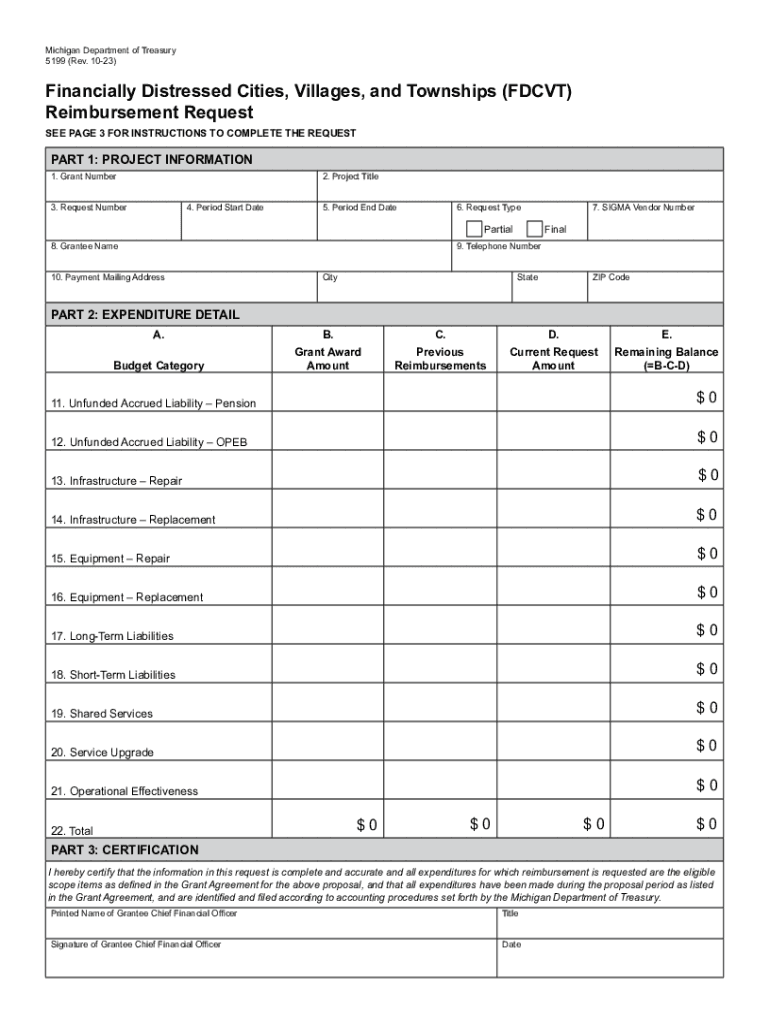
- In Part 1, enter the Grant Number, Project Title, Request Number, Period Start Date, and Period End Date. Select whether this is a partial or final reimbursement request.
- Fill in the SIGMA Vendor Number and Grantee Name. Provide your telephone number and complete the Payment Mailing Address section.
- Move to Part 2: Expenditure Detail. For each budget category listed from lines 11-22, input the Grant Award Amount, Previous Reimbursements, and Current Request Amount. The Remaining Balance will auto-calculate based on your entries.
- In Part 3: Certification, ensure you certify that all information is accurate by entering your printed name, title, signature, and date.
- Review all sections for completeness before submitting your request via email or fax as indicated in the instructions.
Start using our platform today to streamline your form completion process for free!
It's free
See more 5199, Financially Distressed Cities, Villages, and Townships (FDCVT) Reimbursement Request versions
Got questions?
Can I fill out and sign my 5199, Financially Distressed Cities, Villages, and Townships (FDCVT) Reimbursement Request online?
Sure, and it’s really easy! DocHub is a web-based PDF editor with advanced document management capabilities that allow you promptly edit your documents, complete empty fields and add new ones for other people to fill out, and create electronic signatures in several ways. Import your 5199, Financially Distressed Cities, Villages, and Townships (FDCVT) Reimbursement Request, give information as requested, and decide how you want to eSign your document - by typing your name, drawing your signature, uploading its image, or utilizing a QR code.
How do you edit 5199, Financially Distressed Cities, Villages, and Townships (FDCVT) Reimbursement Request in Chrome?
If you are using Chrome, there are two straightforward ways to edit your 5199, Financially Distressed Cities, Villages, and Townships (FDCVT) Reimbursement Request online. First, go to the DocHub website, add your file, and edit it utilizing our toolbar. You may also set up our Chrome extension and edit any document by dragging and dropping it in your web browser tab.
Security and compliance
At DocHub, your data security is our priority. We follow HIPAA, SOC2, GDPR, and other standards, so you can work on your documents with confidence.
Learn more


