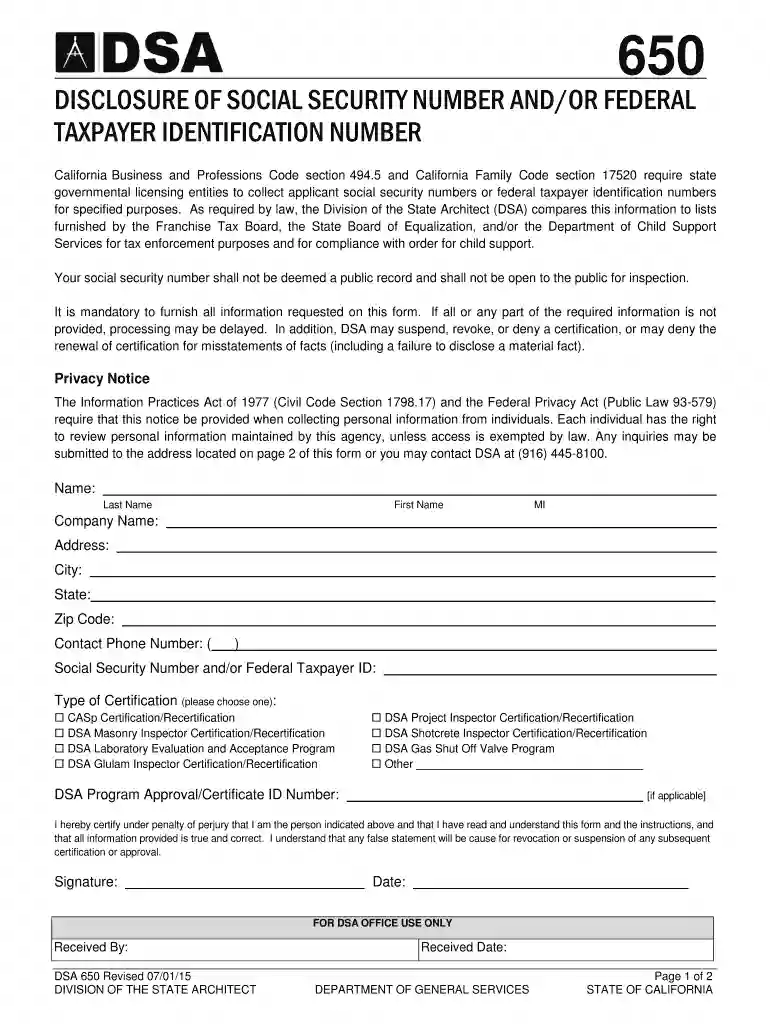
Disclosure of Social Security Number and or Federal Taxpayer Identification Number 2026

Get Form
social security federal Preview on Page 1

Here's how it works

01. Edit your social security federal online
Type text, add images, blackout confidential details, add comments, highlights and more.

02. Sign it in a few clicks
Draw your signature, type it, upload its image, or use your mobile device as a signature pad.

03. Share your form with others
Send california social security number via email, link, or fax. You can also download it, export it or print it out.

How to use or fill out Disclosure of Social Security Number and or Federal Taxpayer Identification Number with our platform

Form edit decoration
9.5
Ease of Setup
DocHub User Ratings on G2
9.0
Ease of Use
DocHub User Ratings on G2
  1. Click ‘Get Form’ to open it in the editor.
  2. Begin by entering your legal name in the 'Name' section. Ensure that you include your last name, first name, and middle initial if applicable.
  3. Fill in the 'Company Name' field if you are applying on behalf of a business. If not, leave this blank.
  4. Provide your current mailing address in the designated fields for 'Address', 'City', 'State', and 'Zip Code'.
  5. Enter your contact phone number in the specified format to ensure accurate communication.
  6. Input your Social Security Number and/or Federal Taxpayer ID in the appropriate field. This information is mandatory for processing.
  7. Select the type of certification you are applying for by checking one of the options provided.
  8. If applicable, enter your DSA Program Approval/Certificate ID Number.
  9. Finally, review all entered information for accuracy, then sign and date the form to certify its correctness before submission.

Start using our platform today to complete your Disclosure of Social Security Number and/or Federal Taxpayer Identification Number form easily and efficiently!

See more Disclosure of Social Security Number and or Federal Taxpayer Identification Number versions

We've got more versions of the Disclosure of Social Security Number and or Federal Taxpayer Identification Number form. Select the right Disclosure of Social Security Number and or Federal Taxpayer Identification Number version from the list and start editing it straight away!
Versions Form popularity Fillable & printable
2021 4.9 Satisfied (20 Votes)
2015 4.3 Satisfied (131 Votes)
2014 4 Satisfied (41 Votes)
be ready to get more

Complete this form in 5 minutes or less

Get form

Got questions?

We have answers to the most popular questions from our customers. If you can't find an answer to your question, please contact us.
Contact us

With DocHub, you can rapidly approve your social security identification or any other document on iOS, even without setting up additional programs. You can access your DocHub account from any internet-connected browser and fill out and sign your form in any way you like with just a few clicks.

Document editing with DocHub is equally convenient on desktop and mobile devices. You just need an internet browser to edit your social security number federal on Android. Open our website and sign in to access the tools you require. Add your file and introduce your intended modifications. Next, you can keep your form in your file storage or send it out right away.

TIN is a unique identification number required for every business enterprise registered under VAT. A TIN typically contains 11 characters and is provided by the IT department to all the business entities willing to register under VAT or CST.
The U.S. Taxpayer Identification Number may be found on a number of documents, including tax returns and forms filed with the IRS, and in the case of an SSN, on a social security card issued by the Social Security Administration.
In Canada, the TIN will be an individuals Social Insurance Number (SIN). For businesses in Canada (such as corporations or partnerships), the TIN will be their Business Number (BN) of the Quebec Enterprise Number (NEQ).

Security and compliance

At DocHub, your data security is our priority. We follow HIPAA, SOC2, GDPR, and other standards, so you can work on your documents with confidence.

Learn more
ccpa2
pci-dss
gdpr-compliance
hipaa
soc-compliance
be ready to get more

Complete this form in 5 minutes or less

Get form

People also ask

A TIN is a combination of letters or numbers that a country assigns to an individual or business for tax purposes. For example, in Canada: for individuals, the TIN will be their Social Insurance Number (SIN)
Taxpayer Identification Number (TIN) For individuals, this is generally your social security number (SSN). However, for a resident alien, sole proprietor, or disregarded entity, see the instructions for Part I, later. For other entities, it is your employer identification number (EIN).
When calling on your business account, use your Tax Identification number (TIN) in place of your Social Security number (SSN) as verification. The only exception is if youre a sole proprietor. In this case, please use your SSN instead.
Social Security Number, the most important aspect that stands out is that SSN is a type of TIN. The major difference between Social Security number (SSN) and any other tax id is that this number is primarily used by individuals for filing taxes while a tax ID number like EIN is used by businesses to file their taxes.
Applying for an individual tax identification number requires the preparation and submission of Form W-7 along with a certified copy of your Canadian passport. We can also assist in requesting an employer identification number (EIN) for a trust or estate. This number serves as a tax ID number for a trust or estate.

california taxpayer identification