PK CDC Securities Deposit Continuation Sheet 2026

Get Form
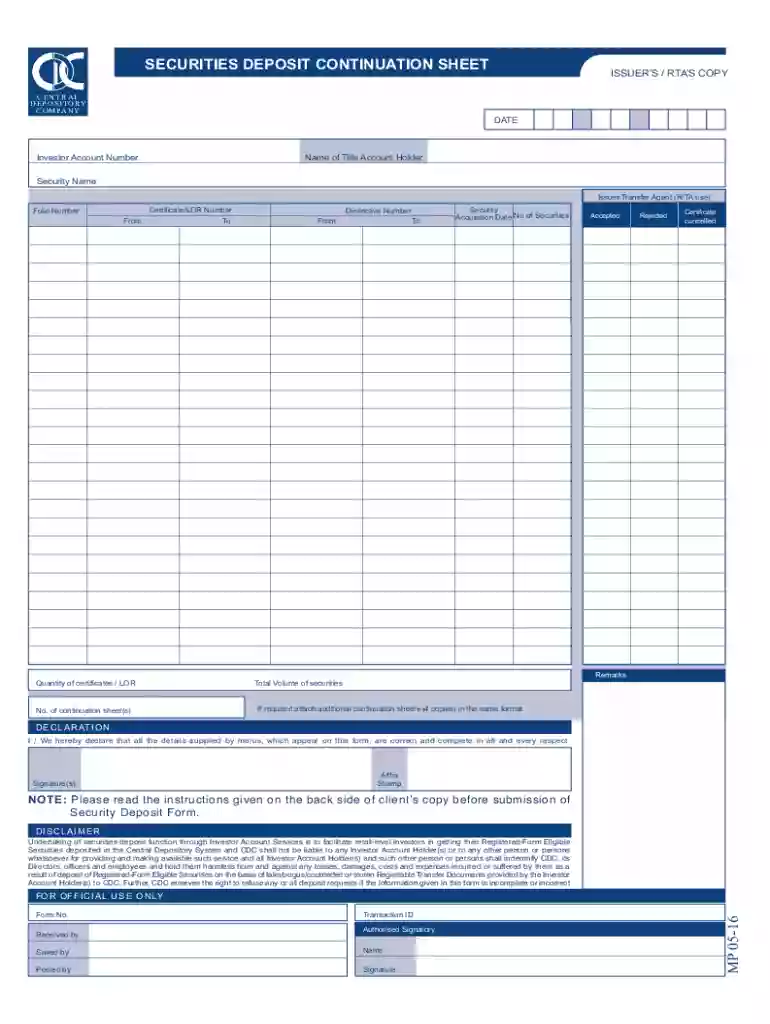
PK CDC Securities Deposit Continuation Sheet Preview on Page 1

Here's how it works

01. Edit your form online
Type text, add images, blackout confidential details, add comments, highlights and more.

02. Sign it in a few clicks
Draw your signature, type it, upload its image, or use your mobile device as a signature pad.

03. Share your form with others
Send it via email, link, or fax. You can also download it, export it or print it out.

How to use or fill out PK CDC Securities Deposit Continuation Sheet with our platform

Form edit decoration
9.5
Ease of Setup
DocHub User Ratings on G2
9.0
Ease of Use
DocHub User Ratings on G2
  1. Click ‘Get Form’ to open the PK CDC Securities Deposit Continuation Sheet in the editor.
  2. Begin by entering the 'Date' at the top of the form. This is essential for record-keeping.
  3. Fill in your 'Investor Account Number' and 'Name of Title Account Holder' accurately to ensure proper identification.
  4. In the 'Security Name' section, specify the name of the security you are depositing, along with details for 'Issuer/Transfer Agent' and 'Folio Number'.
  5. Complete the 'Certificate/LOR Number' fields, indicating both 'From' and 'To' ranges as necessary.
  6. Provide the 'Distinctive Number' range, followed by entering the 'Security Acquisition Date' and total number of securities being deposited.
  7. 'Accepted', 'Rejected', and 'Certificate cancelled' sections should be filled based on your transaction status.
  8. Add any remarks in the designated area and indicate how many continuation sheets you are submitting.
  9. 'Affix Stamp' where required and ensure all signatures are completed before submission.

Start using our platform today to streamline your document editing and signing process for free!

See more PK CDC Securities Deposit Continuation Sheet versions

We've got more versions of the PK CDC Securities Deposit Continuation Sheet form. Select the right PK CDC Securities Deposit Continuation Sheet version from the list and start editing it straight away!
Versions Form popularity Fillable & printable
2016 4.8 Satisfied (88 Votes)
be ready to get more

Complete this form in 5 minutes or less

Get form

Got questions?

We have answers to the most popular questions from our customers. If you can't find an answer to your question, please contact us.
Contact us
Q. How can I deposit funds to my Investor Account? into your Roshan Digital banks internet portal registered with CDC. Select Invest in Capital Market option. Transfer the Funds from your RDA bank account to CDC Bank Account maintained with the same bank through Transfer / Top up process.
You can fund your account using a number of different methods. Credit and debit card. We accept payments from credit and debit cards provided by MasterCard and Visa. Bank and WISE transfers. We accept payments via a range of different bank transfer options, including WISE. Skrill. Neteller. Alternative payment methods.
You can also top up via M-PESA Paybill 600118 by following these steps: Go to the M-PESA menu and click Lipa na M-PESA. Select Pay Bill. Enter 600118 as the business number. Enter your member number. Do not add any letters or special characters before or after the member number.
Investor Accounts are under complete control of CDC and are operated on direct written instruction of the Investor Account Holders. Sub-Accounts, on the other hand, are maintained and operated by CDC Participants (stock brokers financial institutions) on behalf of the Sub-Account Holders.

Security and compliance

At DocHub, your data security is our priority. We follow HIPAA, SOC2, GDPR, and other standards, so you can work on your documents with confidence.

Learn more
ccpa2
pci-dss
gdpr-compliance
hipaa
soc-compliance