For Your Monthly Premium Payment Preview on Page 1

For Your Monthly Premium Payment 2026

Here's how it works

  • 01. Edit your form online

    Type text, add images, blackout confidential details, add comments, highlights and more.

  • 02. Sign it in a few clicks

    Draw your signature, type it, upload its image, or use your mobile device as a signature pad.

  • 03. Share your form with others

    Send it via email, link, or fax. You can also download it, export it or print it out.

How to use or fill out For Your Monthly Premium Payment

Form edit decoration
9.5
Ease of Setup
DocHub User Ratings on G2
9.0
Ease of Use
DocHub User Ratings on G2
  1. Click ‘Get Form’ to open it in the editor.
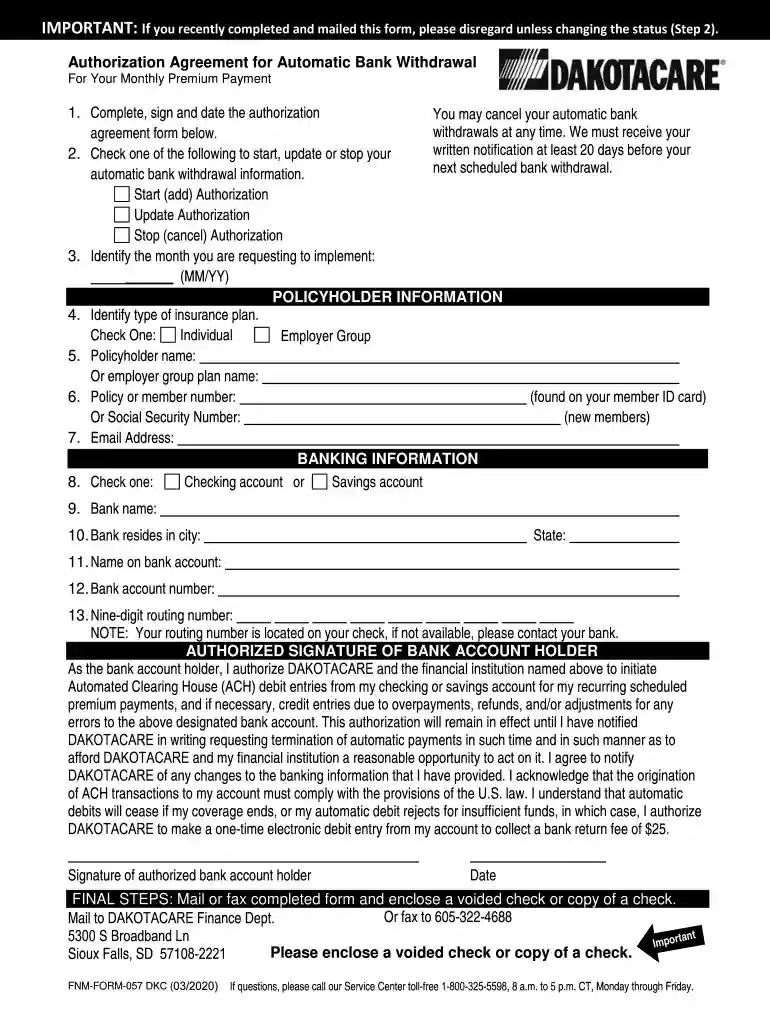
  2. Begin by completing, signing, and dating the authorization section. This is crucial for initiating your automatic bank withdrawals.
  3. Select one of the options to start, update, or stop your automatic bank withdrawal information.
  4. Indicate the month you wish to implement the changes by filling in the MM/YY format.
  5. Provide your policyholder information, including the type of insurance plan (Individual or Employer Group), your name or employer group name, and your policy/member number or Social Security Number.
  6. Fill in your email address for communication purposes.
  7. Choose between a checking account or savings account and provide the necessary banking details such as bank name, city, state, account holder's name, account number, and routing number.
  8. Sign and date the authorization section to confirm your agreement for automatic withdrawals.
  9. Finally, mail or fax the completed form along with a voided check or copy of a check to DAKOTACARE Finance Dept.

Start using our platform today to easily complete your Monthly Premium Payment form online for free!

See more For Your Monthly Premium Payment versions

We've got more versions of the For Your Monthly Premium Payment form. Select the right For Your Monthly Premium Payment version from the list and start editing it straight away!

VersionsForm popularityFillable & printable
20204.8 Satisfied (68 Votes)

be ready to get more

Complete this form in 5 minutes or less

Security and compliance

At DocHub, your data security is our priority. We follow HIPAA, SOC2, GDPR, and other standards, so you can work on your documents with confidence.

Related links

How to Pay Part A Part B premiums

The fastest way to pay your premium is online through your Medicare account or using Medicare Easy Pay. All Medicare bills are due on the 25th of the month.

Learn more
FAQ of the Week - Center on Health Insurance Reforms

Dec 16, 2019 Once youve selected your plan, the marketplace will direct you to your insurance companys website to make the initial premium payment.Read more

Learn more
If you believe that this page should be taken down, please follow our DMCA take down process here