Type text, add images, blackout confidential details, add comments, highlights and more.

02. Sign it in a few clicks
Draw your signature, type it, upload its image, or use your mobile device as a signature pad.

03. Share your form with others
Send it via email, link, or fax. You can also download it, export it or print it out.

How to use or fill out FAFSA - Federal Student Aid with DocHub
Ease of Setup
DocHub User Ratings on G2
Ease of Use
DocHub User Ratings on G2
Click ‘Get Form’ to open the FAFSA - Federal Student Aid in our editor.
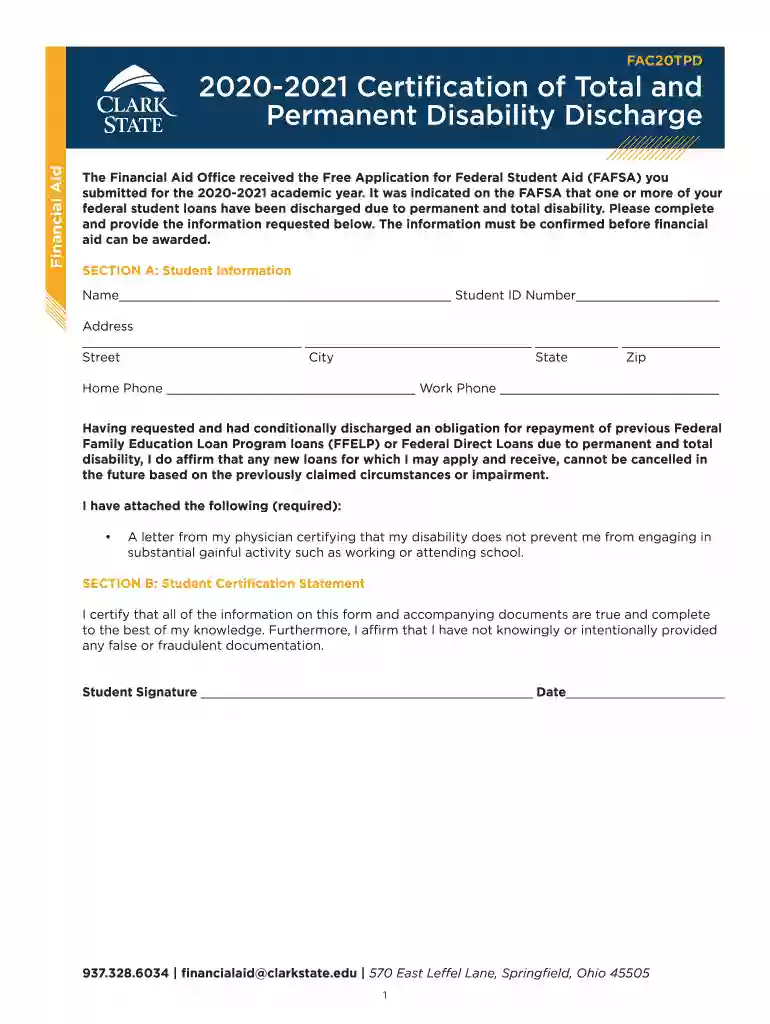
Begin by filling out Section A: Student Information. Enter your name, student ID number, address (including street, city, state, and zip code), and both home and work phone numbers.
In Section A, confirm your understanding regarding the discharge of loans due to permanent disability by reading the statement provided and ensuring you understand its implications.
Attach the required documentation as specified in Section A. This includes a letter from your physician certifying that your disability does not prevent you from engaging in substantial gainful activity.
Proceed to Section B: Student Certification Statement. Review the statement carefully and ensure all information is accurate before signing and dating the form.
Start using our platform today to fill out your FAFSA form online for free!
Fill out FAFSA - Federal Student Aid online It's free
We've got more versions of the FAFSA - Federal Student Aid form. Select the right FAFSA - Federal Student Aid version from the list and start editing it straight away!
Fafsa federal student aid loginFafsa federal student aid eligibilityFAFSA phone numberFederal student aid loginParent FAFSA loginFAFSA paymentFederal student aid login paymentFAFSA 2026--27 application
Security and compliance
At DocHub, your data security is our priority. We follow HIPAA, SOC2, GDPR, and other standards, so you can work on your documents with confidence.
Cookie consent notice
This site uses cookies to enhance site navigation and personalize your experience.
By using this site you agree to our use of cookies as described in our Privacy Notice.
You can modify your selections by visiting our Cookie and Advertising Notice.