Njcu verification 2026

Get Form
njcu verification Preview on Page 1

Here's how it works

01. Edit your njcu verification online
Type text, add images, blackout confidential details, add comments, highlights and more.

02. Sign it in a few clicks
Draw your signature, type it, upload its image, or use your mobile device as a signature pad.

03. Share your form with others
Send it via email, link, or fax. You can also download it, export it or print it out.

How to use or fill out njcu verification with our platform

Form edit decoration
9.5
Ease of Setup
DocHub User Ratings on G2
9.0
Ease of Use
DocHub User Ratings on G2
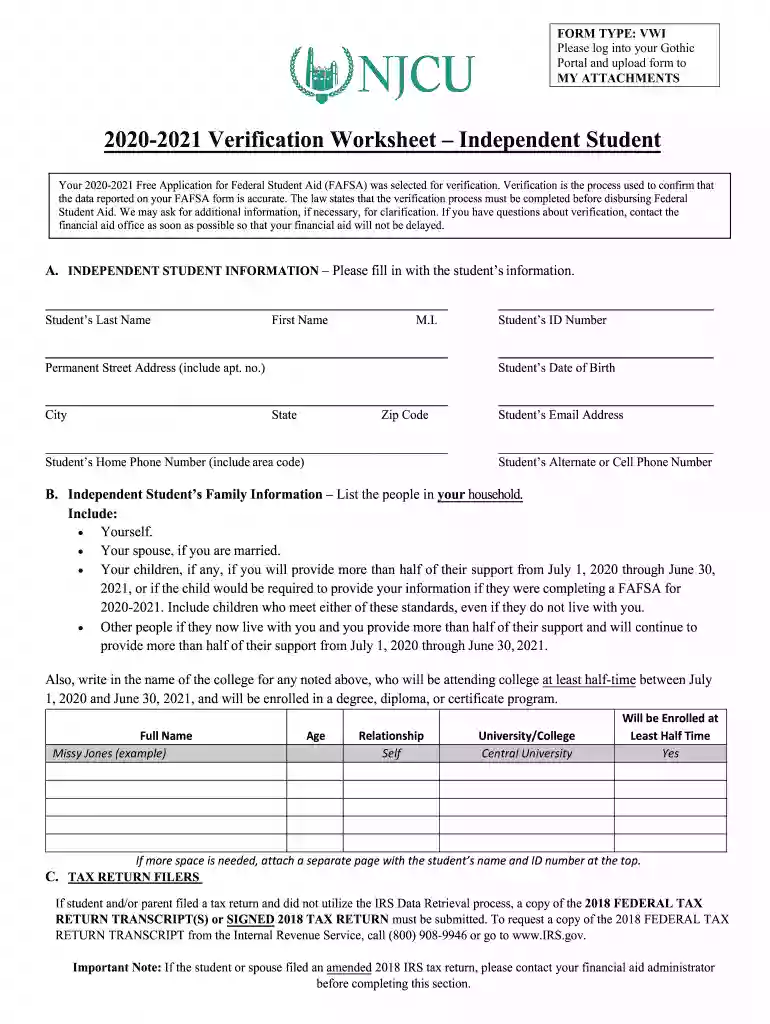
  1. Log into your Gothic Portal and navigate to the MY ATTACHMENTS section to upload the njcu verification form.
  2. Begin with Section A, where you will enter your personal information. Fill in your last name, first name, middle initial, permanent address, city, state, zip code, student ID number, date of birth, home phone number, email address, and alternate phone number.
  3. In Section B, list all individuals in your household. Include yourself, your spouse (if applicable), children who receive more than half of their support from you during the specified period, and any other individuals living with you whom you support.
  4. For Section C and D regarding tax return filers and non-filers respectively, provide necessary documentation such as tax return transcripts or verification letters as required.
  5. Complete Section E by detailing income information. If applicable, list employers along with annual earnings and indicate if W-2 forms are provided.
  6. Finally, ensure that both you and your spouse (if applicable) sign and date the certification section to confirm the accuracy of the information provided.

Start using our platform today for free to streamline your njcu verification process!

See more njcu verification versions

We've got more versions of the njcu verification form. Select the right njcu verification version from the list and start editing it straight away!
Versions Form popularity Fillable & printable
2020 4.8 Satisfied (194 Votes)
2019 4.2 Satisfied (57 Votes)
2018 3.9 Satisfied (28 Votes)
2017 4.1 Satisfied (29 Votes)
2016 4 Satisfied (21 Votes)
be ready to get more

Complete this form in 5 minutes or less

Get form

Got questions?

We have answers to the most popular questions from our customers. If you can't find an answer to your question, please contact us.
Contact us
Verification is a process to confirm that the information reported on the FAFSA form is accurate. Students are selected for verification at random by the U.S. Department of Education. A note will be listed on the FAFSA Submission Summary if a student is selected for verification.
Verification is the process your school uses to confirm that the data reported on your FAFSA form is accurate. If youre selected for verification, your school will request additional documentation that supports the information you reported. Dont assume youre being accused of doing anything wrong.
In early 2025, Kean University submitted a proposal to execute a merger with New Jersey City University (NJCU). On Wednesday, March 5, the NJCU Board of Trustees voted to move forward with that proposal. This website will serve as a resource as the merger process unfolds in the weeks and months ahead.

Security and compliance

At DocHub, your data security is our priority. We follow HIPAA, SOC2, GDPR, and other standards, so you can work on your documents with confidence.

Learn more