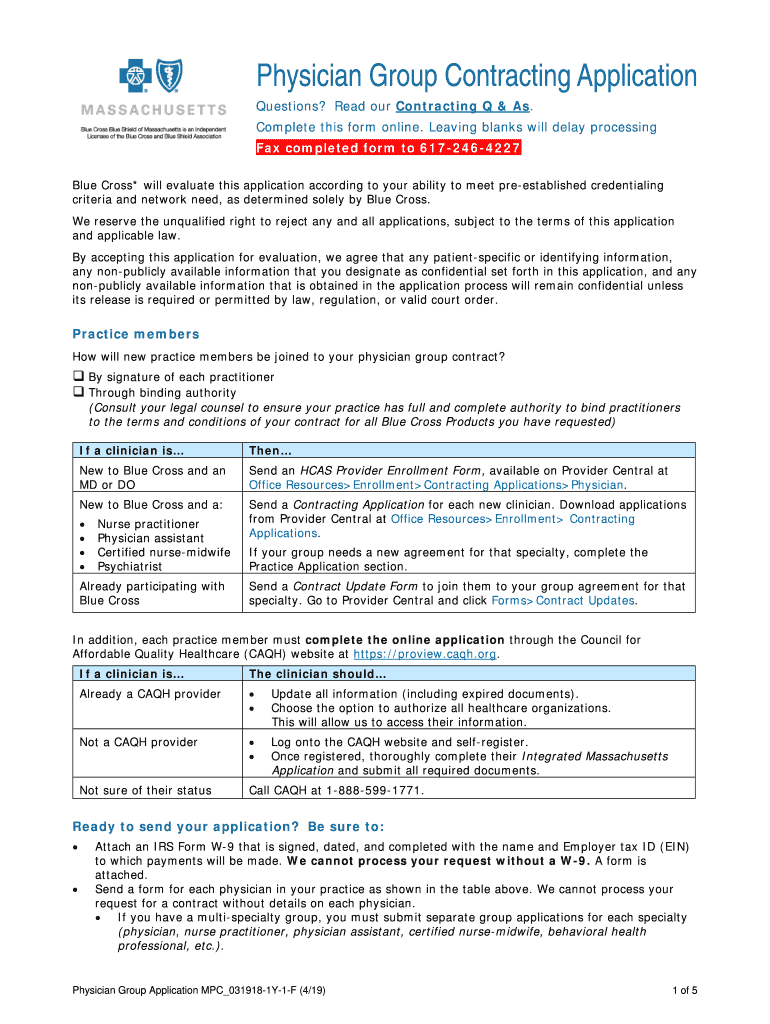
MPC031918-1Y-1-F Physician Group Application 4 19 Request for Taxpayer Identification Number and Cer 2026

Get Form
MPC031918-1Y-1-F Physician Group Application 4 19 Request for Taxpayer Identification Number and Cer Preview on Page 1

Here's how it works

01. Edit your form online
Type text, add images, blackout confidential details, add comments, highlights and more.
02. Sign it in a few clicks
Draw your signature, type it, upload its image, or use your mobile device as a signature pad.
03. Share your form with others
Send it via email, link, or fax. You can also download it, export it or print it out.

How to use or fill out MPC031918-1Y-1-F Physician Group Application 4 19 Request for Taxpayer Identification Number and Cer with our platform

Form edit decoration
9.5
Ease of Setup
DocHub User Ratings on G2
9.0
Ease of Use
DocHub User Ratings on G2
  1. Click ‘Get Form’ to open the MPC031918-1Y-1-F Physician Group Application in the editor.
  2. Begin by filling out the 'Practice Location Information' section. Enter your practice's legal name, tax ID number, and NPI Type 2. Ensure all fields are completed to avoid delays.
  3. In the 'Practice Members' section, indicate how new members will join your group contract. Select either by signature or through binding authority, and provide necessary documentation as outlined.
  4. Complete the 'Blue Cross Product Participation' section by checking all applicable products your group wishes to participate in. This is crucial for processing your application.
  5. Finally, review the 'Release and Representations' section carefully. Sign and date it before submitting your application via fax to ensure compliance with Blue Cross requirements.

Start using our platform today for free to streamline your document editing and submission process!

See more MPC031918-1Y-1-F Physician Group Application 4 19 Request for Taxpayer Identification Number and Cer versions

We've got more versions of the MPC031918-1Y-1-F Physician Group Application 4 19 Request for Taxpayer Identification Number and Cer form. Select the right MPC031918-1Y-1-F Physician Group Application 4 19 Request for Taxpayer Identification Number and Cer version from the list and start editing it straight away!
Versions Form popularity Fillable & printable
2019 4.8 Satisfied (90 Votes)
be ready to get more

Complete this form in 5 minutes or less

Get form

Got questions?

We have answers to the most popular questions from our customers. If you can't find an answer to your question, please contact us.
Contact us

If you frequently deal with documents stored in your Google Drive, DocHub is a superb solution for you to easily and quickly fill out, modify, and approve them. This editor integrates properly with Google apps, so you can export your MPC031918-1Y-1-F Physician Group Application 4 19 Request for Taxpayer Identification Number and Cer from your Google Drive to the editor without downloading and re-uploading it. Right-click on your document, select Open With → DocHub PDF Sign and Edit. In our editor, add and assign Signature Fields for all parties involved, then click on the Menu button above → Send → choose how you want to share your form.

Using a swift editing platform like DocHub, you do not require anything but a browser and internet connection to modify your MPC031918-1Y-1-F Physician Group Application 4 19 Request for Taxpayer Identification Number and Cer online swiftly. Upload your document or find the appropriate form in DocHub’s catalog, open our editor with a single click, and complete it digitally. To edit your forms at any time, register a free account with DocHub.

If you ever find yourself filling out a Form W-9, it generally means a business or person who is paying you money needs your U.S. Taxpayer Identification number (TIN)which can be the U.S. Social Security Number (SSN), Individual Taxpayer Identification Number (ITIN), or Federal Employer Identification Number (EIN/FEIN
There are 3 ways you can apply for an ITIN number: Fill out Form W-7, Application for IRS Individual Taxpayer Identification Number (ITIN), and submit it with your tax return. Contact an IRS-authorized docHubing Acceptance Agent. Make an appointment with the IRS Taxpayer Assistance Center.
Form W-9 Instructions Line 1 Name. This should be your full name. Line 2 Business name. Line 3 Federal tax classification. Line 4 Exemptions. Lines 5 6 Address, city, state, and ZIP code. Line 7 Account number(s) Part I Taxpayer Identification Number (TIN) Part II Certification.

Security and compliance

At DocHub, your data security is our priority. We follow HIPAA, SOC2, GDPR, and other standards, so you can work on your documents with confidence.

Learn more
ccpa2
pci-dss
gdpr-compliance
hipaa
soc-compliance
be ready to get more

Complete this form in 5 minutes or less

Get form

People also ask

You would use Form W-9 to request the TIN. If the person you pay is a foreign person, Form W-8 would be used instead of Form W-9. Second, if you receive more than $600 from someone else, the payor will use Form W-9 to request your TIN. If you dont have a TIN, you must request one.
Use Form W-9 to provide your correct Taxpayer Identification Number (TIN) to the person who is required to file an information return with the IRS to report, for example: Income paid to you. Real estate transactions. Mortgage interest you paid.
How to fill out a W-9 form Download the W-9 form from IRS.gov. Provide your full legal name and business name. Business structure. Exemption. Enter your mailing address. Add any account numbers. Provide your Social Security number or Employer Identification Number. See if you need to sign and date the form.
Doing Business As (DBA) field (in the Company Overview section)must match line 2 of W-9. The IRS prefers you provide your Social Security Number (SSN). But if you have a personal Employer Identification Number (EIN) you can use that, but you cannot use an EIN attached to a Single-Member LLC.