




Here's how it works



How to use or fill out HA-1 Claimant Appeal Under the RRA or RUIA with our platform

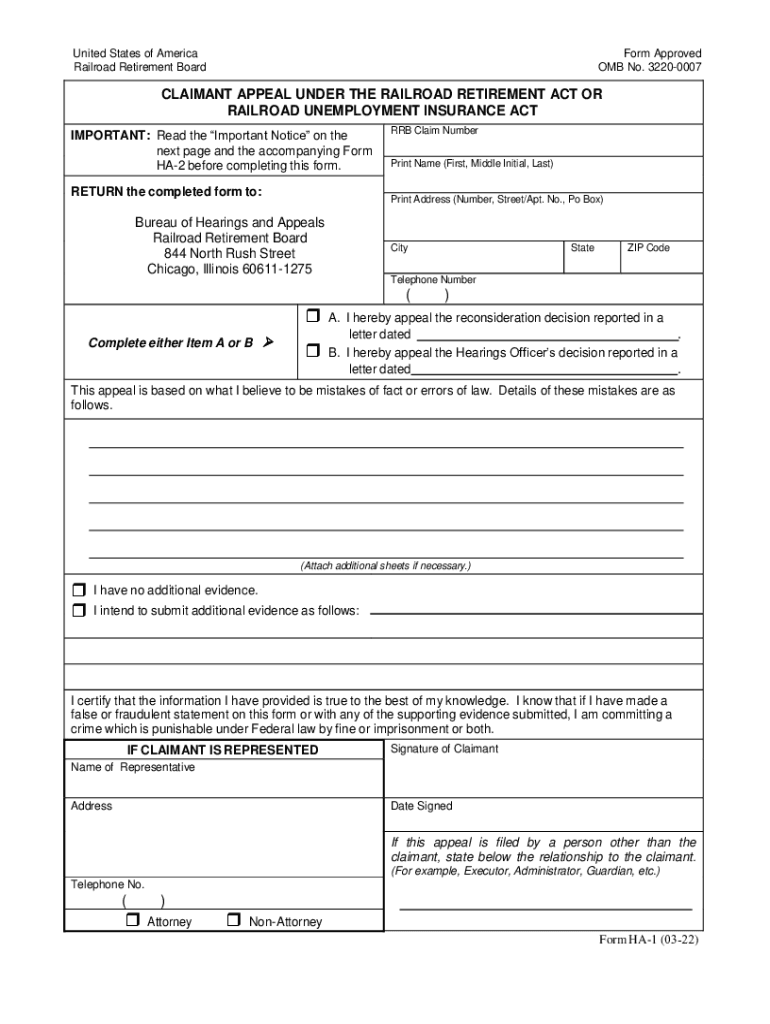
- Click ‘Get Form’ to open the HA-1 Claimant Appeal form in the editor.
- Begin by entering your RRB Claim Number at the top of the form. This is essential for processing your appeal.
- Fill in your full name, address, city, state, and ZIP code. Ensure all information is accurate to avoid delays.
- Select either Item A or B to indicate whether you are appealing a reconsideration decision or a Hearings Officer’s decision. Provide the date of the letter related to your appeal.
- In the section detailing mistakes of fact or errors of law, clearly outline your reasons for appeal. If necessary, attach additional sheets for more information.
- Indicate if you have additional evidence to submit and provide details if applicable.
- Sign and date the form. If someone else is filing on your behalf, ensure they complete their section with their relationship to you.
Start using our platform today to easily fill out and submit your HA-1 Claimant Appeal form for free!
It's free
See more HA-1 Claimant Appeal Under the RRA or RUIA HA-1 Claimant Appeal Under the RRA or RUIA versions
| Versions | Form popularity | Fillable & printable |
|---|---|---|
| 2022 | 4.8 Satisfied (75 Votes) |
Got questions?
What is the best way to send my HA-1 Claimant Appeal Under the RRA or RUIA HA-1 Claimant Appeal Under the RRA or RUIA for eSignature?
Upload your HA-1 Claimant Appeal Under the RRA or RUIA HA-1 Claimant Appeal Under the RRA or RUIA to DocHub (once you’ve created an account for this). If you need to complete fields in it, use proper tools from the top pane. For example, drop Signature Fields, assign each to specific party, and click on Sign → Request signatures from others. Change your message for your recipients and click Send Request. You can also send your form by fax or as a Signing link instead of using email (you’ll locate these options by navigating to the Menu → Send)
How to complete and sign HA-1 Claimant Appeal Under the RRA or RUIA HA-1 Claimant Appeal Under the RRA or RUIA online?
You may quickly fill out, edit, and even eSign your HA-1 Claimant Appeal Under the RRA or RUIA HA-1 Claimant Appeal Under the RRA or RUIA utilizing DocHub. Create a new account and start your free trial. After that, you can upload the file with the form and simply make all the needed edits. No need to print on paper or use a third-party application to sign it, as you can place your electronic signature on your document quicker through DocHub.
What is the Medicare appeal timely filing limit?
What is the timely filing limit for railroad Medicare appeal?
Is there a waiting period for RRB sickness benefits?
Security and compliance
At DocHub, your data security is our priority. We follow HIPAA, SOC2, GDPR, and other standards, so you can work on your documents with confidence.
Learn more


