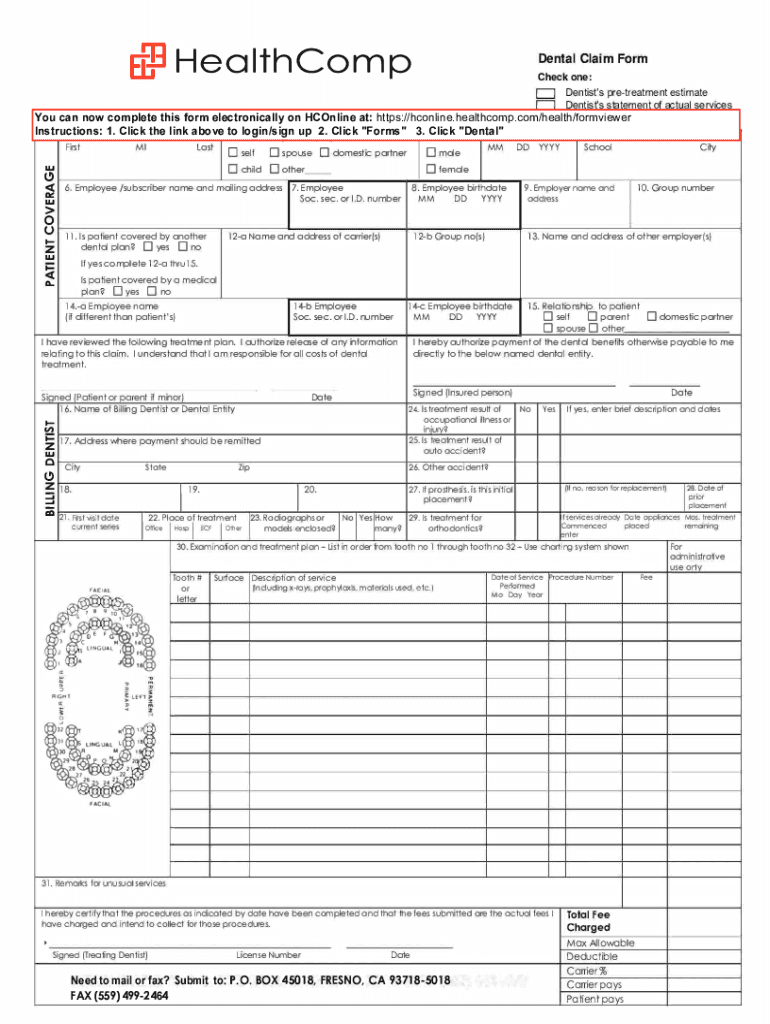
Bennyscafe docsDental Claim FormDental Claim Form - bennyscafe 2026

Get Form
healthcomp dentist Preview on Page 1

Here's how it works

01. Edit your healthcomp dentist online
Type text, add images, blackout confidential details, add comments, highlights and more.
02. Sign it in a few clicks
Draw your signature, type it, upload its image, or use your mobile device as a signature pad.
03. Share your form with others
Send free dental bill template via email, link, or fax. You can also download it, export it or print it out.

How to use or fill out bennyscafe docsDental Claim Form - bennyscafe

Form edit decoration
9.5
Ease of Setup
DocHub User Ratings on G2
9.0
Ease of Use
DocHub User Ratings on G2
  1. Click ‘Get Form’ to open it in the editor.
  2. Begin by selecting the type of claim you are submitting: either a dentist's pre-treatment estimate or a statement of actual services.
  3. Fill in the patient’s name, birth date, and relationship to the patient. Ensure accuracy as this information is crucial for processing your claim.
  4. Provide details about the employee, including their name, birth date, and social security number if applicable.
  5. Indicate whether the patient is covered by another dental plan and provide necessary details such as group numbers and carrier information.
  6. Complete the treatment details section by listing procedures performed, dates of service, and any relevant remarks for unusual services.
  7. Finally, ensure all signatures are completed where required before submitting your form electronically or via mail.

Start using our platform today to easily complete your Dental Claim Form for free!

See more bennyscafe docsDental Claim FormDental Claim Form - bennyscafe versions

We've got more versions of the bennyscafe docsDental Claim FormDental Claim Form - bennyscafe form. Select the right bennyscafe docsDental Claim FormDental Claim Form - bennyscafe version from the list and start editing it straight away!
Versions Form popularity Fillable & printable
2014 4.8 Satisfied (72 Votes)
be ready to get more

Complete this form in 5 minutes or less

Get form

Got questions?

We have answers to the most popular questions from our customers. If you can't find an answer to your question, please contact us.
Contact us
Incomplete or inaccurate information on the dental insurance claim. Not verifying patient insurance benefits before their appointment. Unreadable procedure attachments and/or insufficient documentation. The missing tooth clause guidelines.
The ADA Dental Claim Form provides a common format for reporting dental services to a patients dental benefit plan. ADA policy promotes use and acceptance of the most current version of the ADA Dental Claim Form by dentists and payers.
Tooth system (Box 26) JP, or the American system, follows the ADAs Universal Tooth Designation System with a combination of letters and numbers. Procedure codes (Box 29) add the most appropriate Current Dental Terminology (CDT) procedure code.
How to fill out the Dental Claim Form Instructions and Guidelines? Gather all necessary information including patient and treatment details. Complete the personal information section accurately. Fill out the details of the treatment being claimed. Sign and date the form as required.
Procedure Details Numb your tooth with local anesthesia. Remove damaged or decayed tissue from your tooth using specialized instruments. Fill the hole with dental filling material. Use a dental curing light to harden the material (only for resin composite). Polish and smooth any rough edges.

Security and compliance

At DocHub, your data security is our priority. We follow HIPAA, SOC2, GDPR, and other standards, so you can work on your documents with confidence.

Learn more
ccpa2
pci-dss
gdpr-compliance
hipaa
soc-compliance
be ready to get more

Complete this form in 5 minutes or less

Get form

People also ask

A dental billing payment comes in two forms: Insurance payment and/or patient payment. Your dental billing process is your strategy for collecting from these two revenue sources.
Boxes 18-23 require data from the patients intake forms (name, address, etc.) Procedure date (Box 24) is the date your practice performed the procedure. General area of oral cavity (Box 25) is arranged by numeric codes rather than abbreviations.
We offer a variety of dental services from regular check-ups to teeth whitening. We do accept most insurances, including Tricare!