State release medical form 2026

Get Form
state release medical form Preview on Page 1

Here's how it works

01. Edit your state release medical form online
Type text, add images, blackout confidential details, add comments, highlights and more.

02. Sign it in a few clicks
Draw your signature, type it, upload its image, or use your mobile device as a signature pad.

03. Share your form with others
Send state release medical information via email, link, or fax. You can also download it, export it or print it out.

How to use or fill out state release medical form with our platform

Form edit decoration
9.5
Ease of Setup
DocHub User Ratings on G2
9.0
Ease of Use
DocHub User Ratings on G2
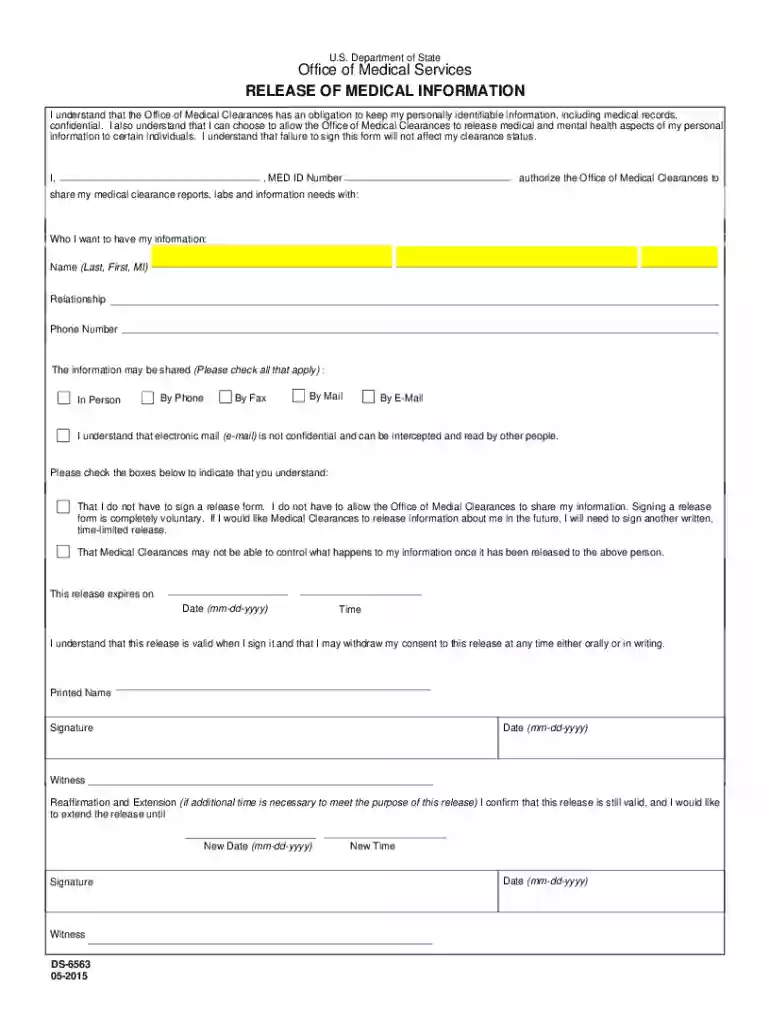
  1. Click ‘Get Form’ to open the state release medical form in the editor.
  2. Begin by entering your full name in the designated field. This identifies you as the individual authorizing the release of information.
  3. Next, provide your MED ID Number, which is essential for tracking your medical records.
  4. In the section labeled 'Who I want to have my information', fill in the name, relationship, and phone number of the individual(s) you authorize to receive your medical information.
  5. Indicate how you would like your information shared by checking all applicable boxes: In Person, By Phone, By Fax, By Mail, or By E-Mail.
  6. Acknowledge your understanding of confidentiality by checking the provided boxes regarding voluntary signing and potential risks associated with sharing via email.
  7. Specify the expiration date and time for this release at the bottom of the form.
  8. Finally, sign and date the form. If necessary, a witness can also sign to validate this document.

Start using our platform today to easily complete your state release medical form online for free!

See more state release medical form versions

We've got more versions of the state release medical form form. Select the right state release medical form version from the list and start editing it straight away!
Versions Form popularity Fillable & printable
2015 4.8 Satisfied (125 Votes)
be ready to get more

Complete this form in 5 minutes or less

Get form

Got questions?

We have answers to the most popular questions from our customers. If you can't find an answer to your question, please contact us.
Contact us

Yes, and it’s really straightforward! DocHub is an online PDF editor with advanced document processing functions that allow you quickly modify your forms, complete empty fields and drop new ones for others to fill out, and create electronic signatures in several ways. Add your state release medical form, give information as required, and select how you want to eSign your document - by typing your name, drawing your signature, uploading its image, or using a QR code.

In addition to an extensive toolset for editing PDFs on mobile devices, DocHub allows you to sign your state release medical information along the way. Open our editor in your web browser, make modifications using DocHub’s toolset, and finish your editing by eSigning the completed form.

How Long Is a HIPAA Release Form Valid? A HIPAA release form is valid until the expiration date or event listed on the form. The expiration can be a specific calendar date (e.g., December 31, 2025) or an event (e.g., end of legal proceedings or completion of treatment).
If youre unable to sign and docHub your medical consent forms in person, you can get a remote online notarization. NotaryLive provides an online notarization process where you can remotely sign and docHub a document from the comfort of your home.
A medical release form (also known as a medical records release form or authority to release medical information) is a legal document patients can sign to permit healthcare providers to share their private health information with specified third parties.

People also ask

A medical release form, often referred to as a liability waiver, is a legal document that authorizes the at-fault drivers insurance company to access your medical records. This allows the insurer to assess the severity of your injuries and the potential compensation required.
You do NOT need to provide the insurance copy with any healthcare records unrelated to the injury, which includes your complete medical history or information about pre-existing health conditions. NEVER sign a release granting the insurance company the right to access any of your medical information directly.
By signing a liability waiver, you waive your right to privacy and allow insurance adjusters access to sensitive health details. This is one of the most docHub risks, as it opens the door for the insurance company to access information that could be used against you in ways you may not expect.
How to create a HIPAA compliant medical records release form Provide instructions. Name the patient and individual authorized to use or disclose their PHI. Describe the information. Specify recipients. Specify the purpose of disclosure. Specify the time period. Detail their revocation rights. Obtain the patients signature.

Related links