




Here's how it works



How to use or fill out the Order Appointing Co-Conservator or Successor Conservator with our platform

- Click ‘Get Form’ to open it in the editor.
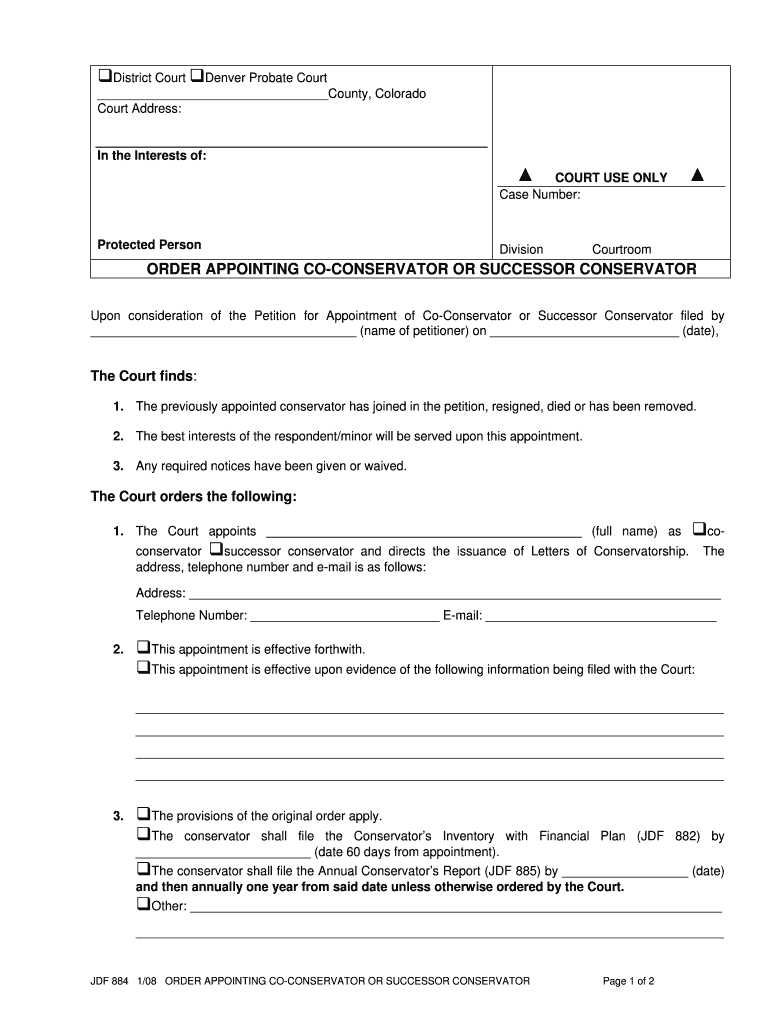
- Begin by entering the court address and case number at the top of the form. Ensure that all details are accurate to avoid any delays.
- In the 'In the Interests of' section, specify the name of the protected person clearly.
- Fill in your name as the petitioner along with the date you are submitting this petition.
- Select whether you are appointing a co-conservator or a successor conservator by checking the appropriate box and providing their full name and contact information.
- Indicate if this appointment is effective immediately or upon certain conditions being met, detailing those conditions if necessary.
- Complete any additional requirements such as filing dates for financial plans and reports, ensuring compliance with court orders.
- Finally, sign and date the document at the bottom, ensuring that it is ready for submission.
Start using our platform today to streamline your document editing and signing process for free!
It's free
See more - courts state co versions
| Versions | Form popularity | Fillable & printable |
|---|---|---|
| 2008 | 4.8 Satisfied (115 Votes) |
Got questions?
How do I sign my - courts state co on iOS?
With DocHub, you can rapidly sign your - courts state co or any other document on iOS, even without setting up extra applications. You can access your DocHub account from any web-connected browser and complete and sign your form in any way you like with just a few clicks.
Can I print my - courts state co and complete it by myself?
When you choose analog methods of completing your - courts state co, you can easily download your file for printing. Search DocHub’s Forms & Templates catalog to find the exact document template you require and open it for editing or download it on your device in the format of your liking. It is possible to complete your form electronically and place your handwritten signature on it right after printing or eSign your document with DocHub.
Security and compliance
At DocHub, your data security is our priority. We follow HIPAA, SOC2, GDPR, and other standards, so you can work on your documents with confidence.
Learn more


