




Here's how it works

01. Edit your report endorsement online
Type text, add images, blackout confidential details, add comments, highlights and more.

02. Sign it in a few clicks
Draw your signature, type it, upload its image, or use your mobile device as a signature pad.

03. Share your form with others
Send gaming endorsement via email, link, or fax. You can also download it, export it or print it out.
How to use or fill out type ii annual financial report with our platform

- Click ‘Get Form’ to open the Type II Annual Financial Report in the editor.
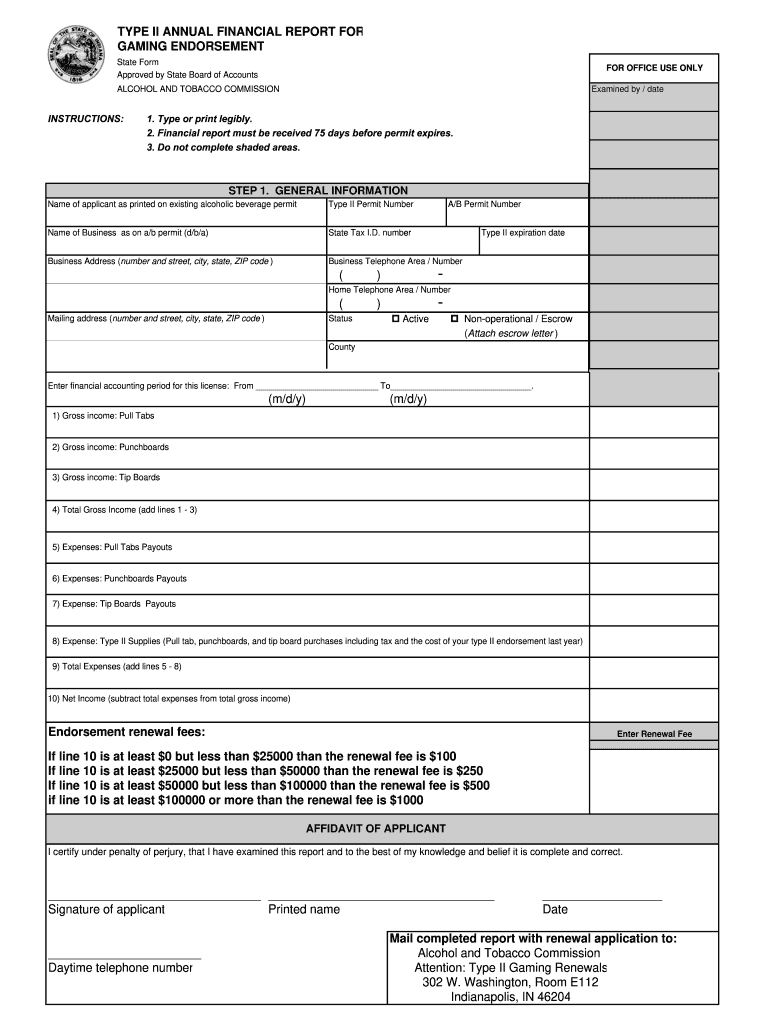
- Begin with the General Information section. Enter the name of the applicant as it appears on the existing alcoholic beverage permit, followed by the Type II Permit Number and Business Name (d/b/a).
- Fill in your State Tax I.D. number, Business Address, and Business Telephone number. Ensure all information is typed or printed legibly.
- Indicate your A/B Permit Number and Type II expiration date. Provide your Home Telephone number and Mailing address if different from the business address.
- Specify your operational status (Active or Non-operational/Escrow) and attach any necessary documentation for escrow status.
- Enter the financial accounting period for this license, including start and end dates.
- Complete the income sections by entering gross income amounts for Pull Tabs, Punchboards, and Tip Boards. Calculate Total Gross Income by adding these figures.
- List expenses related to Pull Tabs, Punchboards, Tip Boards, and Type II Supplies. Add these to find Total Expenses.
- Calculate Net Income by subtracting Total Expenses from Total Gross Income.
- Determine your endorsement renewal fee based on your Net Income amount as specified in the instructions.
- Finally, complete the Affidavit of Applicant section with your signature, printed name, daytime telephone number, and date before mailing it to the Alcohol and Tobacco Commission.
Start using our platform today to easily fill out your Type II Annual Financial Report online for free!
Fill out type ii annual financial report online
It's free
It's free
Security and compliance
At DocHub, your data security is our priority. We follow HIPAA, SOC2, GDPR, and other standards, so you can work on your documents with confidence.
Learn more


