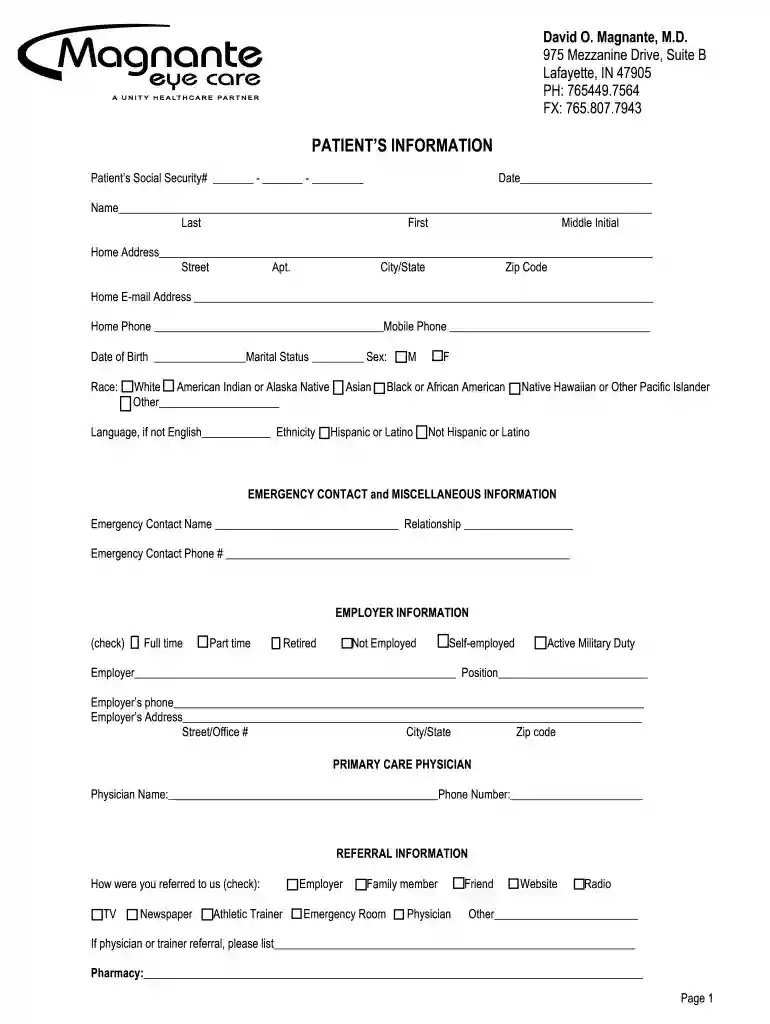
MECNewPatientInfoForm2015REV415 doc 2026

Get Form
MECNewPatientInfoForm2015REV415 doc Preview on Page 1

Here's how it works

01. Edit your form online
Type text, add images, blackout confidential details, add comments, highlights and more.

02. Sign it in a few clicks
Draw your signature, type it, upload its image, or use your mobile device as a signature pad.

03. Share your form with others
Send it via email, link, or fax. You can also download it, export it or print it out.

How to use or fill out MECNewPatientInfoForm2015REV415 doc with our platform

Form edit decoration
9.5
Ease of Setup
DocHub User Ratings on G2
9.0
Ease of Use
DocHub User Ratings on G2
  1. Click ‘Get Form’ to open the MECNewPatientInfoForm2015REV415 in the editor.
  2. Begin by entering your Patient Information. Fill in your Social Security number, date, name (last, first, middle initial), home address, email, and phone numbers. Ensure accuracy for effective communication.
  3. Complete the Emergency Contact section by providing the name, relationship, and phone number of your emergency contact.
  4. In the Employer Information section, indicate your employment status (full-time, part-time, etc.) and provide details about your employer including their address and phone number.
  5. Fill out the Primary Care Physician section with your physician's name and phone number.
  6. For Referral Information, check how you were referred to the practice and provide any additional details if applicable.
  7. If applicable, complete the Parent Information section for minors by providing both parents' details including names, addresses, and contact information.
  8. Lastly, fill in Insurance Information accurately for primary and secondary insurance providers. Include subscriber details as required.

Start filling out your MECNewPatientInfoForm2015REV415 today using our platform for a seamless experience!

See more MECNewPatientInfoForm2015REV415 doc versions

We've got more versions of the MECNewPatientInfoForm2015REV415 doc form. Select the right MECNewPatientInfoForm2015REV415 doc version from the list and start editing it straight away!
Versions Form popularity Fillable & printable
2019 4.8 Satisfied (59 Votes)
be ready to get more

Complete this form in 5 minutes or less

Get form

Got questions?

We have answers to the most popular questions from our customers. If you can't find an answer to your question, please contact us.
Contact us
In a word, absolutely! Doc Hub offers a secure platform for all your document needs, with a range of features that are designed to make your life easier. With its user-friendly interface, seamless integration with cloud storage services, and affordable pricing options, Doc Hub gets a resounding thumbs-up from me.
DocHub is a cloud-based platform that enables users to create, edit and collaborate on PDFs online. It also offers a legally binding electronic signature feature, meaning users can sign their contracts online using the tool and replace wet ink signatures.
In a word, absolutely! Doc Hub offers a secure platform for all your document needs, with a range of features that are designed to make your life easier.
Yes! A simple answer for what should always be a simple question. DocHub and Lumin both offer free options.
While DocHub is generally very user-friendly, occasionally the document loading times can be a bit slow, especially with larger files. Additionally, some of the more advanced editing tools could be enhanced for even greater functionality. However, these are minor issues compared to the overall efficiency it provides.

Security and compliance

At DocHub, your data security is our priority. We follow HIPAA, SOC2, GDPR, and other standards, so you can work on your documents with confidence.

Learn more
ccpa2
pci-dss
gdpr-compliance
hipaa
soc-compliance