Form n 5408-2026

Get Form
n 5408 Preview on Page 1

Here's how it works

01. Edit your n 5408 online
Type text, add images, blackout confidential details, add comments, highlights and more.

02. Sign it in a few clicks
Draw your signature, type it, upload its image, or use your mobile device as a signature pad.

03. Share your form with others
Send n 5408 via email, link, or fax. You can also download it, export it or print it out.

How to use or fill out form n 5408 with our platform

Form edit decoration
9.5
Ease of Setup
DocHub User Ratings on G2
9.0
Ease of Use
DocHub User Ratings on G2
  1. Click ‘Get Form’ to open it in the editor.
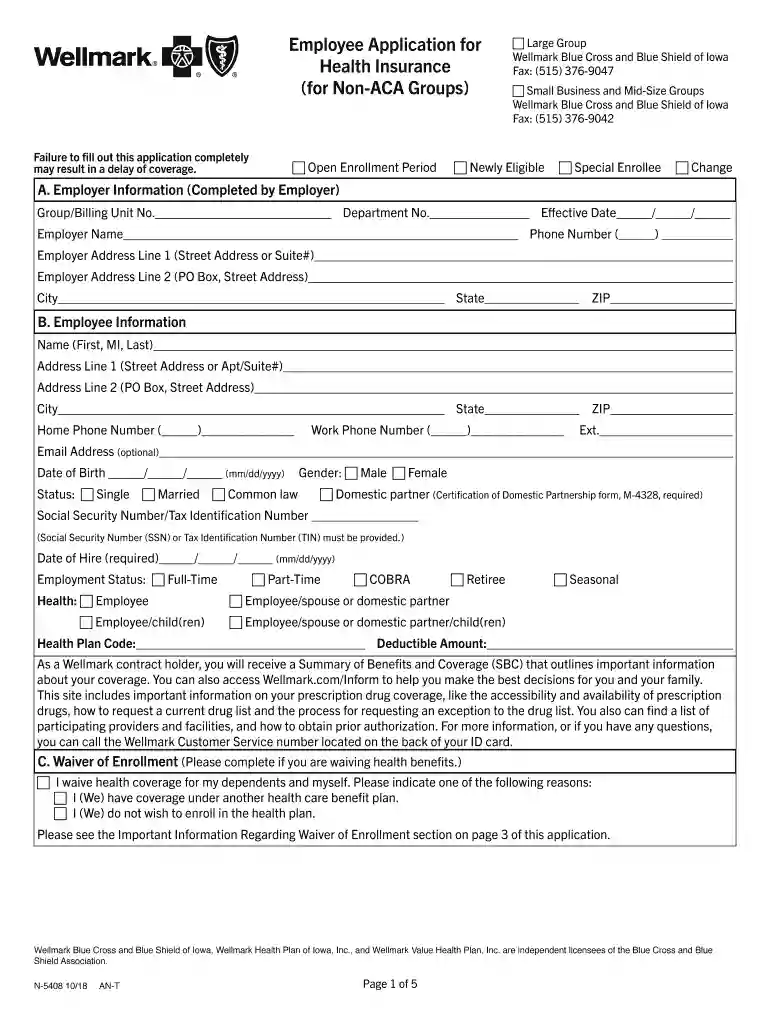
  2. Begin with Section A, where the employer must provide their information. Fill in the Group/Billing Unit No., Department No., Effective Date, Employer Name, Phone Number, and Address details.
  3. Move to Section B for Employee Information. Enter your name, address, phone numbers, email (optional), date of birth, marital status, gender, Social Security Number/Tax Identification Number, and employment status.
  4. In Section C, if waiving health benefits, check the appropriate box and provide a reason for waiving coverage.
  5. Complete Section D by indicating any special enrollment events that apply to you and listing relevant dates.
  6. Fill out Section E with details of all dependents to be covered. Ensure to include their names and dates of birth.
  7. Proceed to Sections F and G for Medicare coverage information and other carrier details as required.
  8. Finally, review Section I for Authorization and Certification. Sign and date the application before submission.

Start filling out your form n 5408 online for free today!

See more form n 5408 versions

We've got more versions of the form n 5408 form. Select the right form n 5408 version from the list and start editing it straight away!
Versions Form popularity Fillable & printable
2018 4.8 Satisfied (85 Votes)
be ready to get more

Complete this form in 5 minutes or less

Get form

Got questions?

We have answers to the most popular questions from our customers. If you can't find an answer to your question, please contact us.
Contact us
The information on Form 5498 is submitted to the Internal Revenue Service by the trustee or issuer of your individual retirement arrangement (IRA) to report contributions, including any catch-up contributions, required minimum distributions (RMDs), and the fair market value (FMV) of the account.
How to find your 5498. Your IRA provider will provide you with your Form 5498 if you are eligible to receive one. They may send it to you via mail or digitally. You may also be able to find it on their website.
No. You arent required to do anything with Form 5498 because its for informational purposes only. Please be sure to keep this form for your records as youll need this information to calculate your taxable income when you decide to take distributions from your IRA.
IRA providers have until May 31 to file Form 5498 with the IRS. As a result, you may receive this form after you have filed your taxes. The reason you typically receive this form later in the year is because IRA rules allow an account owner to make prior-year contributions up until the federal tax-filing deadline.
IRA contributions will be reported on Form 5498: IRA contribution information is reported for each person for whom any IRA was maintained, including SEP or SIMPLE IRAs. An IRA includes all investments under one IRA plan.

Security and compliance

At DocHub, your data security is our priority. We follow HIPAA, SOC2, GDPR, and other standards, so you can work on your documents with confidence.

Learn more
ccpa2
pci-dss
gdpr-compliance
hipaa
soc-compliance

People also ask

You arent required to do anything with Form 5498 because its for informational purposes only. Please be sure to keep this form for your records as youll need this information to calculate your taxable income when you decide to take distributions from your IRA.
0:00 1:06 Where to enter. Form 5498 in Turbo Tax. Step one launch the Turbo. Tax. Program step two go to theMoreWhere to enter. Form 5498 in Turbo Tax. Step one launch the Turbo. Tax. Program step two go to the federal Tab and select deductions.

form n 5408