




Here's how it works



How to use or fill out 2022 Form 3K-1 Partner's Massachusetts InformationTax year with our platform

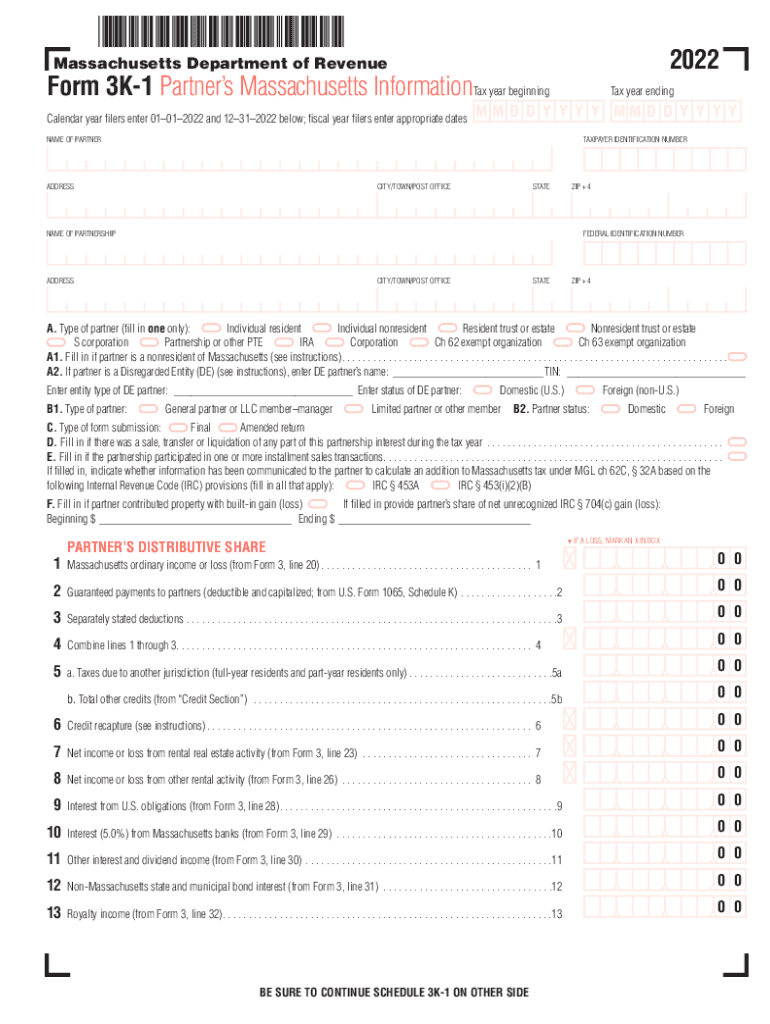
- Click ‘Get Form’ to open the 2022 Form 3K-1 in the editor.
- Begin by entering the tax year dates at the top of the form. For calendar year filers, input '01–01–2022' and '12–31–2022'.
- Fill in the partner's name, address, taxpayer identification number, and other relevant details in the designated fields.
- Select the type of partner from section A. Ensure you only fill in one option that best describes your status.
- Complete sections B through E as applicable, providing information about partner status, submission type, and any sales or transfers during the tax year.
- In the 'Partner’s Distributive Share' section, accurately report income or loss figures from various sources as indicated on lines 1 through 21.
- Finally, review all entries for accuracy before saving or exporting your completed form directly from our platform.
Start using our platform today to easily complete your 2022 Form 3K-1 for free!
It's free
See more 2022 Form 3K-1 Partner's Massachusetts InformationTax year versions
| Versions | Form popularity | Fillable & printable |
|---|---|---|
| 2025 | 4.7 Satisfied (56 Votes) | |
| 2024 | 4.9 Satisfied (38 Votes) | |
| 2023 | 4.2 Satisfied (25 Votes) | |
| 2022 | 4.5 Satisfied (44 Votes) | |
| 2020 | 4.8 Satisfied (197 Votes) | |
| 2019 | 4.3 Satisfied (227 Votes) | |
| 2018 | 4.2 Satisfied (56 Votes) | |
| 2017 | 4.1 Satisfied (45 Votes) | |
| 2015 | 4.4 Satisfied (51 Votes) | |
| 2014 | 4 Satisfied (54 Votes) | |
| 2009 | 4 Satisfied (29 Votes) | |
| 2005 | 4 Satisfied (42 Votes) |
Got questions?
Can I use DocHub to create legal electronic signatures on my 2022 Form 3K-1 Partner's Massachusetts InformationTax year?
Yes, you can utilize DocHub for signing any business and personal documentation, including your 2022 Form 3K-1 Partner's Massachusetts InformationTax year. All eSignatures you generate with our service are legally binding and court-admissible, as DocHub complies with criteria required by ESIGN and UETA. Save your accomplished paperwork with a detailed Audit Trail if necessary.
How do you edit 2022 Form 3K-1 Partner's Massachusetts InformationTax year online?
With DocHub, there are several convenient ways to edit your 2022 Form 3K-1 Partner's Massachusetts InformationTax year online. You can drag and drop the form and modify it straight at the DocHub website or use our browser extension to fill out your form immediately. Additionally, you can modify your PDF on your smartphone, as DocHub works with all the available mobile platforms.
Security and compliance
At DocHub, your data security is our priority. We follow HIPAA, SOC2, GDPR, and other standards, so you can work on your documents with confidence.
Learn more


