




Here's how it works

01. Edit your form online
Type text, add images, blackout confidential details, add comments, highlights and more.

02. Sign it in a few clicks
Draw your signature, type it, upload its image, or use your mobile device as a signature pad.

03. Share your form with others
Send it via email, link, or fax. You can also download it, export it or print it out.
How to use or fill out Meals and Rentals Tax Form - Department of Revenue with DocHub

- Click ‘Get Form’ to open it in the editor.
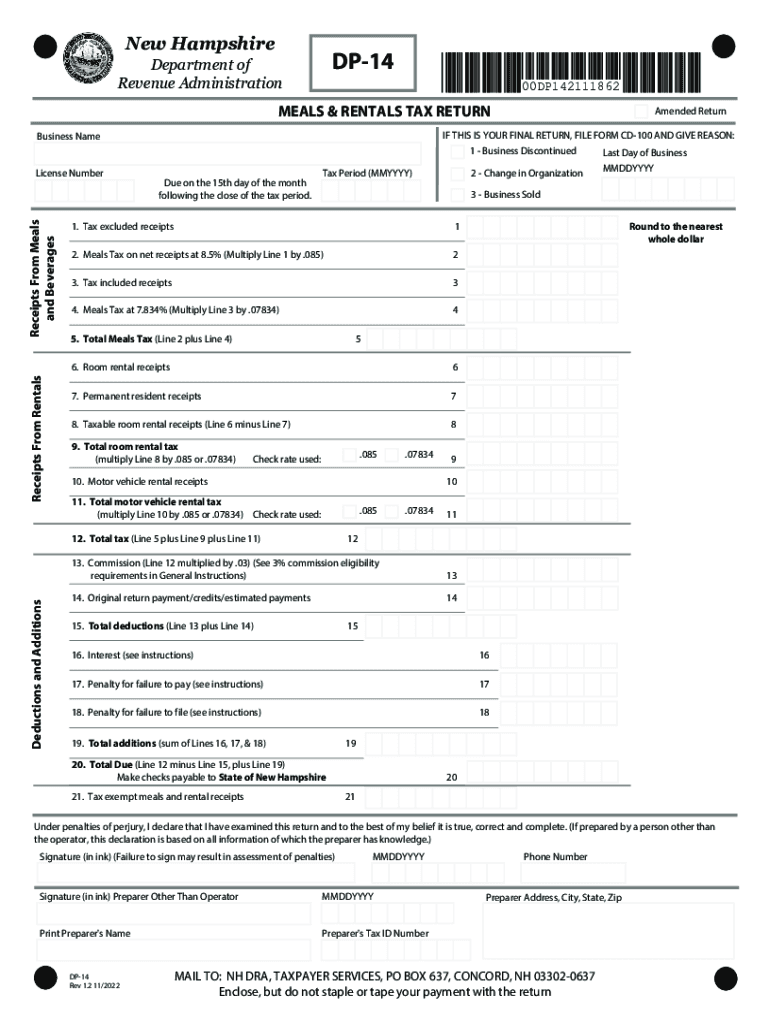
- Begin by entering your business name and six-digit Meals & Rentals Tax Operators License number in the designated fields.
- Specify the tax period for which you are filing. This is crucial for accurate processing.
- For Line 1, input your net receipts from sales where tax is not included. Then, multiply this amount by .085 for Line 2.
- Enter gross receipts where tax is included on Line 3, and calculate the corresponding tax for Line 4 by multiplying this amount by .07834.
- Add Lines 2 and 4 to get the total meals tax on Line 5, rounding to the nearest whole dollar.
- Continue filling out room rental receipts on Lines 6 through 12, ensuring to check applicable tax rates as instructed.
- Complete deductions and additions sections accurately, following instructions for penalties and interest calculations as needed.
- Finally, sign and date the form in ink before submission. If a preparer assisted you, they must also sign and provide their details.
Start using our platform today to easily complete your Meals and Rentals Tax Form online for free!
Fill out Meals and Rentals Tax Form - Department of Revenue online
It's free
It's free
See more Meals and Rentals Tax Form - Department of Revenue versions
We've got more versions of the Meals and Rentals Tax Form - Department of Revenue form. Select the right Meals and Rentals Tax Form - Department of Revenue version from the list and start editing it straight away!
Security and compliance
At DocHub, your data security is our priority. We follow HIPAA, SOC2, GDPR, and other standards, so you can work on your documents with confidence.
Learn more




