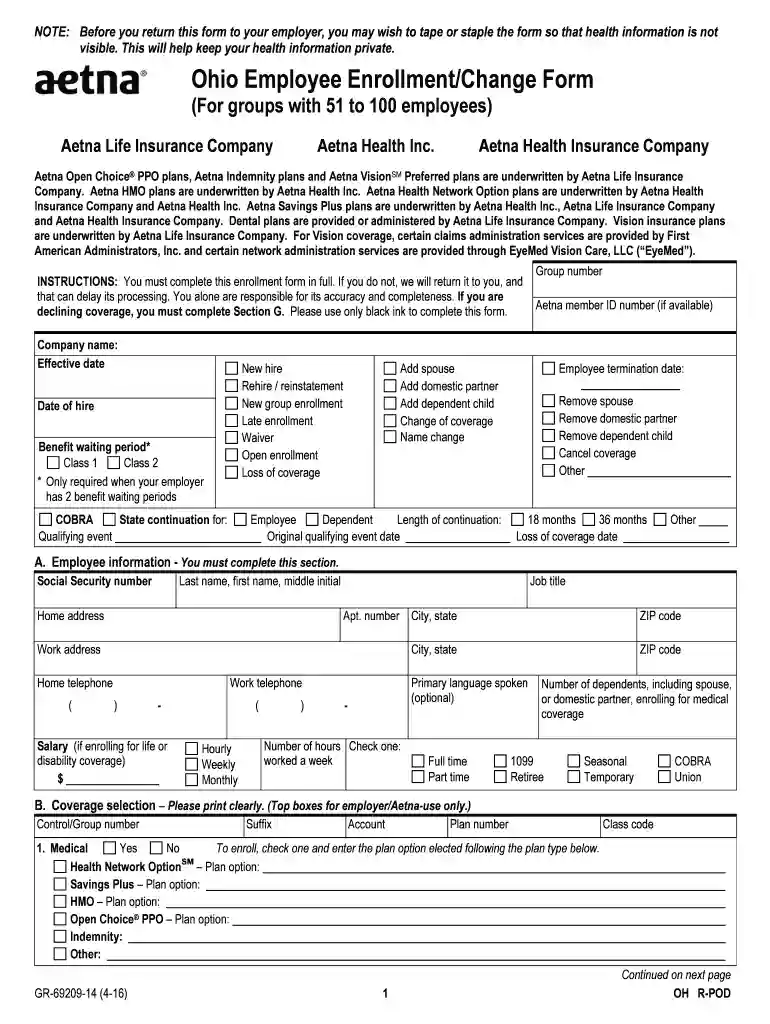
Ohio Employee Enrollment Change Form (For groups with - Aetna 2026

Get Form
Ohio Employee Enrollment Change Form (For groups with - Aetna Preview on Page 1

Here's how it works

01. Edit your form online
Type text, add images, blackout confidential details, add comments, highlights and more.

02. Sign it in a few clicks
Draw your signature, type it, upload its image, or use your mobile device as a signature pad.

03. Share your form with others
Send it via email, link, or fax. You can also download it, export it or print it out.

How to use or fill out Ohio Employee Enrollment Change Form (For groups with - Aetna)

Form edit decoration
9.5
Ease of Setup
DocHub User Ratings on G2
9.0
Ease of Use
DocHub User Ratings on G2
  1. Click ‘Get Form’ to open it in the editor.
  2. Begin by filling out the 'Employee Information' section. Provide your Social Security number, name, job title, and contact details. Ensure accuracy as this information is crucial for processing.
  3. In the 'Coverage Selection' section, indicate your choices for medical, dental, and vision coverage by checking 'Yes' or 'No'. Specify the plan options you wish to enroll in.
  4. Complete Section C by listing all individuals you are enrolling or changing coverage for. Include their names, birthdates, and relationship to you.
  5. If applicable, fill out the health questionnaire in Section H. This is essential for determining eligibility and coverage options.
  6. Review all sections for completeness before submitting. Remember to tape or staple the form if health information is visible to maintain privacy.

Start using our platform today to easily complete your Ohio Employee Enrollment Change Form for free!

See more Ohio Employee Enrollment Change Form (For groups with - Aetna versions

We've got more versions of the Ohio Employee Enrollment Change Form (For groups with - Aetna form. Select the right Ohio Employee Enrollment Change Form (For groups with - Aetna version from the list and start editing it straight away!
Versions Form popularity Fillable & printable
2016 4.8 Satisfied (65 Votes)
2013 4.2 Satisfied (40 Votes)
be ready to get more

Complete this form in 5 minutes or less

Get form

Got questions?

We have answers to the most popular questions from our customers. If you can't find an answer to your question, please contact us.
Contact us
Many Aetna plans automatically cover newborns for the first 31 days after birth. To officially add your newborn to your plan, youll need to contact your benefits administrator.
Coverage for Dependent Children To be eligible for coverage, a dependent child must be under 26 years of age.
You can add a dependent to your health insurance plan during open enrollment. Open enrollment for government-sponsored insurance plans is typically held between November and January. Employers usually offer a similar open enrollment period, with many occurring during October and November.
If you have an Aetna plan through your employer: Let your employer know your name or address has changed. Your employer will send this update to us. If you bought a plan directly from us (not through your employer): Log in to send us your name and address change through the Contact Us feature.
Aetna will confirm the pre-determination of medical benefits in writing to you. Determination of eligibility and fees will be based solely on the information you provide. If the information on the actual claim differs in any way from the information you submit on this form, appropriate adjustments will be made.

People also ask

Enrollment forms record whether employees have enrolled in or waived group benefits. For instance, if you have more than 50 full-time employees, you will need this data to complete IRS forms 1094 and 1095, which record health care coverage.
Dependents must be added to your plan during open enrollment unless there is a qualifying event. If a qualifying event does occur, simply navigate to your Benefits and select the Change coverage button to signal that you need to add a dependent to your plan.

Related links