Tjx invoice 2026

Get Form
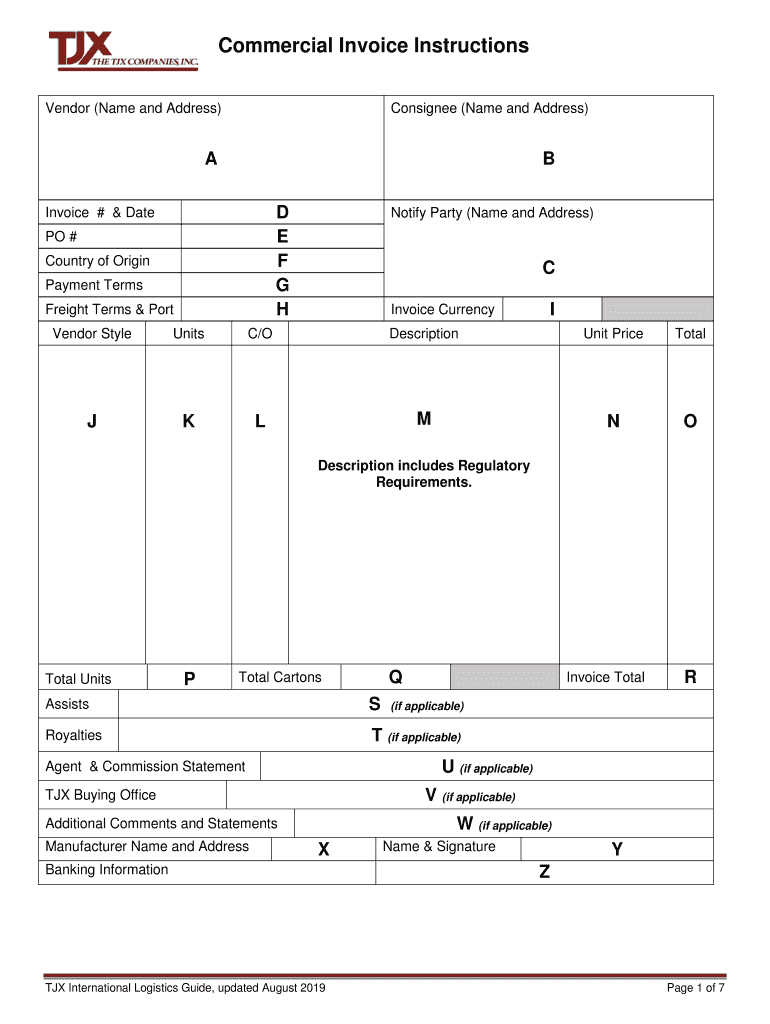
tjx invoice Preview on Page 1

Here's how it works

01. Edit your tjx invoice online
Type text, add images, blackout confidential details, add comments, highlights and more.
02. Sign it in a few clicks
Draw your signature, type it, upload its image, or use your mobile device as a signature pad.
03. Share your form with others
Send it via email, link, or fax. You can also download it, export it or print it out.

How to use or fill out tjx invoice with our platform

Form edit decoration
9.5
Ease of Setup
DocHub User Ratings on G2
9.0
Ease of Use
DocHub User Ratings on G2
  1. Click ‘Get Form’ to open the tjx invoice in the editor.
  2. Begin by entering your company name and address in the Vendor section. Ensure accuracy as this information is crucial for processing.
  3. Fill in the Consignee section with the appropriate TJX division address, ensuring you select the correct location based on your shipment.
  4. Input the Invoice Number and Date, along with the Purchase Order (PO) number. This helps in tracking and referencing your order effectively.
  5. Specify the Country of Origin for each item, as well as Payment Terms and Freight Terms. These details are essential for customs clearance.
  6. In the Description field, provide clear item descriptions that include regulatory requirements to avoid delays during customs processing.
  7. Complete all remaining fields such as Unit Price, Total Units, and any applicable comments or statements before finalizing your invoice.

Start using our platform today to streamline your tjx invoice process for free!

See more tjx invoice versions

We've got more versions of the tjx invoice form. Select the right tjx invoice version from the list and start editing it straight away!
Versions Form popularity Fillable & printable
2019 4.8 Satisfied (105 Votes)
2017 4.8 Satisfied (29 Votes)
be ready to get more

Complete this form in 5 minutes or less

Get form

Got questions?

We have answers to the most popular questions from our customers. If you can't find an answer to your question, please contact us.
Contact us

Electronic document signing demands a software solution that complies with data security and eSignature regulations. DocHub is a perfect tool for that, as it fulfills all the above mentioned requirements. Whatever method you prefer to sign your tjx invoice in DocHub, your eSignature will be legally binding and court-admissible.

If you use Chrome, there are two easy ways to modify your tjx invoice online. First, visit the DocHub site, add your document, and modify it utilizing our toolbar. You may also install our Chrome extension and modify any document by dragging and dropping it in your web browser window.

TJX Rewards Credit Card | Pay Your Bill Online with doxo. doxo enables secure bill payment on your behalf and is not an affiliate of or endorsed by TJX Rewards Credit Card. Pay with your Visa, MasterCard, or Discover debit card, with Apple Pay, or with your bank account.
Find your account here and on your sign in page, tap the Pay as Guest button and then: Select your payment amount. Select your payment method. Review and authorize your payment.
The TJX Rewards Mastercards are issued by Synchrony Bank pursuant to a license by Mastercard International Incorporated.

People also ask

Ways to Make TJX Credit Card Payment Online: Log in to your online account and click on Make a Payment. By phone: Call (800) 952-6133 and enter your card information when prompted, then follow the prompts to make a credit card payment. By mail: Send a check or money order (but not cash) to. TJX Rewards Credit Card.

Related links