




Here's how it works



How to use or fill out First State Commander - Custer Post #46 with our platform

- Click ‘Get Form’ to open the First State Commander - Custer Post #46 document in the editor.
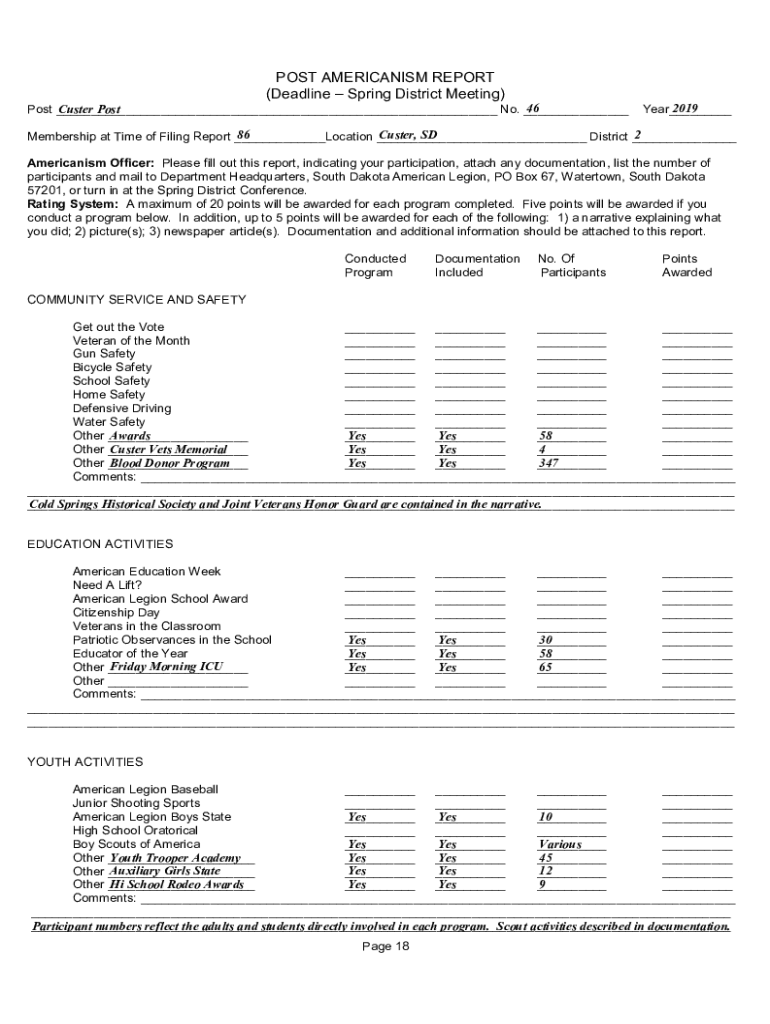
- Begin by filling in the 'Post' and 'No.' fields at the top of the form. Enter 'Custer Post' and its corresponding number.
- In the 'Year' section, input '2019' as indicated. This helps maintain accurate records for your report.
- Complete the 'Membership at Time of Filing Report' field with the current membership count, followed by your location and district information.
- For each program conducted, indicate participation by filling out the respective fields under 'Community Service and Safety', including documentation included and points awarded.
- Attach any necessary documentation such as narratives, pictures, or newspaper articles that support your report. Ensure these are clearly labeled.
- Finally, sign off on the form in the designated area for the Post Americanism Officer before submitting it either via mail or in person at the Spring District Conference.
Start using our platform today to streamline your document editing and submission process for free!
It's free
See more First State Commander - Custer Post #46 versions
| Versions | Form popularity | Fillable & printable |
|---|---|---|
| 2018 | 4.8 Satisfied (78 Votes) |
Got questions?
How do I sign my First State Commander - Custer Post #46 on iOS?
With DocHub, you can rapidly sign your First State Commander - Custer Post #46 or any other document on iOS, even without installing extra programs. You can access your DocHub account from any internet-connected browser and complete and sign your form in any preferred method with just a couple of clicks.
How do you edit First State Commander - Custer Post #46 on iOS?
You can easily edit fill out your First State Commander - Custer Post #46 on any iOS gadget. Open an internet browser of your liking, go to the DocHub site, authorize or create a new account, add your file for editing, and make your desired alterations. Our service is mobile-friendly, so using its features on your smartphone will be a no-brainer, even on the first try.
Security and compliance
At DocHub, your data security is our priority. We follow HIPAA, SOC2, GDPR, and other standards, so you can work on your documents with confidence.
Learn more




