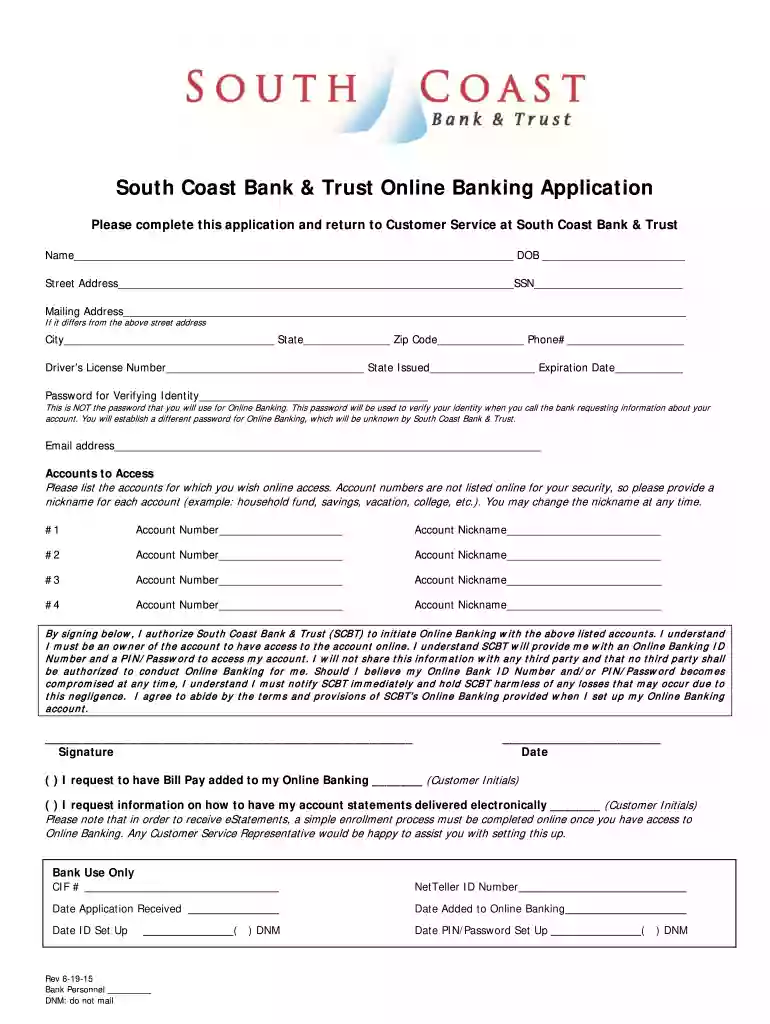
Guardian Bank Online Application - South Coast Bank & Trust 2026

Get Form
Guardian Bank Online Application - South Coast Bank & Trust Preview on Page 1

Here's how it works

01. Edit your form online
Type text, add images, blackout confidential details, add comments, highlights and more.

02. Sign it in a few clicks
Draw your signature, type it, upload its image, or use your mobile device as a signature pad.

03. Share your form with others
Send it via email, link, or fax. You can also download it, export it or print it out.

How to use or fill out Guardian Bank Online Application - South Coast Bank & Trust

Form edit decoration
9.5
Ease of Setup
DocHub User Ratings on G2
9.0
Ease of Use
DocHub User Ratings on G2
  1. Click ‘Get Form’ to open it in the editor.
  2. Begin by entering your full name and date of birth in the designated fields. Ensure accuracy as this information is crucial for identity verification.
  3. Fill in your street address, mailing address (if different), city, state, zip code, and phone number. This information helps the bank contact you regarding your application.
  4. Provide your driver’s license number along with the state issued and expiration date. This step is essential for verifying your identity.
  5. Create a password for verifying your identity when contacting the bank. Remember, this is separate from your online banking password.
  6. Enter your email address to receive important updates regarding your application and online banking access.
  7. List the accounts you wish to access online by providing account numbers and nicknames for each account. This will help you easily identify them later.
  8. Sign and date the application at the bottom to authorize South Coast Bank & Trust to initiate online banking for your listed accounts.

Start filling out your Guardian Bank Online Application today using our platform for free!

See more Guardian Bank Online Application - South Coast Bank & Trust versions

We've got more versions of the Guardian Bank Online Application - South Coast Bank & Trust form. Select the right Guardian Bank Online Application - South Coast Bank & Trust version from the list and start editing it straight away!
Versions Form popularity Fillable & printable
2015 4.8 Satisfied (133 Votes)
be ready to get more

Complete this form in 5 minutes or less

Get form

Got questions?

We have answers to the most popular questions from our customers. If you can't find an answer to your question, please contact us.
Contact us
Online Banking Security Best Practices Create a strong password with at least 8 characters. Change your password frequently. Never share username and password information with anyone. Avoid using an automatic login feature that saves usernames and passwords. Do not use a public computer for logging into online banking.
Here are five steps you can take to enhance the security of your online accounts. Create a password that is long, strong, and complex. To ensure your banking data is secure, always use official bank websites and apps, avoid public Wi-Fi, enable multi-factor authentication, and be wary of suspicious emails and links.
At TrustBank, we make personal and business banking, along with providing superior service to our customers, the cornerstone of our business. We are pleased to offer you the latest in online banking technology, which makes it easier for you to access your banking information from anywhere.
Yes. RCBCs online banking platform allows you to open various accounts tailored to your financial needs.
Yes, banks generally require an online bank account to be opened by someone at least 18 years of age, so be sure to check the state in which the account will be opened as the age requirement may vary. They should be prepared with documentation verifying their identification, age, and residency.

Security and compliance

At DocHub, your data security is our priority. We follow HIPAA, SOC2, GDPR, and other standards, so you can work on your documents with confidence.

Learn more
ccpa2
pci-dss
gdpr-compliance
hipaa
soc-compliance

People also ask

Simple Things You Should Do: Check Your Account: Look at your bank account at least once a week. Be Careful with Emails: Do not click on links in emails that say they are from your bank. Make Hard Passwords: Use passwords that are not easy to guess. Set Up Alerts: Get a message when money leaves your account.
Online Banking Safety Tips for a Worry-Free Experience Use Strong, Unique Passwords. Enable Two-Factor Authentication (2FA) Regularly Monitor Your Accounts. Avoid Public Wi-Fi for Banking. Beware of Phishing Attempts. Keep Devices and Apps Updated. Log Out After Each Session. Verify URLs Before Logging In.
How to improve your banking security Update your browser. Keep your software up to date. Dont share personal information online. Dont use public wi-fi or shared computers. Dispose of paper statements securely. Be alert to scams. Dont fall for websites. Beware of emails.

Related links