Mission emergency contact 2026

Get Form
mission emergency contact Preview on Page 1

Here's how it works

01. Edit your mission emergency contact online
Type text, add images, blackout confidential details, add comments, highlights and more.
02. Sign it in a few clicks
Draw your signature, type it, upload its image, or use your mobile device as a signature pad.
03. Share your form with others
Send it via email, link, or fax. You can also download it, export it or print it out.

How to use or fill out mission emergency contact with our platform

Form edit decoration
9.5
Ease of Setup
DocHub User Ratings on G2
9.0
Ease of Use
DocHub User Ratings on G2
  1. Click ‘Get Form’ to open the mission emergency contact form in the editor.
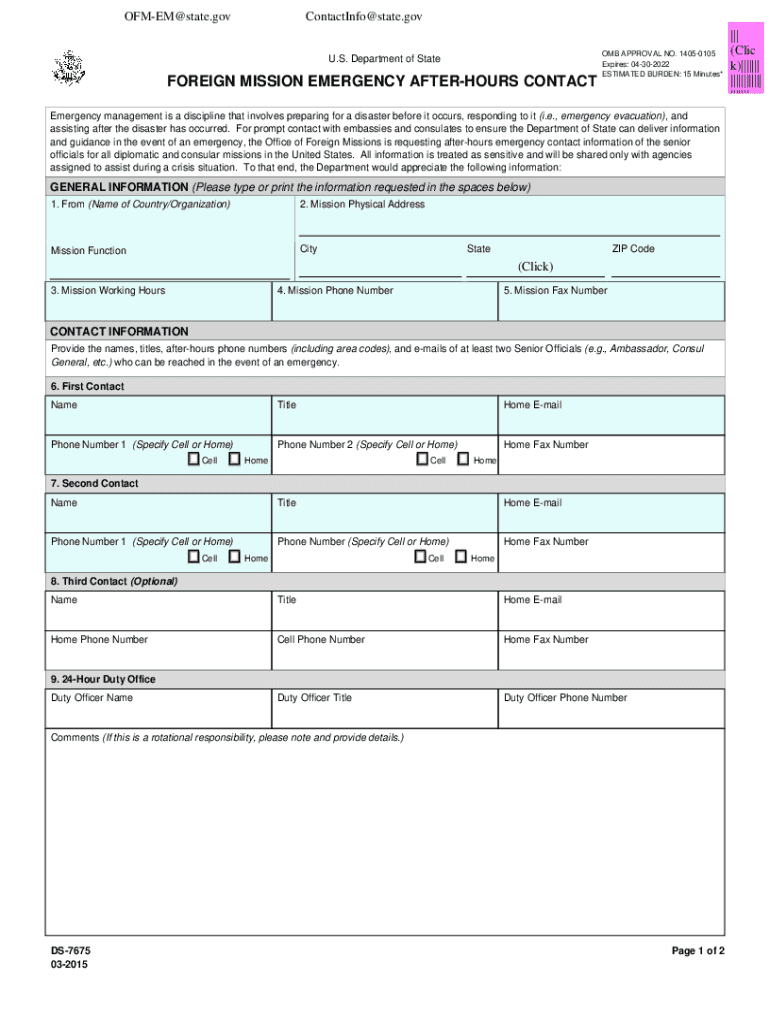
  2. Begin by filling out the 'General Information' section. Enter the name of your country or organization, followed by the mission's physical address, including city, state, and ZIP code.
  3. Next, provide the mission's working hours and phone number. Ensure that all details are accurate for effective communication.
  4. In the 'Contact Information' section, list at least two senior officials. For each official, include their name, title, and after-hours phone numbers (specifying whether they are cell or home).
  5. Also include email addresses for each contact. If applicable, you can add a third optional contact with similar details.
  6. Finally, complete any additional information regarding the duty officer and comments about rotational responsibilities if necessary.

Start using our platform today to easily fill out your mission emergency contact form for free!

See more mission emergency contact versions

We've got more versions of the mission emergency contact form. Select the right mission emergency contact version from the list and start editing it straight away!
Versions Form popularity Fillable & printable
2015 4.8 Satisfied (52 Votes)
be ready to get more

Complete this form in 5 minutes or less

Get form

Got questions?

We have answers to the most popular questions from our customers. If you can't find an answer to your question, please contact us.
Contact us

Most eSignature solutions require users to have a paid subscription. With DocHub, there are two options for you to add an electronic signature to your mission emergency contact free of charge:

  • You can do it during a 7-day trial period;
  • You can sign up for a free plan.

The second option, though, has restrictions on the number of signatures, sign requests, emails, and forms for adjusting available per month. You can check for full information here.

In case your go-to electronic mail service is Gmail, it is simple to integrate your DocHub editor in your work. Edit your mission emergency contact with DocHub tools and connect it to your drafts in Gmail. See how straightforward it is to exchange documents and work together with a swift PDF editing solution at hand.

The term rescue mission refers to organizations, many of which are religious in nature, that help the homeless, impoverished, or otherwise underprivileged. Such organizations rescue people from life-endangering situations by providing food, shelter, and medical needs.
What We Do Food. Our meals are often. the first step toward. Clothing. Clean clothing helps. restore dignity to people. Safe Housing. Our program enable people to have safe clean rooms to plan. a new way forward. Recovery. Our residential program. offers support skills. Health. Behavioral health. and general medical.
A message from Rhonda Neal, CEO of Bridgeport Rescue Mission.

People also ask

Bridgeport Rescue Mission, a 501(C)(3) nonprofit organization, is a member in good standing of the Association of Gospel Rescue Missions (AGRM), the Christian Leadership Alliance (CLA) and the Evangelical Council for Financial Accountability (ECFA).
Rating Information This charitys score is 95%, earning it a Four-Star rating.
We Are Here to Help! Email Joslynn Hernandez or call 203-333-4087, ext 103 if you have: Changes to your contact information. Questions about your account. Questions about making a financial donation.
DROP-OFF or PICK UP To arrange pickup of salable furniture and larger household items, please call 760-347-3512, and ask for EXTENSION 300.

Related links