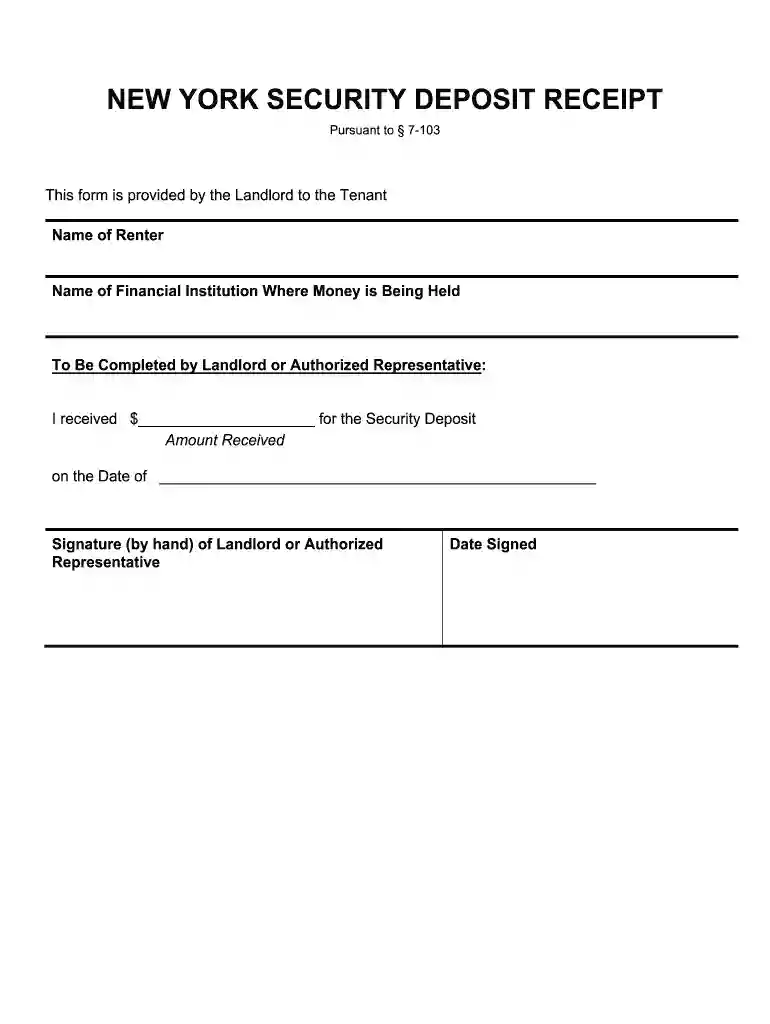
rent and security deposit receipt Preview on Page 1

New-york-security-deposit-receipt-form docx 2026

Here's how it works

  • 01. Edit your rent and security deposit receipt online

    Type text, add images, blackout confidential details, add comments, highlights and more.

  • 02. Sign it in a few clicks

    Draw your signature, type it, upload its image, or use your mobile device as a signature pad.

  • 03. Share your form with others

    Send rent and deposit receipt template via email, link, or fax. You can also download it, export it or print it out.

How to use or fill out new-york-security-deposit-receipt-form docx with our platform

Form edit decoration
9.5
Ease of Setup
DocHub User Ratings on G2
9.0
Ease of Use
DocHub User Ratings on G2
  1. Click ‘Get Form’ to open the new-york-security-deposit-receipt-form in the editor.
  2. Begin by entering the 'Name of Renter' in the designated field. This identifies who is receiving the security deposit.
  3. Next, fill in the 'Name of Financial Institution Where Money is Being Held'. This ensures clarity on where the deposit is secured.
  4. In the section labeled 'Amount Received', input the total amount of the security deposit received. Make sure this matches any agreements made.
  5. Enter the 'Date of Receipt' in the provided space to document when the payment was made.
  6. Finally, have the landlord or authorized representative sign by hand in the designated area and include the 'Date Signed' for record-keeping.

Start using our platform today to easily complete your forms online for free!

be ready to get more

Complete this form in 5 minutes or less

Got questions?

We have answers to the most popular questions from our customers. If you can't find an answer to your question, please contact us.

When writing a security deposit receipt, include the following information: Date of the deposit receipt. Name of the tenant. Name and location of the financial institution where the security deposit is held. Account number, if required. Amount deposited and date the deposit was made.
How to fill out application for release of security deposit form Obtain the Landlord returning security deposit form from your landlord or property management. Fill in your name and contact information at the top of the form. Provide the address of the rental property from which you are requesting the deposit return.
A security deposit release form is a document filed by a tenant when a landlord has returned the tenants deposit.
A Security Deposit Receipt provides proof that a security deposit payment was made and received by the landlord. It documents the amount paid, the date of payment, the payer, and the method of payment.
A security deposit return letter is provided by the landlord when a tenant moves out. It documents the amount of the security deposit that is being refunded and itemizes all funds used to cover damages or repairs for which the tenant is responsible. Its basically a detailed receipt.

Security and compliance

At DocHub, your data security is our priority. We follow HIPAA, SOC2, GDPR, and other standards, so you can work on your documents with confidence.

People also ask

The amount of a security deposit can be no more than one months rent. The security deposit must be kept by the owner in an interest bearing account in a NYS bank. For further details, see HCR Fact Sheet #9: Renting an Apartment Security Deposits and Other Charges.
Youll usually get your money back in 10 days - it depends on your situation and what scheme your deposit is in.

Related links

LEASE AGREEMENT - Search / Commission Files

Landlord will return said security deposit or balance within 30 days from the first business day following the day of possession is returned to. Landlord.Read more

Learn more
standard-form-of-residential-lease.pdf

SECURITY DEPOSIT: Tenant shall pay to the Landlord the sum of $ writing within 30 56 days of Landlords receipt of the Security Deposit of (i) the name and

Learn more
If you believe that this page should be taken down, please follow our DMCA take down process here