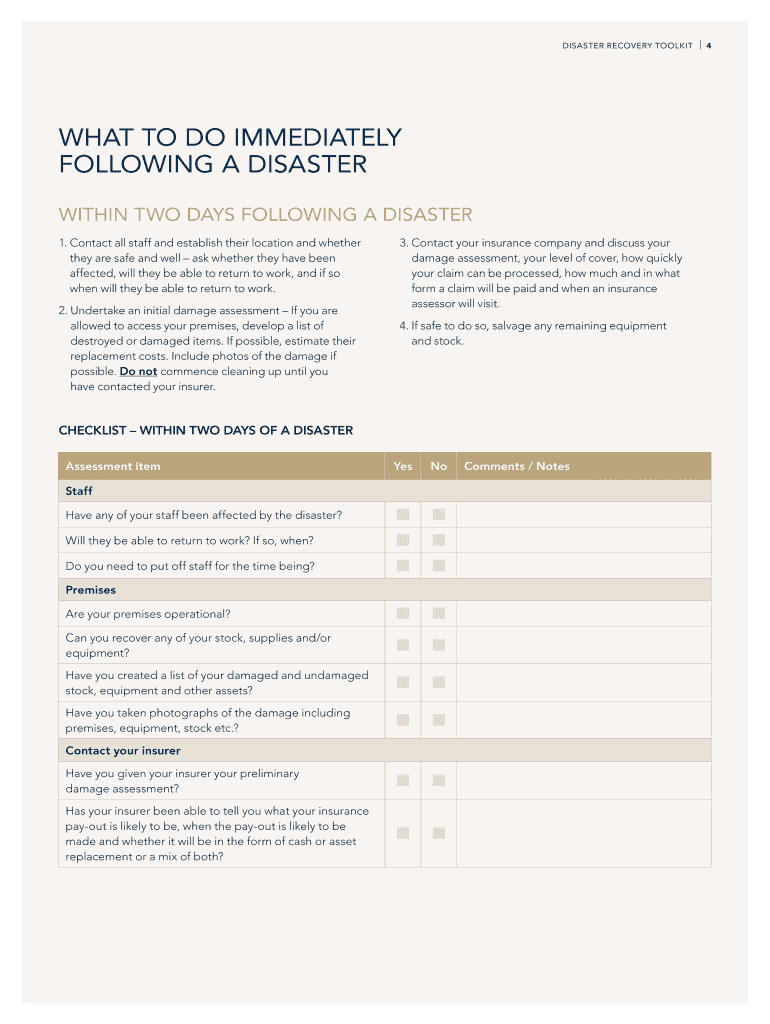
Disaster Recovery Toolkit for Small Businesses - Connecticut 2026

Get Form
Disaster Recovery Toolkit for Small Businesses - Connecticut Preview on Page 1

Here's how it works

01. Edit your form online
Type text, add images, blackout confidential details, add comments, highlights and more.
02. Sign it in a few clicks
Draw your signature, type it, upload its image, or use your mobile device as a signature pad.
03. Share your form with others
Send it via email, link, or fax. You can also download it, export it or print it out.

How to use or fill out Disaster Recovery Toolkit for Small Businesses - Connecticut with our platform

Form edit decoration
9.5
Ease of Setup
DocHub User Ratings on G2
9.0
Ease of Use
DocHub User Ratings on G2
  1. Click ‘Get Form’ to open the Disaster Recovery Toolkit in the editor.
  2. Begin with the 'Introduction' section. Familiarize yourself with the purpose of the toolkit, which is to assist small businesses in recovering from disasters.
  3. Move to 'What to Do Immediately Following a Disaster.' Fill out the checklist provided, ensuring you assess staff safety and initial damage.
  4. In 'Taking Stock of Your Business,' evaluate your business's financial health. Use the templates for damage assessment and initial steps to restart your business.
  5. Proceed to 'A Post-Disaster Business Plan.' Document your new objectives and strategies based on your evaluations.
  6. Complete sections on financing and long-term recovery by filling out budgets and identifying potential funding sources.
  7. Finally, review your entries for accuracy and completeness before saving or sharing your document directly from our platform.

Start using our platform today to streamline your disaster recovery process for free!

See more Disaster Recovery Toolkit for Small Businesses - Connecticut versions

We've got more versions of the Disaster Recovery Toolkit for Small Businesses - Connecticut form. Select the right Disaster Recovery Toolkit for Small Businesses - Connecticut version from the list and start editing it straight away!
Versions Form popularity Fillable & printable
2020 4.8 Satisfied (233 Votes)
be ready to get more

Complete this form in 5 minutes or less

Get form

Got questions?

We have answers to the most popular questions from our customers. If you can't find an answer to your question, please contact us.
Contact us
As a small business it is important to be prepared and take preventative steps to ensure the recovery of essential IT data and maintain stability of key business functions. Creating a disaster recovery plan for maintaining business continuity can help in surviving the unexpected.
Small Enterprise (100-500 employees) Cost CategoryIn-house DRDRaaS Hardware $60,000-150,000 Included in subscription Software $15,000-45,000 Included in subscription Personnel $75,000-135,000 Included in subscription Facilities $45,000-120,000 Included in subscription3 more rows Jun 27, 2025
Developing an IT Disaster Recovery Plan The plan should include a strategy to ensure that all critical information is backed up. Identify critical software applications and data and the hardware required to run them. Using standardized hardware will help to replicate and reimage new hardware.
A disaster recovery plan (DR or DRP) is a formal document created by an organization that contains detailed instructions on how to respond to unplanned incidents such as natural disasters, power outages, cyber attacks and any other disruptive events.
What are the five steps of disaster recovery? Risk assessment. Identify potential threats and vulnerabilities that could disrupt IT systems and business operations. Business impact analysis (BIA) DR planning. Implementation. Testing and maintenance.

Security and compliance

At DocHub, your data security is our priority. We follow HIPAA, SOC2, GDPR, and other standards, so you can work on your documents with confidence.

Learn more
ccpa2
pci-dss
gdpr-compliance
hipaa
soc-compliance
be ready to get more

Complete this form in 5 minutes or less

Get form