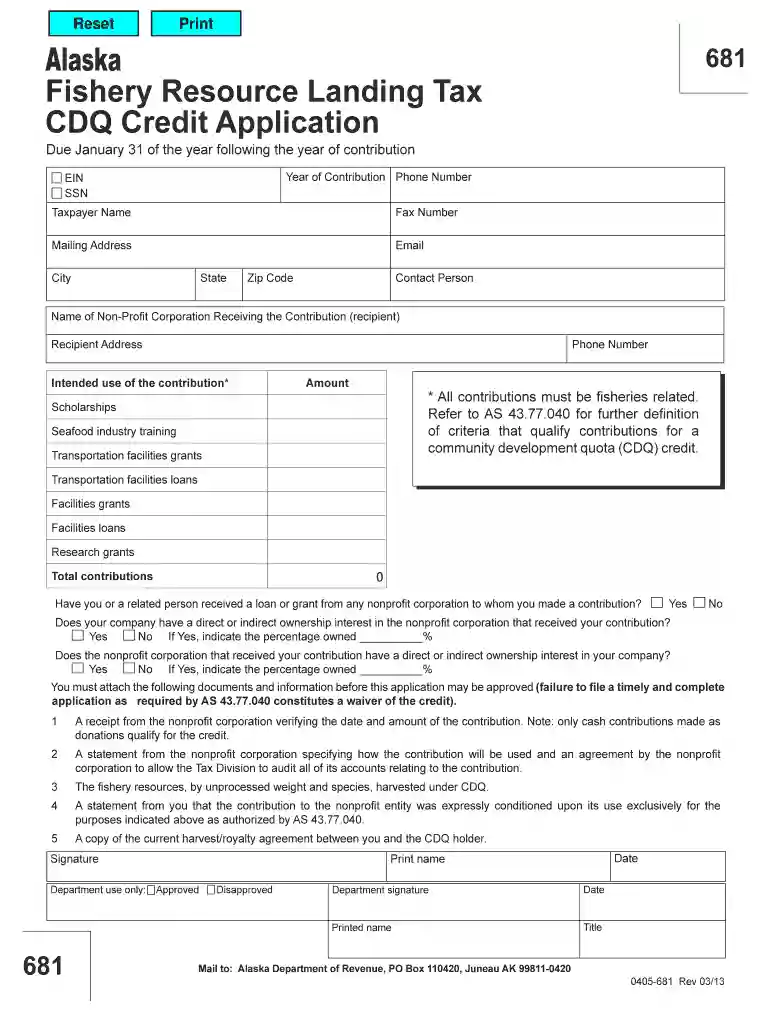
Alaska 681 credit 0405 form-2026

Get Form
alaska resource landing tax cdq credit Preview on Page 1

Here's how it works

01. Edit your alaska resource landing tax cdq credit online
Type text, add images, blackout confidential details, add comments, highlights and more.

02. Sign it in a few clicks
Draw your signature, type it, upload its image, or use your mobile device as a signature pad.

03. Share your form with others
Send alaska 681 credit 0405 form via email, link, or fax. You can also download it, export it or print it out.

How to use or fill out alaska 681 credit 0405 form with our platform

Form edit decoration
9.5
Ease of Setup
DocHub User Ratings on G2
9.0
Ease of Use
DocHub User Ratings on G2
  1. Click ‘Get Form’ to open the Alaska 681 Credit 0405 form in the editor.
  2. Begin by entering your Year of Contribution, Phone Number, EIN or SSN, and Taxpayer Name in the designated fields. Ensure all information is accurate for processing.
  3. Fill in your Mailing Address, Email, City, State, and Zip Code. This information is crucial for correspondence regarding your application.
  4. Identify the Contact Person and provide their details. Next, specify the Name of the Non-Profit Corporation receiving your contribution along with its Address and Phone Number.
  5. In the Intended Use section, select how your contribution will be utilized from options like Scholarships or Research Grants. Enter the Amount of your contribution.
  6. Answer the questions regarding loans or grants received from any nonprofit corporation related to your contributions. Provide ownership percentages if applicable.
  7. Attach required documents such as receipts and statements from the nonprofit corporation before submitting your application for approval.

Start using our platform today to fill out your Alaska 681 Credit 0405 form online for free!

See more alaska 681 credit 0405 form versions

We've got more versions of the alaska 681 credit 0405 form form. Select the right alaska 681 credit 0405 form version from the list and start editing it straight away!
Versions Form popularity Fillable & printable
2013 4.8 Satisfied (127 Votes)
be ready to get more

Complete this form in 5 minutes or less

Get form

Got questions?

We have answers to the most popular questions from our customers. If you can't find an answer to your question, please contact us.
Contact us
The Alaska Education Tax Credit (ETC) program, administered by the Department of Revenue, gives tax credits (50% of the contribution) to third party entities that make charitable donations (of either cash or equipment) for the purpose of education in the state.
Credits do expire. You must use your credits to book travel before you receive your next set of credits. You do not have to travel before your credit expires, only book travel before the expiration date. You may travel up to 90 days in the future.
Flight credits usually have an expiration date. While the length of time a credit is valid varies by airline, more often than not, they are good for one year. Some airlines start the one-year clock when the original ticket was issued, not when the flight credit was generated.
Alaska Airlines gift certificates have no expiration date. Alaska Airlines gift certificates are fully transferable, but may not be bartered or sold.
Certain types of credits that can be deposited into a wallet have expiration dates. Expiring wallet funds must be used to purchase a new ticket before the expiration date passes. Travel can take place up to 11 months later, but the ticket must be purchased with the funds before the expiration date.

Security and compliance

At DocHub, your data security is our priority. We follow HIPAA, SOC2, GDPR, and other standards, so you can work on your documents with confidence.

Learn more
ccpa2
pci-dss
gdpr-compliance
hipaa
soc-compliance