- tax alaska 2026

Get Form
- tax alaska Preview on Page 1

Here's how it works

01. Edit your form online
Type text, add images, blackout confidential details, add comments, highlights and more.
02. Sign it in a few clicks
Draw your signature, type it, upload its image, or use your mobile device as a signature pad.
03. Share your form with others
Send it via email, link, or fax. You can also download it, export it or print it out.

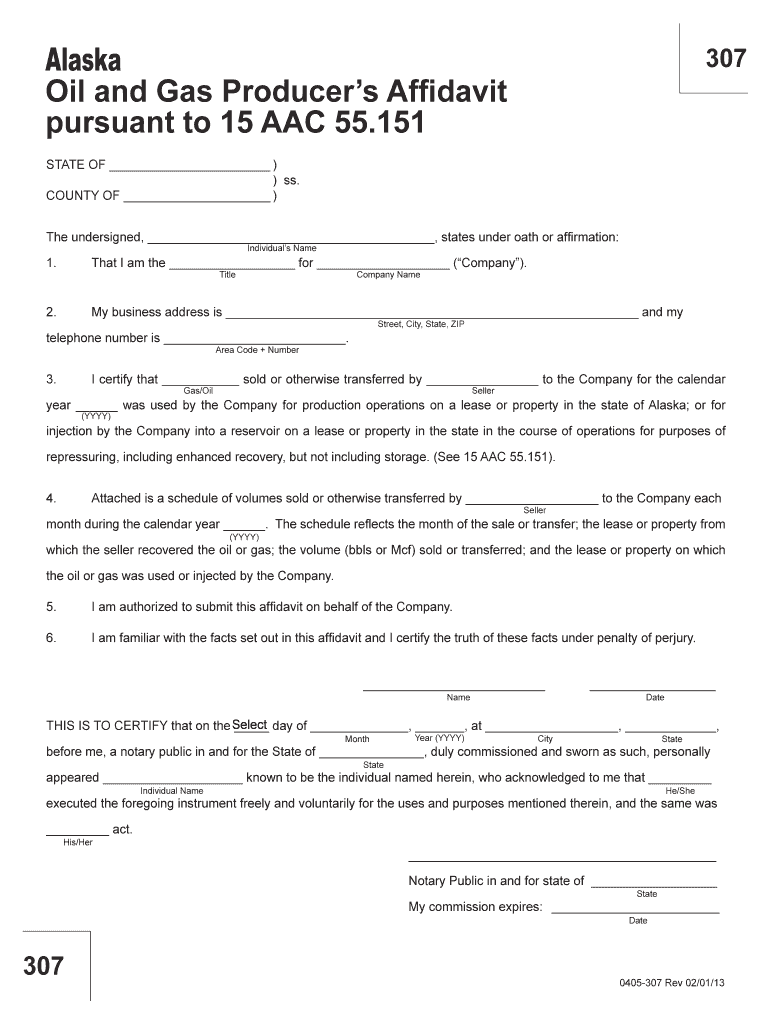
How to use or fill out the Alaska Oil and Gas Producer’s Affidavit

Form edit decoration
9.5
Ease of Setup
DocHub User Ratings on G2
9.0
Ease of Use
DocHub User Ratings on G2
  1. Click ‘Get Form’ to open it in the editor.
  2. Begin by entering your name in the designated field for the undersigned individual. This is crucial as it identifies who is submitting the affidavit.
  3. Next, specify your title and the company name in the respective fields. Ensure that this information accurately reflects your position and the legal entity involved.
  4. Fill in your business address and telephone number. This contact information is essential for any follow-up regarding the affidavit.
  5. In section three, indicate the type of gas or oil sold or transferred, along with the seller's name and calendar year. This data is vital for compliance with state regulations.
  6. Attach a detailed schedule of volumes sold or transferred each month during the specified calendar year, including all required details about leases and properties.
  7. Finally, confirm your authorization to submit this affidavit on behalf of your company and certify that all facts are true under penalty of perjury by signing and dating at the bottom.

Start using our platform today to easily complete your Alaska Oil and Gas Producer’s Affidavit for free!

See more - tax alaska versions

We've got more versions of the - tax alaska form. Select the right - tax alaska version from the list and start editing it straight away!
Versions Form popularity Fillable & printable
2013 4.8 Satisfied (121 Votes)
be ready to get more

Complete this form in 5 minutes or less

Get form

Got questions?

We have answers to the most popular questions from our customers. If you can't find an answer to your question, please contact us.
Contact us

Approving documents on a mobile device is quick, easy, and doesn’t require software installation if you have an account with DocHub. Sign in from any browser, complete your blank fields with your information, and click on Sign → Create your signature. You can draw your eSignature the same way you usually do on paper, add its picture to your - tax alaska, or type in your name and stylize its look. No matter what option you choose, your form will be valid.

If you edit your - tax alaska with DocHub, you merely need a stable web connection and virtually any browser installed on your device. No need to install any third-party applications or research guides. Just open a tab with DocHub, drag and drop your file, and modify it immediately.

Security and compliance

At DocHub, your data security is our priority. We follow HIPAA, SOC2, GDPR, and other standards, so you can work on your documents with confidence.

Learn more
ccpa2
pci-dss
gdpr-compliance
hipaa
soc-compliance