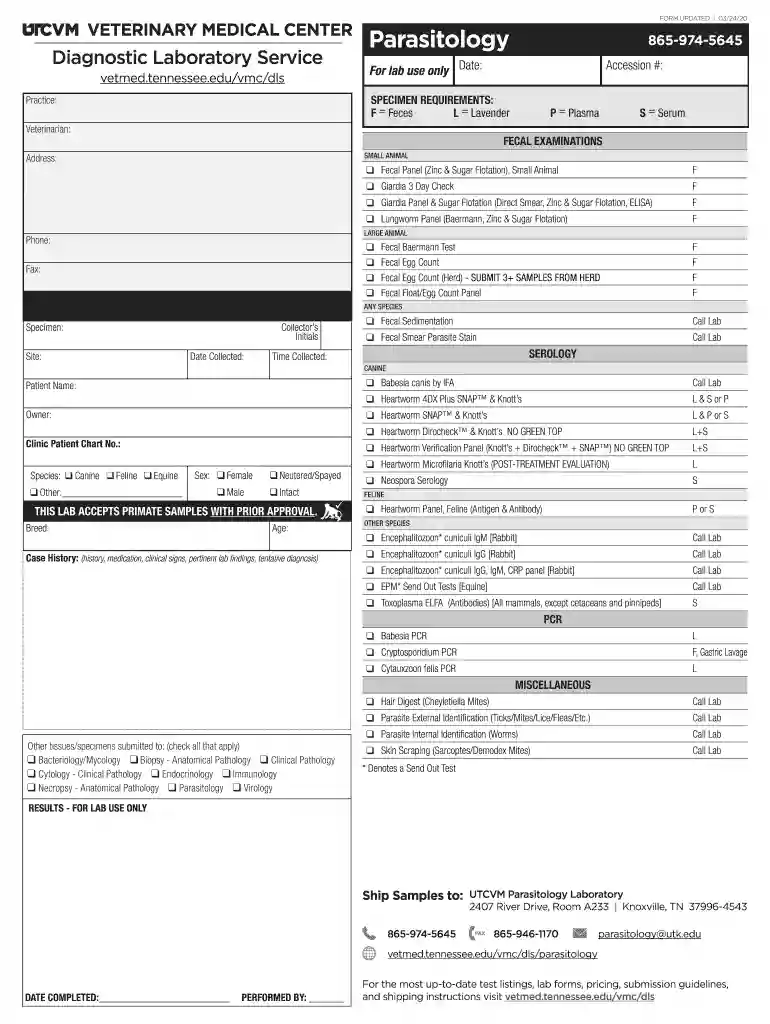
SPECIMEN REQUIREMENTS: Preview on Page 1

SPECIMEN REQUIREMENTS: 2026

Here's how it works

  • 01. Edit your form online

    Type text, add images, blackout confidential details, add comments, highlights and more.

  • 02. Sign it in a few clicks

    Draw your signature, type it, upload its image, or use your mobile device as a signature pad.

  • 03. Share your form with others

    Send it via email, link, or fax. You can also download it, export it or print it out.

How to use or fill out SPECIMEN REQUIREMENTS: with our platform

Form edit decoration
9.5
Ease of Setup
DocHub User Ratings on G2
9.0
Ease of Use
DocHub User Ratings on G2
  1. Click ‘Get Form’ to open the SPECIMEN REQUIREMENTS: document in the editor.
  2. Begin by entering the 'Date' and 'Accession #' at the top of the form. This information is crucial for tracking your specimen.
  3. Fill in the 'Practice', 'Veterinarian', and contact details including 'Address', 'Phone', and 'Email'. Ensure accuracy for effective communication.
  4. Select the appropriate specimen type from the options provided (Feces, Plasma, Serum) based on your analysis needs.
  5. Complete the sections for FECAL EXAMINATIONS by checking off relevant tests such as Fecal Panel or Giardia Panel. Be sure to specify if it's for Small or Large Animal.
  6. Provide patient details including 'Patient Name', 'Owner', and species. Fill in additional fields like 'Sex', 'Breed', and 'Age' as applicable.
  7. In the case history section, provide detailed information regarding history, medication, clinical signs, and any pertinent lab findings.
  8. Finally, review all entries for accuracy before submitting your completed form to ensure a smooth processing experience.

Start using our platform today to streamline your specimen submission process effortlessly!

See more SPECIMEN REQUIREMENTS: versions

We've got more versions of the SPECIMEN REQUIREMENTS: form. Select the right SPECIMEN REQUIREMENTS: version from the list and start editing it straight away!

VersionsForm popularityFillable & printable
20204.8 Satisfied (40 Votes)

be ready to get more

Complete this form in 5 minutes or less

Security and compliance

At DocHub, your data security is our priority. We follow HIPAA, SOC2, GDPR, and other standards, so you can work on your documents with confidence.

Related links

Submitting a Sample | The University of Chicago Genetic

Please label each specimen with at least two patient identifiers, such as patients name and date of birth, in addition to labelling with the date of sampleRead more

Learn more
Specimens

Oct 11, 2018 This webpage explains the requirement for a specimen of your trademark in certain applications, provides examples of acceptable specimens.Read more

Learn more
Specimen Label

Agricultural Use Requirements for Crops: For the following crop uses, follow PPE and re-entry instructions in the Agricultural Use. Requirements section of thisRead more

Learn more
If you believe that this page should be taken down, please follow our DMCA take down process here