




01. Edit your wv 109 online
Type text, add images, blackout confidential details, add comments, highlights and more.

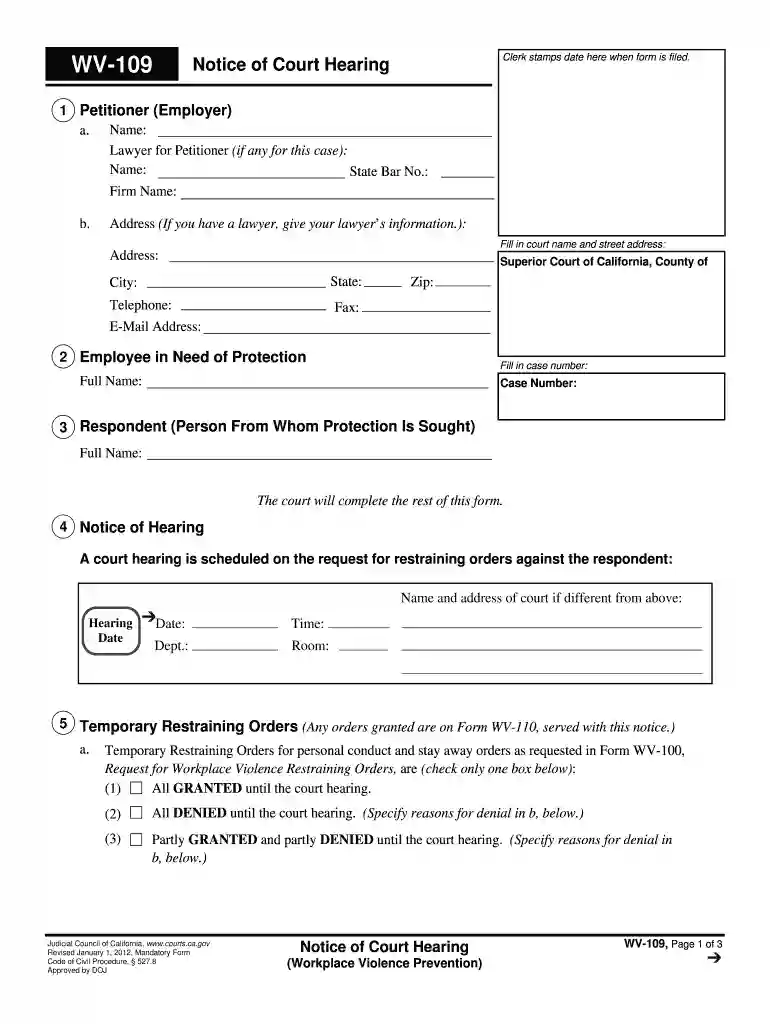
Type text, add images, blackout confidential details, add comments, highlights and more.

Draw your signature, type it, upload its image, or use your mobile device as a signature pad.

Send hearing violence form via email, link, or fax. You can also download it, export it or print it out.

Start using our platform today to easily fill out your WV-109 form online for free!
We've got more versions of the wv 109 form. Select the right wv 109 version from the list and start editing it straight away!
Upload your wv109 to DocHub (once you’ve set up an account for this). If you need to fill out fields in it, use appropriate tools from the top pane. For example, drop Signature Fields, assign each to specific person, and click on Sign → Request signatures from others. Customize your message for your recipients and click Send Request. You can also send your form by fax or as a Signing link instead of using email (you’ll find these options by navigating to the Menu → Send)
You can find the latest and most relevant version of the hearing violence prevention in our DocHub forms library. Browse it by categories or use the search field to find the exact template that suits your case. You may open this form for editing once you find it.
At DocHub, your data security is our priority. We follow HIPAA, SOC2, GDPR, and other standards, so you can work on your documents with confidence.
A Tough Pill to Swallow: Does the First Amendment Prohibit WV From Regulating Pharmaceutical Companies Advertising Expenses to Lower the Cost of PrescriptionRead more
Temporary restraining orders for personal conduct and stay-away orders as requested in form WV-100,. Request for Workplace Violence Restraining Orders, are (Read more


