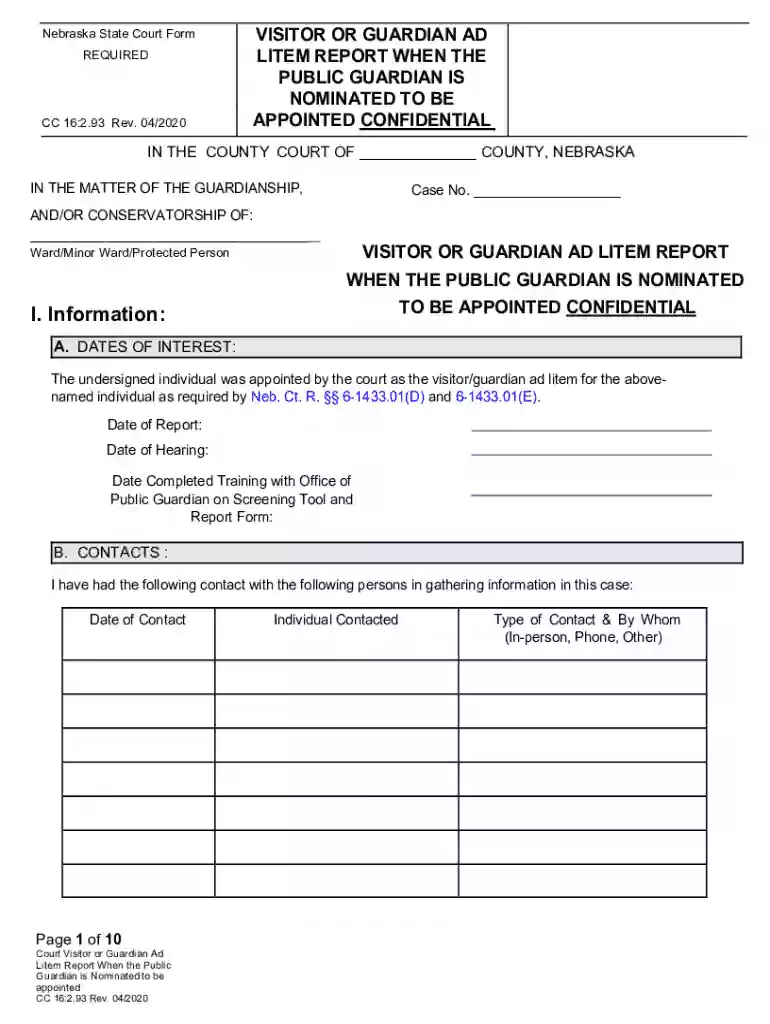
report template Preview on Page 1

Litem appointed 2026

Here's how it works

  • 01. Edit your report template online

    Type text, add images, blackout confidential details, add comments, highlights and more.

  • 02. Sign it in a few clicks

    Draw your signature, type it, upload its image, or use your mobile device as a signature pad.

  • 03. Share your form with others

    Send guardian litem report via email, link, or fax. You can also download it, export it or print it out.

How to use or fill out litem appointed with our platform

Form edit decoration
9.5
Ease of Setup
DocHub User Ratings on G2
9.0
Ease of Use
DocHub User Ratings on G2
  1. Click ‘Get Form’ to open the litem appointed document in the editor.
  2. Begin by selecting the appropriate county in the designated field at the top of the form.
  3. Fill in the case number and details about the ward or protected person, ensuring accuracy for legal compliance.
  4. In Section I, provide dates of interest, including your appointment date and any relevant training completion dates.
  5. Document your contacts in Section I.B., noting each individual contacted, type of contact, and date.
  6. Review documents in Section I.C. and list them with their respective dates to support your report.
  7. Complete Section II by addressing each area regarding the ward's decision-making abilities, marking disputed issues as necessary.
  8. Conclude with recommendations regarding potential guardianship candidates, ensuring all fields are filled accurately before submission.

Start using our platform today for free to streamline your document editing and form completion!

See more report template versions

We've got more versions of the report template form. Select the right report template version from the list and start editing it straight away!

VersionsForm popularityFillable & printable
20204.8 Satisfied (271 Votes)
20184.1 Satisfied (20 Votes)

be ready to get more

Complete this form in 5 minutes or less

Security and compliance

At DocHub, your data security is our priority. We follow HIPAA, SOC2, GDPR, and other standards, so you can work on your documents with confidence.

Related links

CERCLA.pdf

Apr 24, 2013 TITLE IHAZARDOUS SUBSTANCES RELEASES, LIABILITY,. COMPENSATION. Sec. 101. Definitions. Sec. 102. Reportable quantities and additionalRead more

Learn more
Florida Guardian ad Litem Office | Child welfare advocates

The Florida Statewide Guardian ad Litem Office represents abused, abandoned and neglected children in court and the community.Read more

Learn more
If you believe that this page should be taken down, please follow our DMCA take down process here