Ct financial not 2026

Get Form
financial institution execution connecticut Preview on Page 1

Here's how it works

01. Edit your financial institution execution connecticut online
Type text, add images, blackout confidential details, add comments, highlights and more.

02. Sign it in a few clicks
Draw your signature, type it, upload its image, or use your mobile device as a signature pad.

03. Share your form with others
Send financial institution execution debtor via email, link, or fax. You can also download it, export it or print it out.

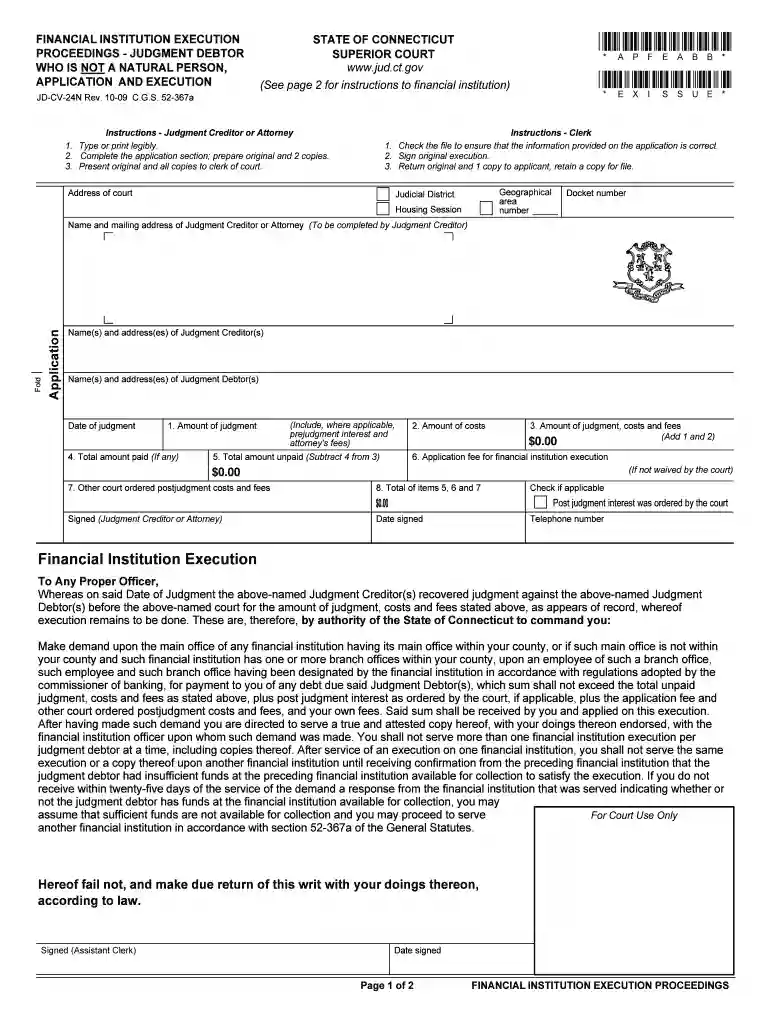
How to Use or Fill Out CT Financial Not

Form edit decoration
9.5
Ease of Setup
DocHub User Ratings on G2
9.0
Ease of Use
DocHub User Ratings on G2
  1. Begin by accessing the form through our platform. Ensure you have a clear view of all sections.
  2. In the application section, fill in the name and mailing address of the Judgment Creditor or Attorney. This is crucial for proper identification.
  3. Next, provide details about the Judgment Debtor(s), including their names and addresses. Accuracy here is essential for legal purposes.
  4. Complete the financial details: enter the date of judgment, amounts for judgment, costs, and any fees. Make sure to calculate totals correctly.
  5. Sign and date the form at the bottom as the Judgment Creditor or Attorney. Include your telephone number for contact purposes.
  6. Once completed, prepare two copies of the form along with the original to present to the clerk of court.

Start using our editor today to streamline your document completion process for free!

See more ct financial not versions

We've got more versions of the ct financial not form. Select the right ct financial not version from the list and start editing it straight away!
Versions Form popularity Fillable & printable
2009 4.8 Satisfied (141 Votes)
be ready to get more

Complete this form in 5 minutes or less

Get form

Got questions?

We have answers to the most popular questions from our customers. If you can't find an answer to your question, please contact us.
Contact us
Connecticuts GDP has grown at an annualized rate of 2.5% over the five years to 2025. Moreover, Connecticuts trailing five-year GDP growth ranks it 27th out of all 50 US states. State GDP, or Gross State Product, is a measurement of a states output, or the sum of value added from all industries in the state.
According to the report, Connecticut has an AA3-Positive government credit rating (which ranks lower than AAA, AA1, and AA2); and falls below the national average in budget balancing and liquidity.
HARTFORD, CT (WFSB) - Connecticut was in the middle of the pack on a list that ranked states in terms of financial distress. The personal finance website WalletHub.com on Wednesday released its report on the States with the Most People in Financial Distress. Connecticut ranked 24th.
‣ Estate Planning, so you can pass on your assets to whom you choose. ‣ Risk Management, to minimize any threats to your personal or business assets. ‣ Business Planning, to help you manage and grow your business. ‣ Taxation, to minimize the tax burdens you face now and in the future.
You can apply for DSS benefits online at or by calling 1-855-626-6632 (TTD/TTY 1-800-842-4524). Applications can also be mailed to DSS or dropped off at your local office. Call 2-1-1 to get the address for the DSS office near you.

Security and compliance

At DocHub, your data security is our priority. We follow HIPAA, SOC2, GDPR, and other standards, so you can work on your documents with confidence.

Learn more
ccpa2
pci-dss
gdpr-compliance
hipaa
soc-compliance
be ready to get more

Complete this form in 5 minutes or less

Get form

People also ask

The most recent report estimated total FY 22 NTSD for all states at $616.5 billion and Connecticuts NTSD at nearly $29 billion. State NTSD ranged from $78 million in Nebraska to $96 billion in California, with a median of $5.3 billion. NTSD as a percent of state GDP ranged from 10.1% in Hawaii to 0% in Nebraska.

connecticut financial not natural fill