Ct jd cv 23a 2026

Get Form
jd cv 23a Preview on Page 1

Here's how it works

01. Edit your jd cv 23a online
Type text, add images, blackout confidential details, add comments, highlights and more.

02. Sign it in a few clicks
Draw your signature, type it, upload its image, or use your mobile device as a signature pad.

03. Share your form with others
Send it via email, link, or fax. You can also download it, export it or print it out.

How to use or fill out ct jd cv 23a with our platform

Form edit decoration
9.5
Ease of Setup
DocHub User Ratings on G2
9.0
Ease of Use
DocHub User Ratings on G2
  1. Click ‘Get Form’ to open the ct jd cv 23a in the editor.
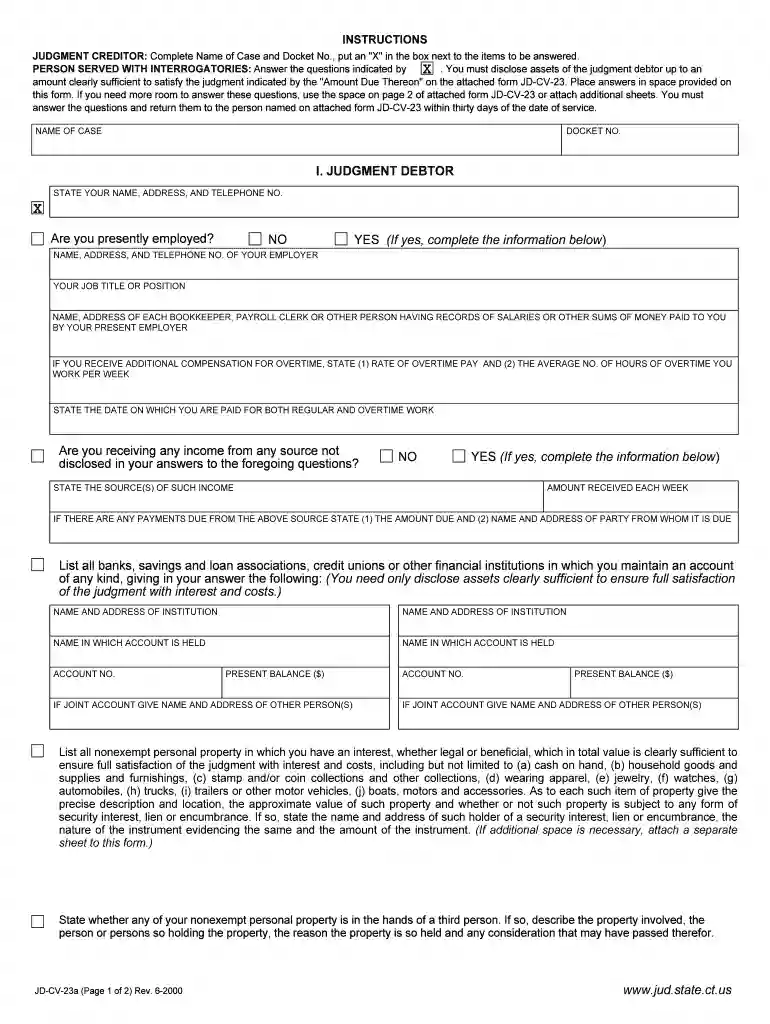
  2. Begin by entering the 'Name of Case' and 'Docket No.' at the top of the form. Ensure these details are accurate as they are crucial for identification.
  3. In Section I, provide your name, address, and telephone number. Indicate your employment status by checking 'YES' or 'NO'. If employed, fill in your employer's details including name, address, and job title.
  4. Disclose any additional income sources by answering the relevant questions. Be thorough in listing all financial institutions where you hold accounts, providing account numbers and balances.
  5. For personal property, describe each item clearly along with its approximate value. If necessary, attach additional sheets for more information.
  6. Complete Sections II through V as applicable, ensuring all information is accurate and complete before signing at the bottom of the form.

Start filling out your ct jd cv 23a today on our platform for free!

See more ct jd cv 23a versions

We've got more versions of the ct jd cv 23a form. Select the right ct jd cv 23a version from the list and start editing it straight away!
Versions Form popularity Fillable & printable
2000 4.8 Satisfied (337 Votes)
be ready to get more

Complete this form in 5 minutes or less

Get form

Got questions?

We have answers to the most popular questions from our customers. If you can't find an answer to your question, please contact us.
Contact us
If a motion for default is granted, it means that the court has determined that the opposing party has failed to respond or take action within the required time frame.
There are three types of Executions that you can seek to levy against a defendant that has not paid as ordered in a judgment. There are Property Executions, Wage Executions, and Financial Institution or Bank Executions.
Generally, a party is in default if it has failed to plead or otherwise respond in a timely fashion to a pleading seeking affirmative relief against the party.
A motion for default and judgment, affidavit of debt, military affidavit, and bill of costs may be filed in any civil action that is based upon an express or implied promise to pay a definite sum and claiming only liquidated damages. (Section 17-23 et seq. of the Connecticut Practice Book).
Can a default judgment affect my credit score or ability to obtain future financing? Yes, a default judgment may negatively affect your credit score, and will be a lien on all of your real estate. Buying and selling real estate will be negatively affected by the entry of a default judgment.

Security and compliance

At DocHub, your data security is our priority. We follow HIPAA, SOC2, GDPR, and other standards, so you can work on your documents with confidence.

Learn more
ccpa2
pci-dss
gdpr-compliance
hipaa
soc-compliance

People also ask

A motion to open is appropriately filed in response to a judgment issued after default, if you have a good cause for challenging the judgment, or if a judgment was issued with an error due to a mistake. A Motion to Open is not appropriate when you disagree with the substance or reasoning of the judgment.

Related links