







Definition and Purpose of the Welder Continuity Log
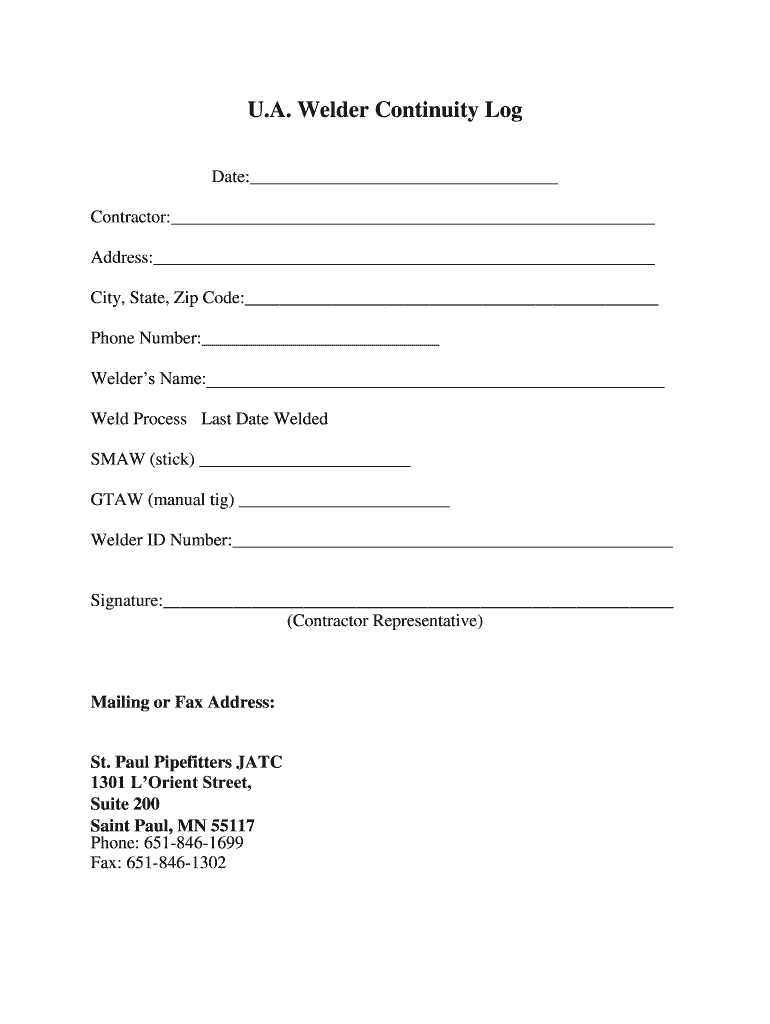
The welder continuity log Excel is a specialized document designed to record crucial information regarding a welder's certification status and employment history within the welding sector. This log serves as an official record for both the welders and the contractors, ensuring that skilled personnel are appropriately qualified for their tasks.
Key Functions
- Record Keeping: The log maintains a detailed history of a welder’s activities, including the types of welding performed, the equipment used, and the completion dates.
- Compliance and Verification: It assists organizations in ensuring compliance with industry standards and safety regulations by tracking welding qualifications and endorsements.
- Quality Assurance: By having a centralized log, contractors can monitor the proficiency of their welders, which is essential for maintaining high-quality welding standards in projects.
This log not only aids welders in professional development by keeping a record of their accomplishments but also serves as a means for employers to verify qualifications and ensure that every weld is performed by a certified professional.
How to Use the Welder Continuity Log Excel
To effectively utilize the welder continuity log Excel, users must understand its structure and the information required. The simple yet effective Excel format makes it adaptable for individual or corporate use, allowing for quick updates.
Basic Structure and Fields
- Welder Information: Include fields for the welder's name, contact details, and certification numbers.
- Welding Techniques: Document specific welding processes (MIG, TIG, Stick, etc.) that the welder is certified in.
- Work History: Log the details of each job, including employer names, dates of service, and specific tasks performed.
To enter data, follow these steps:
- Open the Excel template and ensure macros are enabled for any automated features.
- Enter welder details in the designated columns.
- Update the log regularly after each job or training to ensure accuracy.
The use of Excel not only allows for easy updates but also enables the incorporation of formulas to automate calculations, such as total hours worked or certifications due for renewal.
Steps to Complete the Welder Continuity Log Excel
Completing the welder continuity log Excel involves a systematic approach to ensure all relevant information is captured.
Step-by-Step Instructions
-
Gather Required Information: Before beginning, collect all necessary details about the welder, including personal identification, training certificates, and previous employment records.
-
Open the Template: Start with a blank Excel sheet or an established template. Ensure the formatting suits your tracking needs.
-
Input Welder Details: Fill in the personal and professional data of the welder in dedicated fields. This may include:
- Full name
- Contact information
- Certification details
-
Document Welding Activities: For each job or project:
- Record the type of welding performed.
- Include the dates when the welding occurred.
- Add notes on the tools and processes used to provide a comprehensive history.
-
Review and Update Regularly: Set a reminder to review the log on a monthly basis or after every project to ensure all entries are current and correct.
Implementing these steps promotes consistent tracking of welding qualifications and provides valuable support during audits or evaluations.
Who Typically Uses the Welder Continuity Log Excel
The welder continuity log Excel is used across various sectors where welding services are integral to operations.


Typical Users
- Welding Professionals: Individual welders use the log to track their skills, certifications, and career progression.
- Contractors and Employers: Businesses involved in construction, manufacturing, and pipelines use these logs to verify the qualifications of their workforce.
- Training Institutions: Vocational schools or training centers leverage this log as a tool for monitoring student progress and maintaining certification records.
- Regulatory Bodies: Agencies may request these logs to ensure compliance with safety standards in the welding industry.
By identifying the diverse audience for the welder continuity log Excel, it is clear that maintaining accuracy and detail in such logs is critical to multiple sectors.
Legal Use of the Welder Continuity Log Excel
Utilizing the welder continuity log Excel entails adherence to legal standards and regulations within the welding industry.
Compliance Considerations
- Industry Standards: The log should reflect compliance with the American Welding Society (AWS) and other relevant welding codes and standards.
- Record Authenticity: Employers must ensure that the information noted in the log is truthful and can stand up to legal scrutiny during inspections or compliance audits.
- Retention Period: Typically, these documents should be retained for several years, depending on state regulations and company policy to ensure that historical qualifications are preserved in case of audits or claims.
Understanding legal considerations is paramount for both employers and welders to protect their rights and ensure adherence to professional standards in the industry.
Important Terms Related to the Welder Continuity Log Excel
Familiarity with specific terminology enhances the understanding of the welder continuity log Excel.
Key Terms
- Welding Certification: Verification that a welder has successfully completed necessary training and is proficient in specific types of welding.
- Continuity: The ongoing training or involvement in welding activities that validate a welder's skills over time.
- Qualifying Procedures: The set methods through which welding proficiency is evaluated, often involving practical tests and assessments.
- Welding Procedures Specification (WPS): Documents that outline how welding is to be performed, detailing materials, techniques, and safety measures.
Understanding these terms ensures that users can effectively engage with the welder continuity log Excel while maintaining professional standards and compliance within the industry.


