Type text, add images, blackout confidential details, add comments, highlights and more.
02. Sign it in a few clicks
Draw your signature, type it, upload its image, or use your mobile device as a signature pad.
03. Share your form with others
Send selene finance loan modification via email, link, or fax. You can also download it, export it or print it out.
How to use or fill out selene assistance with our platform
Ease of Setup
DocHub User Ratings on G2
Ease of Use
DocHub User Ratings on G2
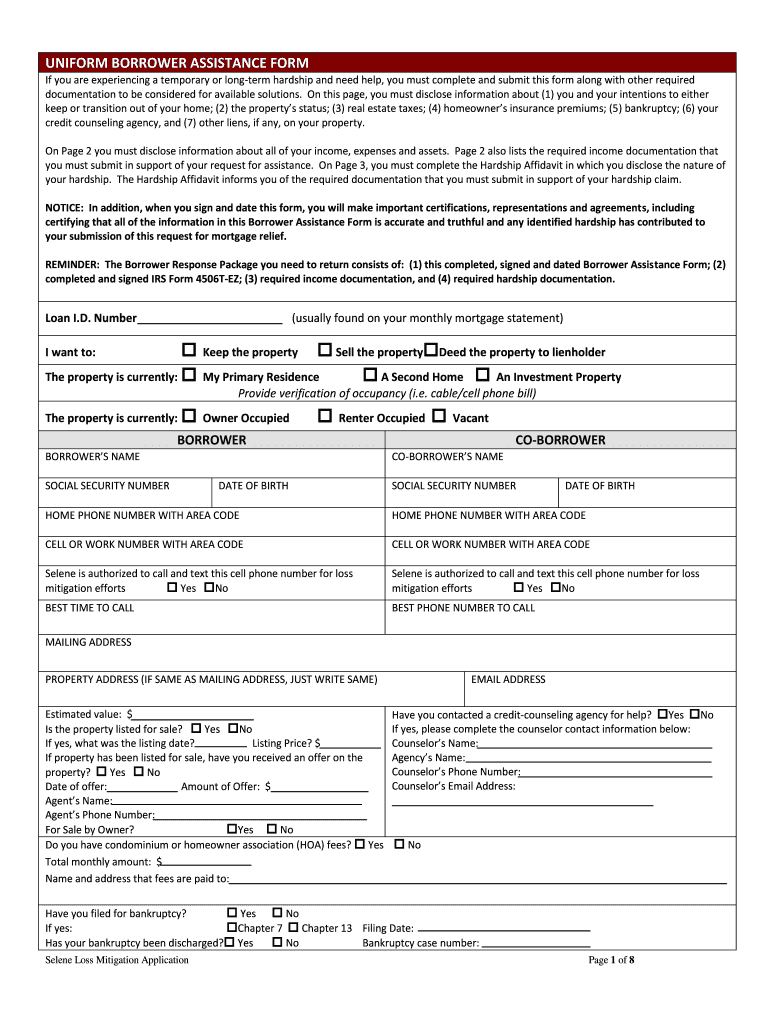
Click ‘Get Form’ to open the selene assistance document in the editor.
Begin by filling out your personal information, including your name, social security number, and contact details. Ensure accuracy as this information is crucial for processing your request.
In the property section, indicate whether it is your primary residence, a second home, or an investment property. Provide verification of occupancy if necessary.
On Page 2, disclose all income sources and monthly expenses. Use our platform's tools to easily input figures and ensure you attach any required documentation for income verification.
Complete the Hardship Affidavit on Page 3 by detailing the nature of your hardship. This section is vital for assessing your eligibility for assistance.
Finally, review all entries for accuracy before signing and dating the form. Remember that submitting false information can have serious consequences.
Start using our platform today to streamline your selene assistance application process!
Contact Us | Chicanx/Latinx Student Success Center
Jun 18, 2025 Chicanx/Latinx Student Success Center at SJSU. Email: chicanxlatinxssc@sjsu.edu. Main Phone: 408-924-5102. Office Location: Diaz Compean Student Union RoomRead more
Cookie consent notice
This site uses cookies to enhance site navigation and personalize your experience.
By using this site you agree to our use of cookies as described in our Privacy Notice.
You can modify your selections by visiting our Cookie and Advertising Notice.