Type text, add images, blackout confidential details, add comments, highlights and more.
02. Sign it in a few clicks
Draw your signature, type it, upload its image, or use your mobile device as a signature pad.
03. Share your form with others
Send it via email, link, or fax. You can also download it, export it or print it out.
How to use or fill out aka membership 2016-2019 form with our platform
Ease of Setup
DocHub User Ratings on G2
Ease of Use
DocHub User Ratings on G2
Click ‘Get Form’ to open the aka membership 2016-2019 form in the editor.
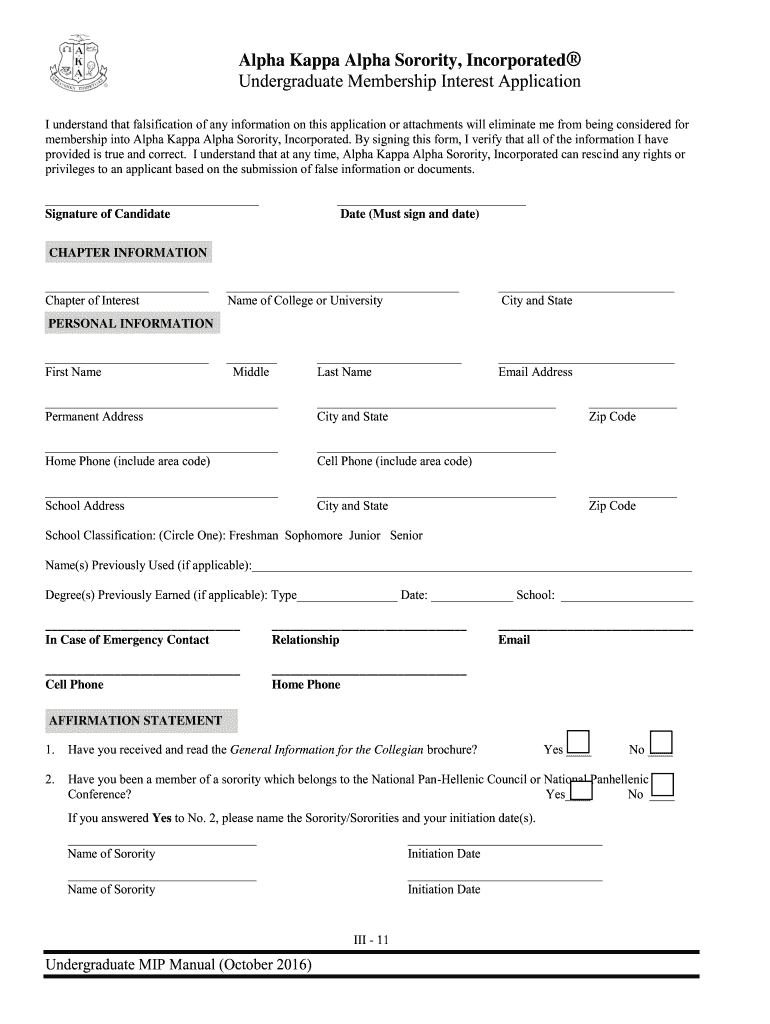
Begin by filling out the 'CHAPTER INFORMATION' section. Enter your Chapter of Interest, Name of College or University, and City and State. Ensure all details are accurate.
Proceed to the 'PERSONAL INFORMATION' section. Fill in your First Name, Last Name, Permanent Address, and contact numbers. Be sure to include area codes for phone numbers.
In the 'AFFIRMATION STATEMENT' section, answer the questions regarding your sorority history honestly. If applicable, provide names and initiation dates of previous sororities.
Complete the 'BACKGROUND CHECK' authorization by printing your name clearly and signing where indicated. Remember to date your signature.
Finally, review all sections for completeness and accuracy before submitting your application through our platform.
Start filling out your aka membership form today for free using our platform!
Fill out aka membership 2016-2019 form online It's free
We've got more versions of the aka membership 2016-2019 form form. Select the right aka membership 2016-2019 form version from the list and start editing it straight away!
Aka membership 2016 2019 form pdfAKA General Membership dues 2026AKA General Membership dues 2026 pdfAKA General membership dues 2025Aka membership 2016 2019 form free downloadAka membership 2016 2019 form onlineAka membership 2016 2019 form freeAka membership 2016 2019 form download
Security and compliance
At DocHub, your data security is our priority. We follow HIPAA, SOC2, GDPR, and other standards, so you can work on your documents with confidence.
Dec 3, 2015 This document is the 2016-2019 STIP. It meets the requirements of Title 23 United States Code, Title 23 Code of. Federal Regulations, and TitleRead more
Cookie consent notice
This site uses cookies to enhance site navigation and personalize your experience.
By using this site you agree to our use of cookies as described in our Privacy Notice.
You can modify your selections by visiting our Cookie and Advertising Notice.