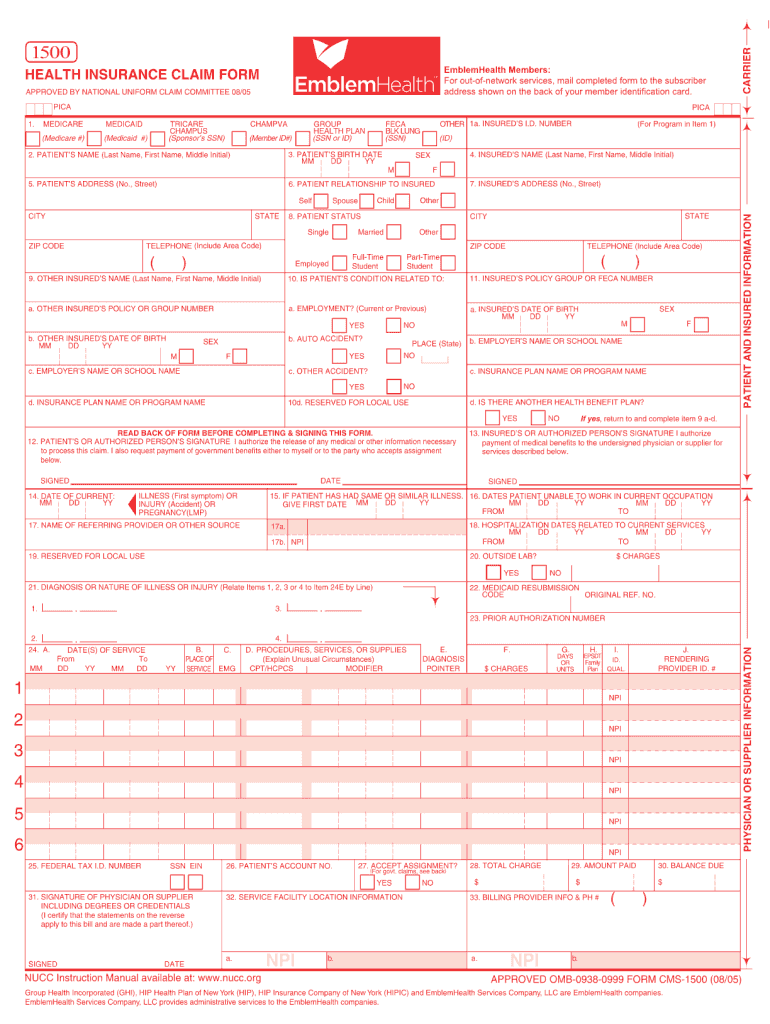
Emblemhealth fillable 1500 form 2005-2026

Get Form
emblemhealth fillable 1500 form 2005 Preview on Page 1

Here's how it works

01. Edit your form online
Type text, add images, blackout confidential details, add comments, highlights and more.
02. Sign it in a few clicks
Draw your signature, type it, upload its image, or use your mobile device as a signature pad.
03. Share your form with others
Send it via email, link, or fax. You can also download it, export it or print it out.

How to use or fill out emblemhealth fillable 1500 form 2005 with our platform

Form edit decoration
9.5
Ease of Setup
DocHub User Ratings on G2
9.0
Ease of Use
DocHub User Ratings on G2
  1. Click ‘Get Form’ to open the emblemhealth fillable 1500 form 2005 in the editor.
  2. Begin by entering the patient’s information in Section 1, including their name, date of birth, and insurance details. Ensure accuracy for seamless processing.
  3. In Section 2, provide the provider's information. Fill in your National Provider Identifier (NPI) and any relevant contact details to ensure proper communication.
  4. Proceed to Section 3 where you will detail the services provided. Include dates of service, procedure codes, and descriptions. This section is crucial for claims processing.
  5. Finally, review all entered information for completeness and accuracy before submitting. Use our platform’s tools to make any necessary edits easily.

Start using our platform today to fill out your emblemhealth fillable 1500 form 2005 online for free!

See more emblemhealth fillable 1500 form 2005 versions

We've got more versions of the emblemhealth fillable 1500 form 2005 form. Select the right emblemhealth fillable 1500 form 2005 version from the list and start editing it straight away!
Versions Form popularity Fillable & printable
2012 4.8 Satisfied (64 Votes)
2005 4.3 Satisfied (263 Votes)
be ready to get more

Complete this form in 5 minutes or less

Get form

Got questions?

We have answers to the most popular questions from our customers. If you can't find an answer to your question, please contact us.
Contact us
The CMS 1500 HCFA claim form (sometimes simply called the HCFA form) is used by individual healthcare providers, practices, and non-institutional entities to bill outpatient services. Its maintained by the National Uniform Claim Committee (NUCC) and required by Medicare, Medicaid, and most commercial payers.
The red ink that is specified for the form allows scanners to drop the form template during the imaging of the paper. This cleaner image is easier and faster to process with data capture automation such as ICR/OCR (Intelligent Character Recognition/Optical Character Recognition) software.
Providers sending professional and supplier claims to Medicare on paper must use Form CMS-1500 in a valid version.
Top CMS-1500 Form Mistakes Mental Health Providers Makeand How to Avoid Them Mismatched or Incomplete Client Demographics. Missing or Invalid Diagnosis Codes (ICD-10) Incorrect CPT Codes or Modifier Usage. Inaccurate NPI, Tax ID, or Rendering Provider Info. Incorrect Place of Service (POS) Code.
The 837P (Professional) is the standard format used by health care professionals and suppliers to transmit health care claims electronically. The Form CMS-1500 is the standard paper claim form to bill Medicare Fee-For-Service (FFS) Contractors when a paper claim is allowed.
be ready to get more

Complete this form in 5 minutes or less

Get form

People also ask

The only acceptable claim forms are those printed in Flint OCR Red, J6983, (or exact match) ink. Although a copy of the CMS-1500 form can be downloaded, copies of the form cannot be used for submission of claims, since your copy may not accurately replicate the scale and OCR color of the form.
Handwritten claims are difficult to read; therefore, they take longer to process. The OCR equipment may misread the information, resulting in the entry of invalid information for the claim. To ensure timely and accurate processing of claims, Noridian recommends claims be typed, not handwritten.
Can CMS 1500 Forms be Handwritten? While it is technically possible to handwrite a CMS 1500 form, it is generally not recommended.

Related links